Shopify Agentic Storefronts: Keep Them On or Opt Out?
Are Shopify agentic storefronts on for my store?
Shopify’s agentic storefronts let customers find and buy your products in AI channels, and are on by default for eligible stores. With Allow Shopify to manage for me on, ChatGPT, Copilot and Meta get them through Shopify Catalog, Google through Merchant Center; direct checkout is on where offered and new channels are added. Turn it off in Sales channels > Agentic to choose.
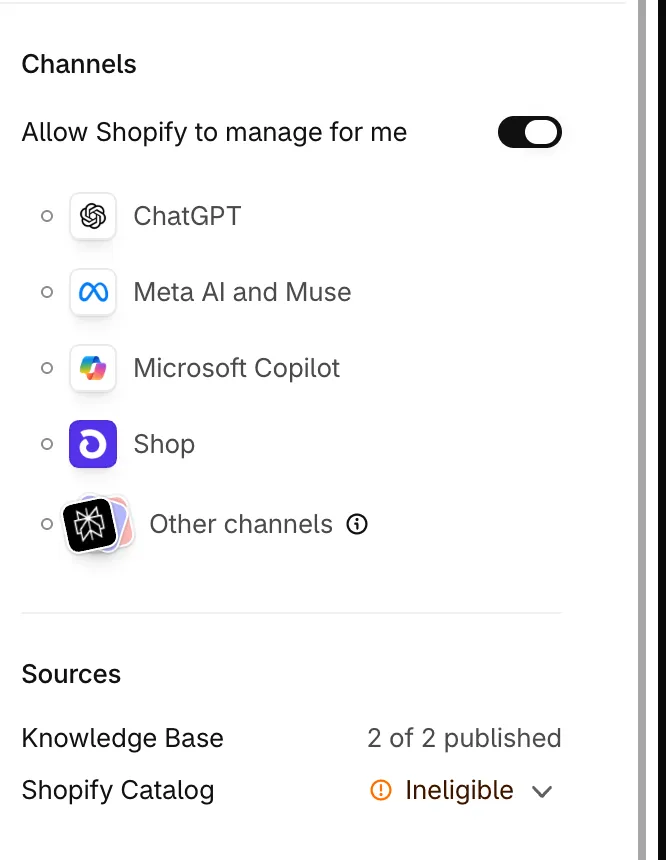
Shopify’s overview says the feature “is active by default for eligible stores”. Shopify introduced it on 10 December 2025, announced ChatGPT selling “starting this week” on 24 March 2026, and added Meta on 8 September 2026, with products “shared with Meta by default through Shopify Catalog”.
To open Agentic you must be the store owner, or a staff member with the App and sales channel > Agentic permission or the App development > View apps developed by staff and collaborators permission (Shopify, checked 4 November 2026). On the Agentic plan, for brands without a Shopify online store, direct checkout starts off (Agentic plan).
How does each AI channel work?
ChatGPT sends buyers to your checkout. Google, Copilot and Meta can take the order in a Shopify-powered direct checkout inside the channel, shown only to buyers in the US (Copilot), the US, Canada and Australia (Google) or the US, Canada, Mexico, Brazil, Japan and Singapore (Meta). With Allow Shopify to manage for me on:
| ChatGPT | Google AI Mode and Gemini | Microsoft Copilot | Meta | |
|---|---|---|---|---|
| Where the buyer pays | Your online store checkout, in ChatGPT’s in-app browser or a new tab | Direct checkout in Google, rolling out gradually to buyers based in the US, Canada and Australia; your store if it’s off or the buyer doesn’t have direct checkout yet | Direct checkout in Copilot, shown only to US-based buyers; your store if it’s off | Direct checkout on Meta surfaces, including Muse when available, shown only to buyers based in the US, Canada, Mexico, Brazil, Japan or Singapore; your store if it’s off |
| Direct checkout by default | There is none | On for eligible stores; still rolling out | On for eligible stores | On for eligible stores |
| Products come from | Shopify Catalog | Google & YouTube channel or Merchant Center | Shopify Catalog | Shopify Catalog, per the Meta page; the products page says the Facebook and Instagram channel, and the data-privacy page “individual sales channels”; shoppable ads need the Facebook and Instagram channel |
| Shopify’s requirement | Sell to US customers; the store can be based anywhere | For direct checkout: sell to customers in the US, Canada or Australia, from a store based in any country, with a valid Merchant Center account | For direct checkout: sell to US customers | For direct checkout: sell to customers in the US, Canada, Mexico, Brazil, Japan or Singapore |
| Fees Shopify states | None beyond standard payment processing | Same | Same | Same |
| Browser pixels (Google Analytics, custom pixels) | Not documented | Don’t fire; only server-to-server “started, completed” | Same | Same |
| Checkout blocks | Your full checkout | Only blocks that support blocking checkout, with it enabled; even those may not load | Same as Google | None |
Source: Shopify’s ChatGPT, Google, Copilot, Meta and data and privacy pages, checked 4 November 2026.
OpenAI said on 24 March 2026 that the first version of its Instant Checkout lacked flexibility, so it was letting merchants use their own checkout. Shopify’s ChatGPT page calls it “a discovery-focused referrer platform”; sales happen in your online store checkout, so all your customisations and payment methods are supported. Products on OpenAI’s Prohibited products and services list don’t appear in ChatGPT results.
Google launched Universal Cart in the US on 15 October 2026: shoppers in AI Mode in Search and the Gemini app save items from several retailers in one cart, get alerts on price drops and restocks, and check out with Google Pay at many stores or transfer the items to the merchant’s own cart. Google lists “many Shopify merchants” among the stores offering these checkouts. Shopify’s Google and Agentic help pages don’t mention Universal Cart, so they don’t say whether Direct checkout governs it (checked 4 November 2026).
Agentic also lists Shop, Shopify’s own channel, which you manage from the Shop sales channel instead, and Other channels, smaller and emerging AI agents under one Shopify Catalog access switch.
Shop MCP: any AI agent can now buy from your store
Since 13 October 2026, Shop MCP lets any MCP-compatible agent search Shopify Catalog and create a checkout at your store, and pay with Shop Pay once a signed-in shopper confirms. The orders “appear in the merchant’s Shopify admin like any other order”.
Shopify’s Fall ’26 Edition of 28 October 2026 adds Shop Pay checkout inside personal AI agents, “starting with Muse from Meta, Claude Duet, and Instinct”, and a shop.md skill with which “ChatGPT, Claude, or another agent” can search products, check out with Shop Pay and track orders (checked 4 November 2026).
Shop’s help for shoppers says the agent “agrees to the store’s shipping, refund, return, and cancellation policies” for the shopper, and that disputing an approved purchase “might be unsuccessful”.
Shopify’s help doesn’t say whether any Agentic or Shop channel switch keeps your products out of Shop MCP (checked 14 October 2026). An Unlisted product isn’t eligible for Shopify Catalog (requirements), which is what Shop MCP searches.
What direct checkout doesn’t support
On Google, Copilot and Meta, direct checkout can’t sell subscriptions, bundles, customisable or B2B-only products, offer local delivery or pickup, or require sign-in. Shopify Functions and discounts run; only some accelerated checkout options are supported.
How do I switch off one channel, or all of them?
To switch off an agentic channel, turn off Allow Shopify to manage for me first; the other switches appear only then. Turning it back on later re-activates every agentic setting, direct checkout included (Shopify).
Switch off every third-party channel
- From your Shopify admin, go to Sales channels > Agentic.
- Deactivate Allow Shopify to manage for me. The Shopify Catalog access and Auto enroll new storefronts settings become available.
- Deactivate Shopify Catalog access to remove existing and future Catalog access for third-party channels. To keep your current channels but not be added to new ones, deactivate only Auto enroll new storefronts.
- Click Save.
Switch off one channel
After steps 1 and 2 above:
| Channel | Click | Then deactivate | Then |
|---|---|---|---|
| ChatGPT | ChatGPT | Shopify Catalog access | Save |
| Google AI Mode and Gemini | Direct checkout | Save | |
| Copilot | Microsoft Copilot | Shopify Catalog access or Direct checkout | Save |
| Meta | Meta AI and Muse | Shopify Catalog access or Direct checkout | Save |
| Other channels | Other channels | Shopify Catalog access | — |
Labels checked 4 November 2026; Google may not appear in every store yet.
What switching off does and doesn’t do
| You change | What happens | What doesn’t change |
|---|---|---|
| Shopify Catalog access off | Product data can take up to 7 days to stop being shared; direct checkout switches off too | Products can still be found through web crawling; Shop still shows them; they stay in Shopify Catalog for storefront search and Shop |
| Direct checkout off | Buyers are sent to your online store to pay | Your Shopify Catalog access setting; on Google, products can still appear in AI Mode and Gemini through Merchant Center |
| Auto enroll new storefronts off | You aren’t added to new channels | You can still enrol in one manually |
| AI crawlers blocked in robots.txt or at the network | Open-web discovery only | Shopify Catalog still sends your product data to the channels you’ve activated |
A product set to Unlisted, or given the seo.hidden metafield |
Hidden from Shop and every channel fed by Shopify Catalog | — |
Important: Unlisted also hides the product from search engines such as Google, from sitemaps and from your online store search (products).
What do AI channels get, and what do the terms say?
AI channels get product data: titles, descriptions, images, prices and availability. A channel that takes an order in direct checkout also gets the customer’s name, email, phone number and address. Shopify says AI channels don’t get your full order history, orders from other channels or your customer database (data and privacy).
Since 26 October 2026, the Knowledge base page of Sales channels > Agentic holds the non-product facts agents can ask Shopify about your store, “the source of truth for AI agents for all non-product information about your store”. Shopify drafts them from your storefront and admin: facts from a storefront scan stay unpublished until you publish them, facts linked to admin data such as policies are published when created, and published facts are public through the Storefront MCP. The standalone Knowledge Base app is deprecated on 15 January 2027 (changelog, help, checked 4 November 2026).
Since 9 October 2026, Shopify Catalog can also send a compare-at price higher than the current price as the list price; agents “might use the list price to advertise strikethrough pricing”. Shopify’s developer changelog says it “turns this on by default for most stores” and off for stores that use compare-at for MSRP or another reference price; a store that hides compare-at prices from EEA buyers doesn’t send them to those buyers. To check yours (labels checked 4 November 2026), go to Sales channels > Agentic, click the icon next to Shopify Catalog in Sources, click Review product data mapping, select Price or Compare-at price in the List price drop-down menu, and click Save (Shopify).
Every channel page lists agreement to the Agentic Storefronts Supplemental Terms of Service as a requirement. The terms, last updated on 6 October 2026 (checked 14 October 2026), bring in the Google Merchant Center addendum, the Microsoft Copilot Shopify Checkout Terms and the Meta Seller Agreement addendum, to the extent each channel is enabled for your store; they list no OpenAI terms. What they say:
- New channels: “Your continued participation in Agentic Storefronts after additional Participating Channels are added constitutes your acceptance and agreement to the respective Participating Channel Terms.”
- Opting out: “it is your responsibility to disable the features for that Participating Channel for your Shopify Store in your Shopify Admin.”
- Checkout: you remain seller of record, but a channel may “override customizations you have made through the Checkout Branding API”.
- Your content: Shopify’s licence to your materials becomes “sublicensable to Shopify partners and their affiliates operating Participating Channels”, and survives the end of these terms.
- Fees: the help pages state none beyond payment processing (checked 4 November 2026), but the terms say that for certain channels Shopify “may, in its discretion, assess a fee on transactions”, payable as “set out in your Shopify Admin”.
- Data: for channels run by Shopify’s partners, Shopify may share customer and order data with the channel to process transactions, send order updates, prevent fraud and comply with the law, and may share your name and business contact details.
If contracts, licences or data-protection duties of yours could be affected, have a lawyer read the terms against them.
Should I keep agentic storefronts on before Black Friday?
If you sell direct to US consumers and need nothing direct checkout lacks, keeping agentic storefronts on, by doing nothing, is reasonable. Otherwise switch off direct checkout, or Catalog access to leave the channels Shopify Catalog feeds (Google keeps your products through Merchant Center). Catalog access can take up to 7 days to switch off, so decide by 20 November 2026 for Black Friday on 27 November (our arithmetic).
- Agentic Storefronts introduced
Announced in Shopify's Winter '26 Edition.
- ChatGPT selling announced, "starting this week"
OpenAI lets merchants use their own checkout, so buyers pay in your store.
- Meta added as an AI channel
Products shared with Meta by default through Shopify Catalog.
- Shop MCP opens checkout to any agent
Search Shopify Catalog, create a checkout at your store, pay with Shop Pay.
- Knowledge base built into the admin
The standalone Knowledge Base app is deprecated on 15 January 2027.
- Fall '26 Edition
Shop Pay checkout in Muse, Claude Duet and Instinct; a shop.md skill for any agent.
- Last day to switch off Catalog access
Shopify says sharing can take up to 7 days to stop; the date is our arithmetic.
- Black Friday
Source: Shopify's news, changelog and help pages and OpenAI, as linked in the text, checked 4 November 2026
| Your situation | What to do | Why |
|---|---|---|
| D2C, selling to the US, standard checkout | Nothing; keep Allow Shopify to manage for me on | Shopify states no fees beyond payment processing; staying in accepts new channels’ terms |
| You sell subscriptions, bundles or customisable products, or offer local delivery or pickup | Keep Catalog access; switch off Direct checkout on Google, Copilot and Meta | Direct checkout doesn’t support them; with it off, buyers pay on your store |
| Your checkout collects consent, runs loyalty or shows upsells in blocks | Switch off Direct checkout on Google, Copilot and Meta | Those blocks may not load in direct checkout; Meta’s supports none |
| You judge sales by Google Analytics or custom pixels | Read agentic sales in Agentic, or switch off Direct checkout | Browser pixels don’t fire in direct checkout; Agentic sales include direct-checkout sales |
| B2B through Shopify’s B2B features, or selling to businesses and consumers | Nothing | B2B-only products are excluded when Shopify can identify them, such as through B2B catalogs; mixed products show the D2C price |
| B2B through a third-party app or theme edits (prices hidden until login) | Set those products Unlisted, or move them to Shopify’s B2B catalogs | Shopify may not detect them, so they may appear |
| Age-restricted or regulated products | Put legal disclosures in each description’s first 6,000 characters; set products you want kept out Unlisted | Shopify asks for that; mature content isn’t Catalog-eligible; OpenAI’s prohibited products don’t show in ChatGPT |
| Your compare-at prices are MSRP or reference prices | Check which price the List price drop-down uses | With Compare-at price, agents may show them as a strikethrough discount; with Price, the list price is your current price |
| You want no AI channels | Switch off Shopify Catalog access and Google’s Direct checkout; set products that must not appear Unlisted | Google discovery continues through Merchant Center and channels can still crawl your store; Shopify says Unlisted hides a product completely; Shop is managed in the Shop channel |
From the channel, products, Catalog requirements and compare-at mapping pages, checked 4 November 2026.
Why isn’t my store showing up?
If your products aren’t appearing in AI channels, start in Sales channels > Agentic: Shopify’s help says it shows how many of your products are in Shopify Catalog, or lets you “learn why your store might not be eligible” (checked 4 November 2026). Its Catalog requirements say eligibility “is reviewed over time” and can be gained or lost. Check:
- Your store is on the Starter plan or higher and isn’t in private mode.
- Each product has a title, at least one image and a price above zero, is published to the online store (or a Hydrogen or headless storefront) with a product URL, isn’t Unlisted or hidden from search engines, has no sensitive content and isn’t in a category Shopify Catalog excludes.
- Terms of service, Privacy policy and Return and refund policy are completed in Settings > Policies.
- Your account is in good standing: Shopify’s suggestions include two-step authentication, prompt fulfilment, a low chargeback rate and paid invoices.
- You meet the channel’s country requirements in the table above. For Google, if you use the Google & YouTube channel, keep Automatically sync products and Automatically sync shipping information on in its Product feed section.
In Agentic, the search field Enter a search query to see how you might rank previews raw Shopify Catalog results (“a directional signal, not an exact prediction”), and each product’s Listing insights break its Listing quality score into signals such as Image coverage.
Where do AI-channel orders show, and do my pixels see them?
AI-channel orders show in your Shopify admin with channel or referrer attribution, but Google Analytics and other browser pixels don’t fire on orders taken in Google’s, Copilot’s or Meta’s direct checkout. Meta’s orders are attributed to Meta and shown like any other sales channel’s, and Agentic shows each channel’s Sales, Orders, Online store sessions and Online store conversions, referral and direct-checkout sales combined, though not yet for headless stores.
Shopify’s Google, Copilot and Meta pages say direct checkout fires only server-to-server pixels (“started, completed”); the Meta page says this “applies to any direct checkout that’s completed outside your online store”. On blocked browser pixels generally, Shopify says its own reports and order records aren’t affected; what’s reduced or lost is third-party attribution (app pixels). See app pixels vs custom pixels, and for paid ads, ChatGPT Ads conversion tracking.
What Shopify doesn’t say yet
As of 14 October 2026, Shopify’s help doesn’t document these parts of agentic storefronts:
- which apps’ pixels receive direct checkout’s server-to-server events; the app pixels page says only that “certain app owners” have server pixels, so ask the app owner;
- whether browser pixels fire on ChatGPT orders in ChatGPT’s in-app browser;
- which sales channel name Google and Copilot direct-checkout orders carry in your reports;
- how long Direct checkout or Auto enroll new storefronts changes take;
- how to take products out of Google AI Mode and Gemini short of setting them Unlisted;
- whether switching off Meta’s Catalog access affects products your Facebook and Instagram channel sends to Meta;
- what happens to a store that doesn’t agree to the supplemental terms;
- what customer data ChatGPT receives on the orders it refers.
What to do next
Open Sales channels > Agentic, check whether Allow Shopify to manage for me is on, which price the List price drop-down uses and which Knowledge base facts are published, and find your row in the decision table. If you’re switching off Shopify Catalog access, do it by 20 November 2026. For the rest of the pre-Black Friday list, see Shopify changes to check before Black Friday. To switch a sale theme and discounts on and off at set times, see how to schedule Black Friday theme changes on Shopify.
Note: How we made this guide: researched and drafted with AI tools, and every fact checked against the linked sources on 26 September 2026, rechecked on 14 October 2026, and the channel pages, labels and additions rechecked on 4 November 2026. Spotted an error? Email support@b2bgold.app.