
Shopify app · Ads
cPixel Facebook Pixel CAPI GA4
Server-side tracking for TikTok, Meta Ads and ChatGPT Ads
cPixel is a Shopify app that sends your store’s events to Meta, TikTok, Google Analytics 4 and OpenAI’s ChatGPT Ads from shoppers’ browsers and from its own servers, with one shared event ID so each platform can keep a single copy. A live view shows each send, with the platform’s reply to server sends, and alerts flag a rejected token or stalled tracking.
- Plans
- Free, then from $9.90 / month
- Billing
- On your Shopify invoice
- Docs
- 16 guides

What does cPixel do?
cPixel sends conversions to Meta, TikTok, GA4 and ChatGPT Ads from the shopper’s browser and from its own servers, with one shared event ID.
Server-side events for Meta, TikTok, GA4 and ChatGPT Ads
Alongside the browser, cPixel sends from its own servers on every plan, Free included. Meta and TikTok get browsing, cart and checkout events plus the purchase, GA4 gets purchases and refunds, and ChatGPT Ads gets checkouts and purchases. Each purchase is rebuilt from the Shopify order, not read from the Thank you page.
Google Ads, Pinterest and Snapchat
Google Ads gets a browser tag that fires the purchase on the Thank you page, with its value, currency and order ID; it has no server connection. Pinterest and Snapchat get a storefront tag through cPixel’s app embed, plus checkouts and purchases from cPixel’s servers.
A Live view of every send
Start a 10-minute session and watch each event as cPixel sends it: whether it went from the browser or the server, how many matching details it carried and, for server sends, the platform’s reply. Live works on the Free plan too, and cPixel keeps no copy of what it shows.
One event ID per purchase
Each purchase gets one event ID, built from your shop and the checkout, and every account on a platform shares it. Meta’s browser Purchase is switched off while cPixel’s server sending is active, so Meta gets one Purchase per order. cPixel can’t deduplicate another app’s events, so keep one sender per pixel.
Alerts and Reconciliation
Checks run nightly. A rejected access token, orders arriving with no storefront events for 24 hours, or a used-up Free allowance raises a critical alert, emailed at most once a day each. On paid plans, Reconciliation compares your Shopify orders with what each platform received over the last 30 days.
Order rules and several pixels
Send the purchase when the order is paid (the default), when it ships, which usually suits cash on delivery, or when it’s placed. Test and cancelled orders are skipped by default. Connect up to 10 accounts per platform and 20 in total, each limited to chosen collections, tags or markets if you like.
Which ad platforms does cPixel send to?
cPixel sends to seven platforms on every plan: Meta, TikTok, Google Analytics 4, OpenAI’s ChatGPT Ads, Google Ads, Pinterest and Snapchat. Six of them also get events from cPixel’s servers: Meta and TikTok get the shopping funnel and the purchase, GA4 gets purchases and refunds, ChatGPT Ads and Pinterest get checkouts and purchases, and Snapchat gets checkouts, the payment step and purchases. Google Ads gets a browser tag only, which fires the purchase on the Thank you page.
Can I see what cPixel sends?
Yes. Open Live in cPixel and click Start session: for 10 minutes, each event appears as cPixel sends it, with the time, whether it went from the browser or the server, and how many matching details it carried. Open a row to see its event ID, the redacted payload and, for server sends, each platform’s reply: Accepted, Rejected or Error, with the HTTP status and any error text the platform returned. Free includes 3 sessions a day and 10 in total, paid plans 10 a day, and cPixel keeps no copy of the stream.
Will cPixel count a purchase twice?
cPixel gives each purchase one event ID, built from your shop and the checkout, and every account on a platform shares it, so retries and extra pixels carry the same ID. Meta gets one Purchase per order, from the server: its browser Purchase is switched off while cPixel’s server sending is active. Other events go from one side only, or share one ID across browser and server. What cPixel can’t do is deduplicate another app’s events, so if the Facebook & Instagram app or a theme tag sends to the same pixel, keep one sender per pixel.

Can I keep Shopify’s Facebook and Instagram app?
Yes. Keep the Facebook & Instagram app for your catalogue, shop and ads, and don’t uninstall it to fix tracking: removing it can break catalogue sync, product feeds or Shops. Just let one tool send events to each Meta pixel, because the two create different event IDs for the same purchase and Meta counts both. Either answer Yes to “Is the official Meta app also installed?” when you connect Meta in cPixel, which stops cPixel sending to that pixel, or connect cPixel to a different dataset. The same one-sender rule applies to the TikTok, Google & YouTube and ChatGPT Ads apps.
What happens when I reach my monthly orders?
Each plan covers a number of orders, and an order counts once however many platforms receive it; orders cPixel skips, such as test orders, never count. On Free, server-side sending pauses at 50 orders until the month resets or you upgrade, after warnings in the app at 80% and 95% and an email at the limit, while browser tracking keeps running. Paid plans never pause sending: past their allowance, Starter and Growth lock Live and Reconciliation after 72 hours, and Scale never locks.
Screenshots
As the Shopify App Store listing shows them.
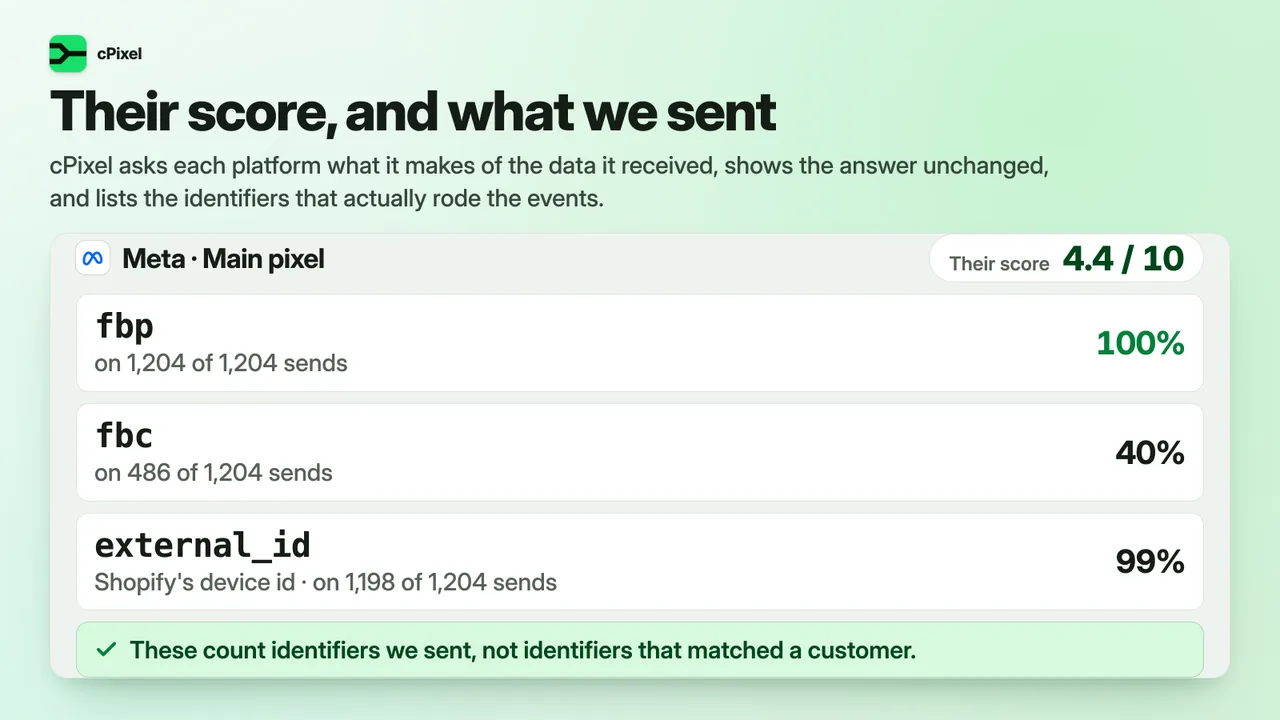
Event quality: Meta’s score beside what cPixel sent 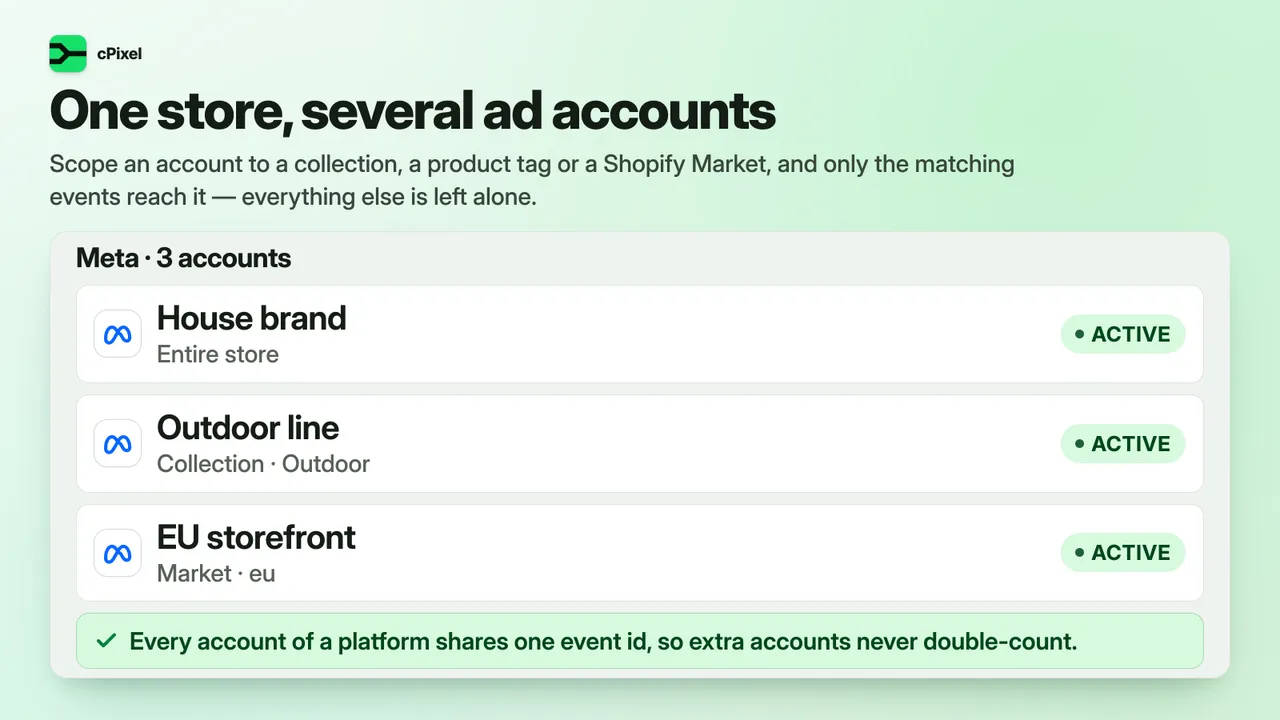
Several accounts on one platform, each with its own scope 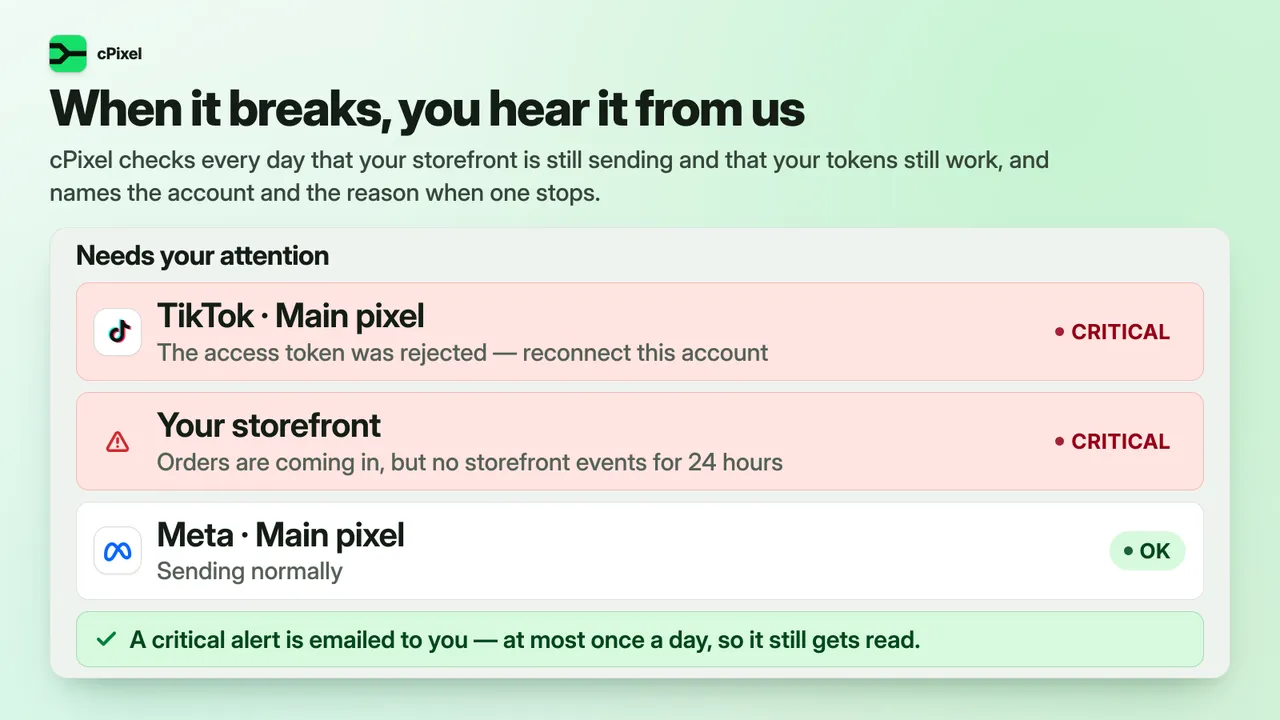
Alerts: nightly checks, critical ones emailed


cPixel vs the platforms’ own Shopify apps
The platforms’ own apps are free to install and run catalogues, shops and campaigns, which cPixel doesn’t. Cells outside the cPixel column restate the sources listed under the table. A dash means the job is outside that tool’s platform; “Not stated” means its source doesn’t say.
| Job | Facebook & Instagram app | TikTok app | Google & YouTube app | ChatGPT Ads app (OpenAI) | Shopify custom pixel | cPixel |
|---|---|---|---|---|---|---|
| Meta purchases through the Conversions API | Yes, at Enhanced or Maximum sharing | — | — | — | Not stated; runs in the shopper’s browser | Yes: purchases from the order, plus funnel events |
| TikTok events through the Events API | — | Yes, at Enhanced or Maximum sharing | — | — | Not stated; runs in the shopper’s browser | Yes: funnel events and purchases |
| GA4 purchases sent from a server | — | — | Not stated; the app installs Google tags | — | Not stated; runs in the shopper’s browser | Purchases and refunds |
| ChatGPT Ads conversions | — | — | — | Yes, through its own Shopify pixel | Code you write; unsupported by Shopify | Checkouts and purchases from the server |
| Google Ads purchase conversions | — | — | Yes; enhanced conversions if you turn them on | — | Code you write; unsupported by Shopify | Browser tag, purchase on the Thank you page |
| Pinterest and Snapchat purchases | — | — | — | — | Code you write; unsupported by Shopify | From the server. New: in production since September 2026, and not yet confirmed on a live ad account |
| Several pixels on one platform | Not stated | Not stated | Not stated | Not stated | Not stated | Up to 10 per platform, 20 in total |
| See each event and the platform’s reply | Test Events in Meta’s Events Manager | Test events in TikTok Events Manager | Google Tag Assistant, for tag firing | A 15-minute event sample, via OpenAI’s API | Shopify Pixel Helper, one pixel at a time | Live: each event, with replies to server sends |
| Alerts when sending stops | Not stated | Not stated | Not stated | Not stated | Not stated | Nightly checks; critical alerts emailed |
| Purchase timing for cash on delivery | Not stated | Not stated | Not stated | Not stated | Not stated | When paid (default), shipped or placed |
| Catalogue, shop and campaigns | Yes: catalogue sync, shop and ads | Yes: product sync, TikTok Shop and ads | Yes: product sync to Google, and ads | Yes: catalogue sync and campaigns | — | No: tracking only |
| Price | Free to install | Free to install | Free to install | Free | Part of your Shopify admin | Free plan; paid plans by monthly orders |
Use the platforms’ own apps for catalogues, shops and campaigns — and let one of them send your events if that covers what you need. Use cPixel for several platforms and pixels from one place, and to see each event arrive. Either way, one sender per pixel.
Checked .
16 sources
- Shopify Help Center: Facebook data sharing
- Shopify Help Center: Meta pixel
- Meta for Developers: Conversions API, using the API
- Shopify App Store: Facebook & Instagram
- TikTok For Business: Data sharing in the TikTok app for Shopify
- TikTok For Business: Diagnostic and monitoring tools in Events Manager
- Shopify App Store: TikTok
- Google Ads Help: Conversion tracking with the Google & YouTube app
- Shopify Help Center: Setting up Google Analytics 4
- Shopify App Store: Google & YouTube
- Shopify App Store: ChatGPT Ads
- OpenAI Developers: Conversion tracking
- Shopify Help Center: Pixels overview
- Shopify Help Center: Custom pixels
- Shopify Help Center: Testing custom pixels
- Shopify.dev: About web pixels
How much does cPixel cost?
cPixel has a Free plan and 3 paid plans from $9.90 / month. Paid plans are billed through Shopify, on your Shopify invoice.
| Plan | Price | What it includes |
|---|---|---|
| Free | Free |
|
| Starter | $9.90 / month |
|
| Growth | $49 / month |
|
| Scale | $129 / month |
|
Plans and prices as listed on the Shopify App Store, which is authoritative. Page updated .
What can cPixel access?
The Shopify access scopes in cPixel’s app configuration, and what each one is for.
| Permission | What it allows | Why |
|---|---|---|
| write_pixels | Add a web pixel to your store | To add the cPixel pixel under Settings › Customer events, which reports what shoppers do on your storefront and in checkout. |
| read_customer_events | Receive customer events | So the cPixel pixel receives the events Shopify records as shoppers browse and check out. |
| read_orders | Read your orders | To send each purchase from Shopify's order webhook to the platforms' server-side APIs. |
| read_products | Read your products | To look up a product's collections and tags when an account's order rules depend on them. |
| read_themes | Read your themes | To check whether the cPixel app embed is on in your live theme. |
| read_customers | Read customer records | Only for a purchase sent again later: to read the customer's ID, so the resent event matches the original. |
cPixel asks for no script-tag or theme-editing access, so it never changes your theme files.
Frequently asked questions
Is cPixel free?
Yes, there is a Free plan. It covers 50 orders a month, with no order cap for your first 7 days, and within that allowance it sends real server-side events, not test events. Browser tracking is unmetered and free on every plan today, and Live gives Free stores 3 sessions a day and 10 in total. Paid plans differ in how many orders they cover and add Reconciliation, resending a purchase from Live and 10 Live sessions a day, and your first paid plan starts with a free trial, once per store. The pricing table on this page lists each plan.
Which ad platforms does cPixel send to?
Seven, on every plan: Meta, TikTok, Google Analytics 4, OpenAI’s ChatGPT Ads, Google Ads, Pinterest and Snapchat. Meta, GA4 and Google Ads run in Shopify’s web pixel, which also covers checkout, while the TikTok, ChatGPT Ads, Pinterest and Snapchat tags load on your storefront through cPixel’s app embed. From cPixel’s servers, Meta and TikTok get the funnel and the purchase, GA4 purchases and refunds, and ChatGPT Ads, Pinterest and Snapchat checkouts and purchases; Google Ads is browser-only. The Pinterest and Snapchat server connections are new: in production since September 2026, and not yet confirmed on a live ad account.
Will cPixel count a purchase twice?
Each purchase carries one event ID, built from your shop and the checkout and shared by all your accounts on a platform, and retries, the nightly repair of missed orders and resending from Live all reuse it, so each platform can keep one copy. The catch is time: a resend goes to every connected account, and Meta deduplicates for 48 hours only, so resend only a purchase that never arrived. Doubled purchases usually come from a second sender, such as the Facebook & Instagram app’s data sharing or a pixel pasted into your theme, which cPixel can’t deduplicate: keep one sender per pixel.
Can I keep Shopify’s Facebook & Instagram app?
Yes, and you should: it runs your catalogue, shop and ads, and removing it can break catalogue sync, product feeds or Shops. What matters is that only one tool sends events to each Meta pixel. When you connect Meta, cPixel asks “Is the official Meta app also installed?”, and answering Yes stops cPixel’s browser and server sends to that pixel; the other option is connecting cPixel to a different dataset. cPixel also scans your storefront once a day and warns you in Destinations when another sender is set up for a platform it sends to.
How is cPixel different from OpenAI’s ChatGPT Ads app?
OpenAI’s free ChatGPT Ads app, launched on 3 September 2026, connects your ad account, syncs your product catalogue, builds campaigns and sets up conversion tracking with its own Shopify pixel. cPixel runs no campaigns: it tracks, sending ChatGPT Ads your checkouts and purchases from its servers, and it tracks six other platforms too, with Live showing each send. If ChatGPT Ads is all you advertise on, OpenAI’s app may be enough. If you use both, let just one of them send events to each OpenAI pixel ID.
What happens when I reach my monthly orders?
On Free, cPixel warns you in the app at 80% and 95%, then emails the store’s contact address when the month’s 50 orders are used and server-side sending pauses. Browser tracking carries on, and Meta gets a browser Purchase instead. Orders from the pause are held for 7 days and sent after an upgrade or at the monthly reset, to each platform only within its own window, which for Meta is 48 hours from the order. Paid plans never pause: past the allowance, Starter and Growth lock Live and Reconciliation after 72 hours, and Scale doesn’t lock.
What customer data does cPixel send, and is it hashed?
cPixel sends the identifiers ad platforms match conversions on: email and phone number hashed with SHA-256 once a shopper gives them, a hashed Shopify customer ID (GA4 gets it unhashed as its user ID), click IDs and cookies such as _fbp and ttclid, and the visitor’s IP address and browser. By default Meta also gets the country, region, city and postcode guessed from the IP, hashed, which you can reduce or turn off in Settings. cPixel never sends names or postal addresses and keeps no event payloads. It follows the consent choices Shopify records, and sends a purchase with no consent record as consented.
Will cPixel raise my Event Match Quality?
cPixel can’t promise a score, because Meta sets it from what it manages to match. What cPixel does is send the identifiers Meta matches on, including hashed email and phone, _fbp and _fbc, and the visitor’s IP address and browser, from both browser and server under one event ID. Its Event quality page shows Meta’s own score, read once a day when your access token allows it, beside the identifiers cPixel sent over the last 7 days. Many tokens can’t read the score; that’s expected and doesn’t affect sending.
How do I know cPixel is working?
Start a session in Live and browse your store in another tab: each event appears as it’s sent, and server sends show the platform’s reply. In the connect wizard, Test connection checks your credentials; after the first successful server send, the account shows Verified in Destinations, and Show checks on Home lists what is running. Confirm in each platform’s own tool as well: Meta says you should be able to verify events within 20 minutes. Each night cPixel checks for rejected tokens and stalled storefront events, and emails you about critical problems.
Does cPixel handle cash-on-delivery orders?
Yes. By default cPixel sends a purchase when the order is paid, and cash-on-delivery orders are marked paid on delivery, often too late for the platform to credit the ad click. In Settings, under When to send the purchase, choose When the order ships, usually the right choice for cash on delivery, or When the order is placed, which reaches the platform sooner but reports a delivery that’s later refused as a sale. cPixel doesn’t see cancellations made after the purchase is sent.
Does cPixel slow my store or leave code behind?
Like any tracking, it adds some work to your pages. Meta, GA4 and Google Ads run inside Shopify’s sandboxed web pixel, and the TikTok, ChatGPT Ads, Pinterest and Snapchat tags load only through cPixel’s optional app embed. cPixel edits no theme files and has no permission to add script tags, and Shopify removes an app’s theme blocks, including that embed, when you uninstall. At uninstall cPixel also deletes your access tokens at once, and everything else it holds about 48 hours later.
Which languages does cPixel support?
The cPixel admin is available in 20 languages, including English, German, French, Spanish, Japanese and both Simplified and Traditional Chinese, and it follows the language your Shopify admin passes to the app. Alert emails and support notifications are in English, and cPixel’s documentation on this site is in English for now, with translations planned. Shoppers never see any cPixel text on your storefront, so there is nothing to translate for them.
Guides and documentation
cPixel documentation
All 16 cPixel guidesInstall cPixel from the Shopify App Store.
Start on the Free plan and move up only when you need to.
Need help with cPixel? Email support@b2bgold.app.