
Shopify app · Anti theft, Fraud
X Shield: IP Country Blocker
Block fraud with country block, IP blocker & bot blocker
X Shield is a Shopify app that blocks visitors by country, IP address or network, and turns away the bots, VPNs and spy extensions it detects, showing them a blocked page instead of your store. Googlebot and Bingbot, checked against their published IP ranges, still get in, and dry run lets you test every rule before it blocks anyone.
4.8 from 11 reviews on the Shopify App Store · checked
Built for Shopify- Plans
- Free, then from $9.99 / month
- Billing
- On your Shopify invoice
- Docs
- 15 guides

What does X Shield do?
X Shield blocks visitors by country, IP address or network, and the bots and VPNs it detects, showing them a blocked page instead of your store.
Country and city blocking
Block visitors from the countries you list, or let in only the countries you sell to. Add a whole group such as the EU or a continent in one step, limit a rule to certain pages, and add city rules on Enterprise and Plus.
IP address and network blocking
Block single IPv4 or IPv6 addresses, CIDR blocks and start-to-end ranges, or admit only the addresses you list. On Enterprise and Plus, one entry can block a whole provider by its network number (ASN).
Bot protection with verified crawlers
Blocks scrapers and automated browsers that give themselves away. Googlebot, Bingbot and other crawlers you allow are checked against their published IP ranges or networks, so a fake Googlebot gets no pass. AI crawlers are opt-in, and bots that never run JavaScript still receive your page’s HTML.
VPN, proxy and scraper-network blocking
Turn away Tor and visitors on known VPN, proxy and hosting networks, or use the narrower Scraper network blocking for clouds known for scraping, such as Alibaba, Tencent and Huawei. Both are off until you turn them on, and iCloud Private Relay is exempt.
Spy-extension and developer-tools protection
On paid plans, shows the blocked page to visitors running one of more than 130 known store-spy and dropshipping extensions, PPSPY and Koala Inspector among them, or opening developer tools on your store.
Content and image protection
Disable right-click, text selection, copy, cut and paste, image and video dragging, and shortcuts such as view source, each with its own switch, on every plan. It slows casual copying but can’t stop screenshots.
Blocked-visitor analytics
See each blocked visitor’s time, country, IP address, page and the protection that stopped them. Free keeps your latest 200; paid plans add 30- or 90-day history, dry-run results and one-click rules.
Order protection
On paid plans, checks each new order against what X Shield saw on your storefront and flags risky ones in Shopify’s fraud analysis, with the evidence. Enterprise adds automatic tags and Plus a reversible fulfillment hold. Nothing is ever cancelled.
Will blocking hurt my Google rankings?
Not while Googlebot stays allowed under Global bypass → Known bots, which is the default. X Shield checks anything calling itself Googlebot against Google’s published IP ranges, so the real crawler passes every rule and an impostor gets no exemption. The blocked page is marked noindex, so “Access denied” never becomes a search result. Google asks sites to treat Googlebot like any visitor from the country it crawls from, so block only countries you don’t need search traffic from.

How do I avoid blocking real customers — or myself?
Test before you enforce. Dry run evaluates every rule but lets everyone through, recording who would have been blocked (visitor by visitor in Analytics on paid plans); choose Block for real once the results look right. The rule tester checks any IP address against your country, IP and network rules, X Shield warns before you save a rule that matches your own connection, and a private access link from Safety & testing gets you back in on any network.

Screenshots
As the Shopify App Store listing shows them.
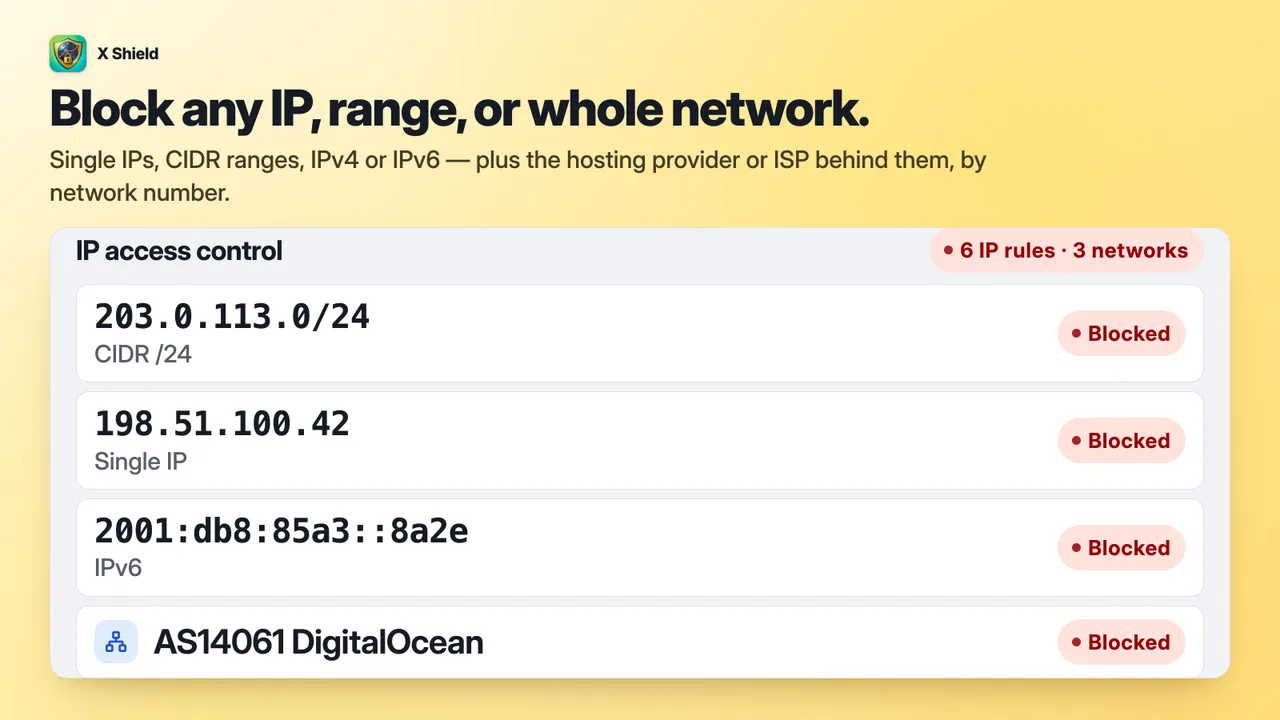
IP blocker: block IP, CIDR range, IPv6 or a whole network by ASN 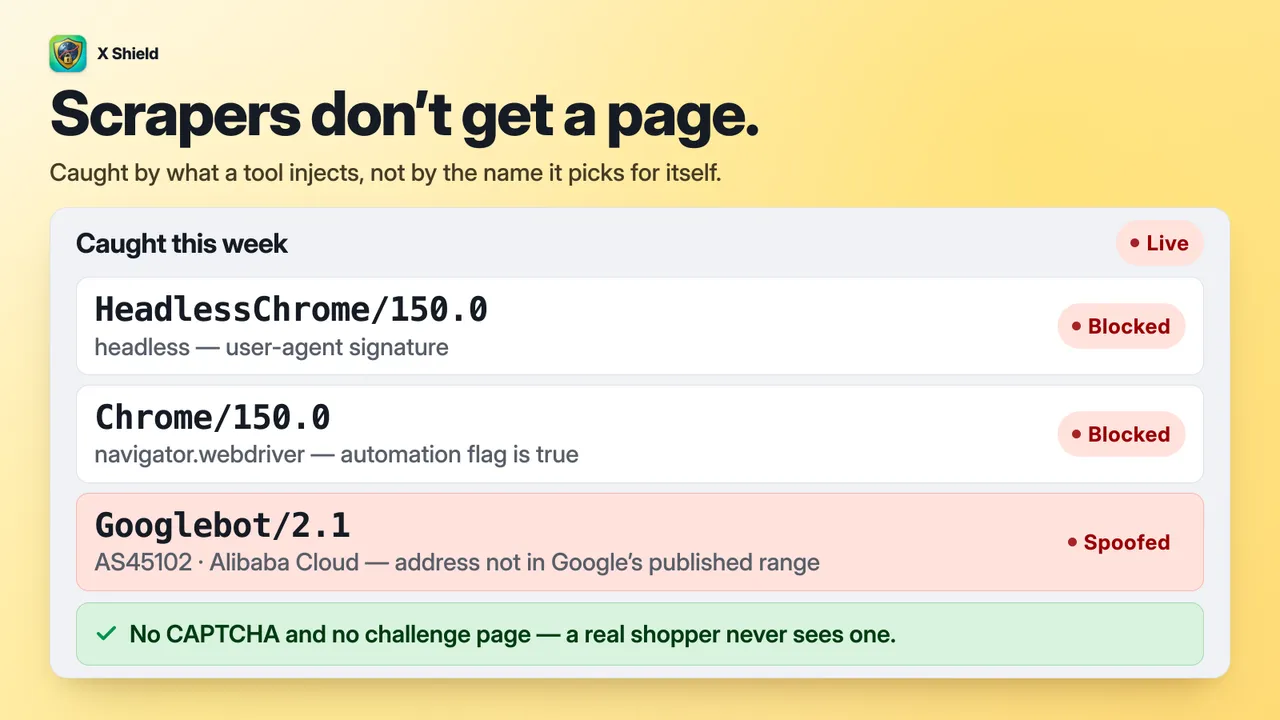
Bot blocker: what the bot did to give itself away 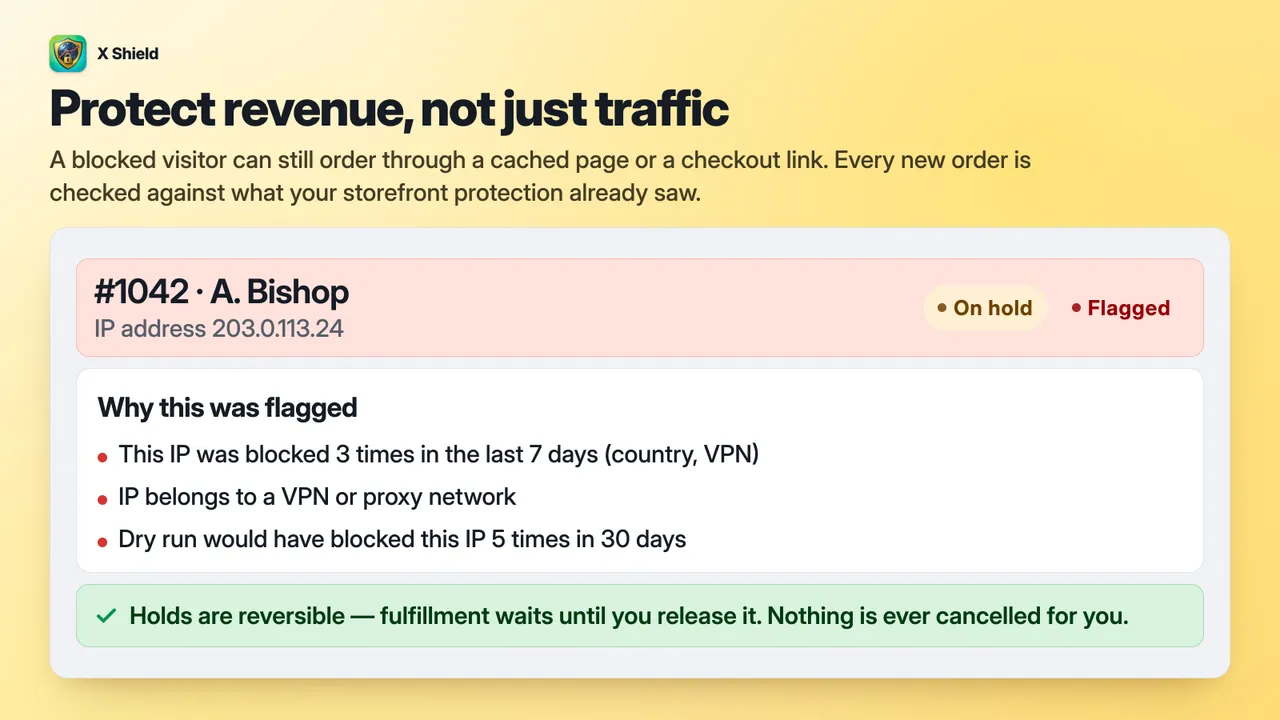
Fraud order protection: flagged orders and the evidence for each


X Shield vs Shopify’s built-in tools
Shopify’s own tools are the right place for checkout and payments, but none of the four below lets you choose who can load your storefront. Each Shopify cell reflects the Help Center page listed under the table.
| Job | Shopify Markets | Fraud Control app | Shopify bot tools | Shopify fraud analysis | X Shield |
|---|---|---|---|---|---|
| Stop a country browsing | No: countries outside active markets can browse | No | — | — | Yes: block or allow only listed countries |
| Stop a country checking out | Yes: leave it out of every active market | Address filters, with Shopify Payments | — | — | No: hosted checkout isn’t covered |
| Block an IP address from browsing | — | No: checkouts only | — | — | Yes: IPs, ranges, IPv6; networks on Enterprise+ |
| Block an IP address at checkout | — | Yes, with Shopify Payments | — | — | No |
| Handle datacenter and VPN traffic | — | — | Challenges some automated or VPN visits | Flags unusual device or network activity | VPN, proxy, Tor and scraper-network blocking |
| Let Googlebot in while blocking | — | — | — | — | Checked against Google’s published IP ranges |
| Test a rule before it applies | — | Saving a rule activates it | — | — | Dry run and rule tester |
| Keep bots out of your reports | — | — | Bot sessions filtered out by default | — | Logs every block; Shopify may still count visits |
| Stop bots at checkout | — | — | Checkout bot protection, Shopify Plus only | — | No |
| Judge an order’s risk | — | — | — | Low, medium or high risk per order | Adds storefront evidence on paid plans |
| Protect content and block spy tools | — | — | — | — | Content protection; spy tools on paid plans |
Use Shopify’s tools for checkout and payments. Use X Shield to keep countries, IP addresses, networks and bots off your storefront, which Shopify has no setting for. A dash means the tool doesn’t do that job.
Checked .
7 sources
- Shopify Help Center: Understanding market types
- Shopify Help Center: Backup region in Markets
- Shopify Help Center: Fraud Control app
- Shopify Help Center: Protecting your store from bots
- Shopify Help Center: Bot filtering in Shopify analytics and reports
- Shopify Help Center: Protecting your store from selling to bots
- Shopify Help Center: Reviewing orders with fraud analysis
Against another Shopify app: X Shield vs Blockify.
How much does X Shield cost?
X Shield has a Free plan and 3 paid plans from $9.99 / month. Paid plans are billed through Shopify, on your Shopify invoice.
| Plan | Price | What it includes |
|---|---|---|
| Free | Free |
|
| Premium | $9.99 / month | Everything in Free, plus:
|
| Enterprise | $19.99 / month | Everything in Premium, plus:
|
| Plus | $39.99 / month | Everything in Enterprise, plus:
|
Plans and prices as listed on the Shopify App Store, which is authoritative. Page updated .
What can X Shield access?
The Shopify access scopes in X Shield’s app configuration, and what each one is for.
| Permission | What it allows | Why |
|---|---|---|
| read_themes | Read your themes | To check that the X Shield app embed is on in your live theme. |
| read_files | Read your store's Files | To show the blocked-page logo you upload once Shopify has processed it. |
| read_markets | Read your Markets | So setup never suggests blocking a country you sell to. |
| read_locales | Read your store's languages | Granted at install and read-only. No current feature relies on it. |
| write_app_proxy | Add an app proxy to your storefront | Serves /apps/x-shield-store-guard/ on your domain, which the storefront script uses to record each decision for Analytics. |
| write_files | Upload files to your store's Files | To save the logo you upload for the blocked page. It stays in your Files. Asked only when you upload a logo. |
| read_orders, write_orders | Read and update your orders | To check each new order, write X Shield's verdict into Shopify's fraud analysis and, if you choose, tag flagged orders. Asked only when you turn on Evaluate new orders. |
| write_merchant_managed_fulfillment_orders | Hold and release your fulfillment orders | To pause fulfillment on a flagged order, with the reason High risk of fraud, until you release it. Nothing is cancelled. Asked only when you turn on Hold fulfillment on flagged orders. |
X Shield asks for no access to your products or customer records, and none to edit your theme.
Frequently asked questions
Is X Shield free?
Yes, there is a Free plan. It covers 5 countries and 5 IP addresses or ranges, bot, VPN/proxy and scraper-network blocking, content and image protection, dry run, a custom blocked page and your latest 200 blocked visitors. Paid plans add unlimited country and IP rules, spy-extension and developer-tools protection, visitor history and order protection, and your first paid plan starts with a free trial. The pricing table on this page lists what each plan includes.
Will X Shield block Googlebot or hurt my SEO?
Not while Googlebot stays ticked under Global bypass → Known bots, which is the default. Crawlers are checked against their owners’ published IP ranges or networks, so the real Googlebot, Bingbot, Applebot, DuckDuckBot and Meta crawlers pass every rule while impostors get no exemption. AI crawlers are opt-in. The blocked page is marked noindex, and X Shield adds no structured data to your pages. To stay safe, don’t block countries you want search traffic from.
Why do blocked visitors still appear in Shopify Analytics?
Because Shopify can record a visit before X Shield has finished deciding. X Shield checks each visitor in their browser while the page loads, so Shopify may already have counted the session even though the visitor only saw the blocked page, and crawlers can register too. X Shield Analytics counts blocks and Shopify counts sessions, so the two numbers won’t match. Since late September 2026, Shopify also filters sessions it identifies as bots out of its session reports by default.
Can X Shield block checkout or stop fake orders?
No. X Shield works on your storefront pages, so it can’t control Shopify’s hosted checkout, including Shop Pay, or block payment authorisations, and a blocked visitor can still reach checkout through a direct checkout link. On paid plans, order protection checks each new order against what X Shield saw on your storefront and flags risky ones in Shopify’s fraud analysis; higher plans can also tag or hold them. To block checkouts by email, address or IP, use Shopify’s Fraud Control app with Shopify Payments.
What if I block a real customer — or myself?
Find the visit in X Shield Analytics, which lists each blocked visitor with the protection and reason that stopped them, then loosen that rule or exempt their IP address. The Free plan lists your latest 200 blocked visitors. Your Shopify admin is never blocked, so if you lock yourself out, create a private access link under Safety & testing: it skips every rule on any network or device. Use dry run and the rule tester to check changes before they go live.
Which countries should I block?
There’s no universal list, because risk differs from store to store. If you sell to only a few countries, use Allow only listed and add each of them, including your own. Otherwise block only countries you never sell or ship to, guided by your own orders and traffic; X Shield’s setup suggestions never include a country in your active Shopify markets. Visitors on a VPN can appear to be somewhere else, so test new rules in dry run first.
Does X Shield block VPN users, including iCloud Private Relay?
Only if you turn on VPN/Proxy protection, which is off by default. It blocks Tor and visitors on known VPN, proxy and hosting networks, while iCloud Private Relay is exempt. It can’t catch residential proxies or VPNs on networks it doesn’t list, and it will turn away some honest shoppers, so consider Scraper network blocking first: it refuses only clouds known for scraping. Dry run shows who a VPN rule would block before it goes live.
Can I block a country on only some pages or products?
Yes. In GEO control, set Page targeting to Specific pages only and list the paths the rules should cover. Paths match from the start, so /products/linen-shirt covers that product and /collections/wholesale covers that collection and everything under it. A translated URL such as /fr/products/linen-shirt, or a product opened through a collection link, needs its own entry. IP rules have the same option; every other protection applies to the whole store.
Can X Shield stop spy tools like PPSPY and Koala Inspector?
Yes, on paid plans, when the extension is installed in the visitor’s browser. Spy extensions protection looks for more than 130 known store-spy and dropshipping extensions, PPSPY and Koala Inspector among them, and shows the blocked page instead of your store. It can’t stop spy services that collect your public store data from their own servers, and new extensions are missed until an app update adds them. The list includes some Shopify developer and SEO tools, so your own team may trip it.
Does X Shield slow down my store?
It adds some load, as any storefront app does. X Shield runs from a small inline script and one main script that loads deferred, so it runs after the page’s HTML has been parsed instead of holding it up. A September 2026 update halved that script and removed its main-thread blocking, but some cost remains, so compare your PageSpeed results before and after you turn it on.
Does uninstalling leave code in my theme?
No. X Shield runs as an app embed from a theme app extension, so nothing is written into your theme files, and Shopify removes an app’s blocks from your themes when you uninstall it. Before uninstalling, release any fulfillment holds X Shield placed. Its settings are deleted within 48 hours of uninstalling, while order tags it added and any logo you uploaded to your Files stay in your store.
Which languages does X Shield support?
The X Shield admin is available in 20 languages, including English, Spanish, French, German, Japanese and both Simplified and Traditional Chinese, and follows your Shopify admin language. What shoppers see is up to you: the blocked page and protection alerts show the text you write, in one version for every visitor, with English defaults. Email reports are in English.
Guides and documentation
X Shield documentation
All 15 X Shield guidesInstall X Shield from the Shopify App Store.
Start on the Free plan and move up only when you need to.
Need help with X Shield? Email support@b2bgold.app.