Shopify High Risk of Fraud Detected: What to Do

What does “high risk of fraud detected” mean?
It means Shopify’s fraud analysis rates this order’s risk of a fraud chargeback as high. Indicators shown alongside it can include a failed card-verification check, a location that doesn’t match the payment method, or several cards tried. It isn’t proof of fraud. Hold fulfilment, verify the buyer, and cancel with a refund if the details don’t hold up.
Note: The Shopify settings, labels and plan rules on this page were checked against Shopify’s help documentation on 26 September 2026.
Shopify’s fraud analysis is a machine-learning model trained on transactions across all Shopify stores. For eligible online card orders it gives a low, medium or high risk recommendation, and medium and high orders get a warning symbol next to the order number on the Orders page. To read it, open the order and, in the Order risk section, click Order risk evaluation (on some stores, About this order). You’ll see the risk level, a recommended next step, from You can fulfill this order to Consider canceling this order, and the indicators, which can include:
- whether the card passed the address verification (AVS) check;
- whether the buyer entered the correct card security code (CVV);
- whether the buyer’s location matches the payment method;
- whether there’s unusual device or network activity;
- whether the buyer tried more than one card.
Shopify is clear that you should go by the overall recommendation, not by a single indicator or by how many there are (fraud analysis).
What you see depends on your setup. Indicators appear on the Basic plan and above; the low, medium or high recommendation needs the Grow plan or higher, or Shopify Payments. Some orders don’t receive a recommendation at all: test orders (which can simulate one), free orders, orders paid entirely by gift card, point-of-sale orders, B2B orders and subscription renewals.
Should I fulfil, hold or cancel?
Hold first, then decide. Put the order’s fulfilment on hold, run the checks in the next section, and ship only if the buyer checks out. A fraudulent order you ship costs you the goods, the payment and a chargeback fee, and every chargeback counts towards your store’s chargeback rate.
| What you find | What to do |
|---|---|
| The checks fail: the IP is far from both addresses or belongs to a host or proxy, the card checks failed, the buyer doesn’t reply | Cancel before fulfilment and refund to the original payment method |
| The checks pass: a returning customer, the buyer confirms the order, a gift explains the two addresses | Release the hold and fulfil; keep the messages and the tracking number |
| No answer yet | Keep the hold. If you capture payments manually, decide before the authorisation expires |
| The order shows a Shopify Protect section | Shopify covers fraudulent chargebacks on protected orders: fulfil within 7 days with valid tracking, make sure it’s in transit within 10, and don’t change the shipping address |
| Medium risk | Follow the recommended next step on the order, which may ask you to confirm with the customer first |
How to hold an order
- In your Shopify admin, go to Orders and open the order.
- In the Unfulfilled section, click the menu icon, then Mark as on hold.
- Select the items, choose a Hold reason, and click Mark as on hold.
The order’s fulfilment status changes to On hold, and it leaves your unfulfilled list until you click Release hold (holding fulfilments).
How to cancel an order
- Open the order and click More actions → Cancel order.
- Under Refund payment, choose Original payment method.
- Choose a Reason for cancellation, leave Restock inventory ticked, and click Cancel order.
If the payment was never captured, Shopify voids it instead of refunding it. Card transaction fees aren’t returned on a refund (cancelling orders). Cancelling lowers the chargeback risk but doesn’t remove it: the cardholder’s bank can still file one, and an authorisation hold can appear on the real cardholder’s statement even when nothing was captured (preventing fraud).
How do I verify a high-risk order?
Compare what the order says with what the analysis shows, then ask the buyer. Shopify’s own guidance starts with the IP address, the two addresses and the contact details, and says to contact the customer before shipping if any of them doesn’t fit.
- Let the analysis finish. It’s usually immediate but can take a few minutes. Don’t fulfil before it’s done.
- Check the IP address. Is it far from the billing and shipping addresses, does it belong to a web-hosting company, or is it a proxy? Any yes means contact the buyer.
- Map the addresses. Billing and shipping addresses on different continents are a warning sign. A gift sent to another city usually isn’t.
- Look for a pattern. Several orders with different names and billing addresses going to one shipping address is a classic sign of fraud.
- Check the contact details. Search the email address, and call the phone number. Can the person describe the order and the details they used?
- Use Contact customer. On desktop, the revised assessment offers a Contact customer button when it recommends investigating. It opens an email draft and sends nothing until you do.
- Read every assessment. If a fraud app adds its own assessment, the Order risk section shows one tab per provider.
- Mind Shopify Protect. On a Shop Pay order covered by Shopify Protect, changing the shipping address after checkout voids the protection.
A returning customer with earlier orders delivered and never disputed is a different case from a first order. Weigh the history as well as the indicators.
Can Shopify cancel or hold high-risk orders automatically?
Not on its own: the fraud analysis flags orders and leaves the decision to you. Shopify Flow, free on the Basic plan and above, can act on it. Shopify’s templates cancel and restock high-risk orders, or capture payment only on orders that aren’t high risk.
Pick the right trigger. Use Order risk analyzed, not Order created. The analysis takes a little while after an order is created, so a workflow that starts on Order created can run before the risk level exists. Order risk analyzed starts once Shopify’s analysis is complete (Flow for high-risk orders).
To set one up, go to Apps → Flow → Create workflow → Browse templates → Risk, pick Cancel and restock high risk orders or Capture payment if order is not high fraud risk, and click Turn on workflow. A gentler version ends in Hold fulfillment order and Add order tags and leaves the final call to a person.
Three gotchas:
- The trigger fires for Shopify’s own assessment only. Assessments that third-party fraud apps add don’t start it (trigger reference).
- Capture workflows only work with manual capture (Settings → Payments → Payment capture method). Shopify Payments gives you 7 days to capture an authorised payment (payment capture settings).
- Test before you trust it. An order placed with the email
shopify.test.high@shopify.comsimulates a high-risk recommendation. It needs an order total above zero and Shopify Payments in test mode, or another gateway on the Grow plan or higher (testing fraud analysis).
Separately, Shopify Payments blocks some high-risk checkout attempts before they become orders. You’ll find them in the Blocked view of Orders → Abandoned checkouts. If you know the customer, create a draft order and send them an invoice (fraud analysis).
What does Shopify’s fraud analysis not see?
What your own store decided about the buyer before checkout. Shopify scores the payment, location and device against transactions across all Shopify stores, but it doesn’t know your rules blocked the same IP yesterday, or that the order came from a network you keep off your storefront. Only a tool that records that history can add it.
It also leaves gaps you should know about:
- Orders without a recommendation, listed above, including Basic-plan stores on a third-party gateway, which see indicators but no risk level.
- Disputes that aren’t fraud. The rating is about fraud chargebacks, so an “item not received” or “not as described” dispute isn’t what it predicts.
- Some third-party gateways don’t send their fraud-review status back to Shopify. Check those orders in the gateway’s own dashboard.
Adding storefront evidence with X Shield
X Shield, which we build, is a storefront blocker with an order check on top. Its order protection compares each new order with what X Shield recorded on your storefront:
- whether your rules blocked the order’s IP address in the last 7 days;
- whether dry run would have blocked that IP in the last 30 days;
- whether the customer appeared in blocked sessions in the last 30 days;
- whether the IP belongs to a VPN, proxy or data-centre network.
It flags an order only on firm evidence: an IP your rules had already blocked, a customer seen in blocked sessions, or a weaker signal backed by a second one, such as a dry-run match from a VPN network, or Shopify’s own high rating plus any X Shield signal. A VPN on its own never flags an order. For a flagged order, X Shield writes its assessment, with the evidence, into the order’s fraud analysis next to Shopify’s. Higher plans can also tag the order (XShield Flagged by default) or hold its fulfilment with the reason High risk of fraud until you click Release hold in X Shield. It never cancels an order.
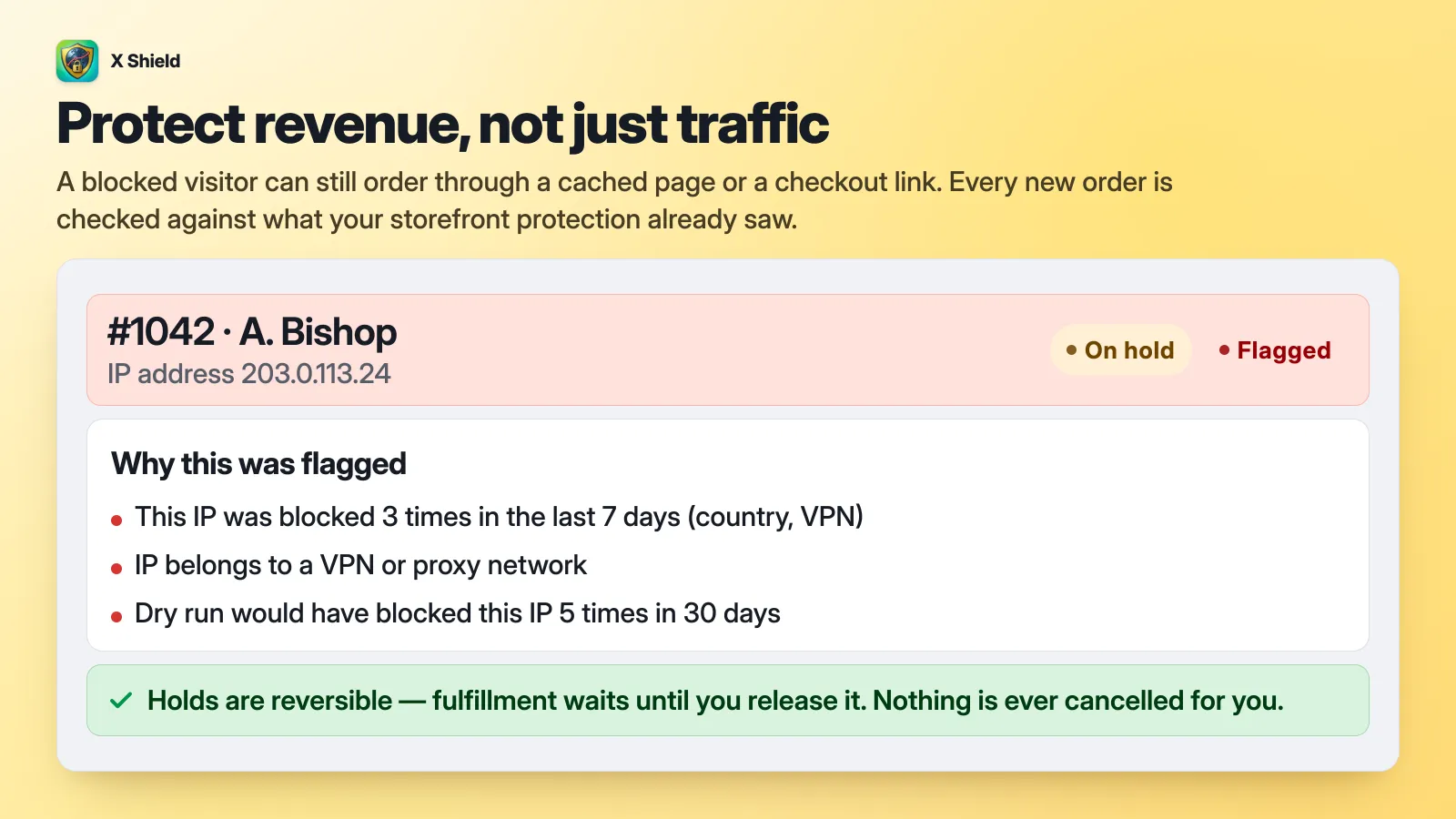
Order protection is on paid plans, with tagging and holds on the higher tiers, and each plan evaluates up to a monthly number of orders; beyond that, new orders are recorded but not evaluated (pricing). It reacts after the order exists, because it can’t control Shopify’s hosted checkout, and as a third-party assessment it doesn’t start the Flow trigger described above. How it decides, step by step: add storefront evidence to Shopify’s fraud analysis.
Tip: Order protection builds on X Shield, a free country and bot blocker for Shopify. The storefront blocking it draws its evidence from is on the Free plan.
How do I stop risky orders before checkout?
At checkout, with Shopify’s own tools. A storefront app only narrows who gets that far. Shopify Payments already blocks some high-risk checkout attempts and includes card testing protection, Fraud Control rules block emails, addresses and IPs you’ve seen before, and Shopify Plus stores get extra checkout bot protection during sales.
- Fraud Control checkout rules need Shopify Payments. They stop a known email, address or IP before it becomes an order; block a specific customer explains which details to use.
- Card testing happens at checkout, not on your storefront. If you’re seeing floods of abandoned checkouts under one name, read fake John Doe checkouts.
- The storefront layer keeps visitors you’ve decided against, such as countries you don’t ship to, data-centre networks or IPs you’ve banned, away from your product pages and cart. It can’t touch Shopify’s hosted checkout: someone with a direct checkout link, or a page cached before the block, can still place an order. That’s why checking orders afterwards still matters.
Frequently asked questions
Is Shopify’s fraud analysis accurate?
It’s a machine-learning model trained on transactions across all Shopify stores, and Shopify doesn’t publish an accuracy rate. Read “high” as “check this one”, not as “fraud”. Gift orders and travellers can trip the location checks, and a fraudster whose stolen details all match can pass them.
Does Shopify Protect cover high-risk orders?
Only orders that show a Shopify Protect status on the order page; Shopify decides eligibility order by order. It’s for merchants based in the US with a US Shopify Payments account, on Shop Pay orders of physical goods, and it covers fraudulent chargebacks once the order is fulfilled with valid tracking within 7 days and in transit within 10 (Shopify Protect).
I’ve already shipped it. What if a chargeback arrives?
Respond with evidence, strongest first. You usually have 7 to 21 days. For fraud disputes, Shopify suggests card-verification results, device and IP data, 3D Secure records, proof of delivery to the verified address, and any messages in which the buyer acknowledged the order. The bank’s decision can take up to 75 days (responding to chargebacks), and every chargeback counts towards your chargeback rate whether you win or lose (preventing fraud).
How many chargebacks is too many?
For Shopify Payments stores, Fraud Control’s dashboard grades your chargeback rate against card-network standards: under 0.4% of orders is good standing, 0.4% to 0.6% is at risk, and above 0.6% is elevated risk (Fraud Control app).
