X Shield Order Protection: Flag, Tag and Hold
How does X Shield’s order protection work?
On paid plans, X Shield checks each new Shopify order against what its storefront protection saw: visits your rules blocked, dry-run matches, the customer’s blocked sessions and VPN or data-centre networks. Flagged orders get X Shield’s evidence added to their fraud analysis in Shopify, and higher plans can also tag them or hold their fulfilment until you release it.
It reacts after an order exists. X Shield can’t control Shopify’s hosted checkout, so it can’t stop an order being placed. A visitor you blocked can still order through a cached page or a direct checkout link, and that is exactly what order protection looks for.
Turn it on
- In X Shield, open Order protection. If the settings are collapsed, click Configure.
- Select Evaluate new orders.
- Optional, on Enterprise and Plus: select Tag flagged orders, then keep the default tag, XShield Flagged, or type your own in Tag (up to 40 letters, numbers, spaces, hyphens and underscores).
- Optional, on Plus: select Hold fulfillment on flagged orders.
- Click Save in the save bar. Shopify asks you to allow access to orders, and to fulfilment if you chose holds. Approve, and a toast says Changes saved.
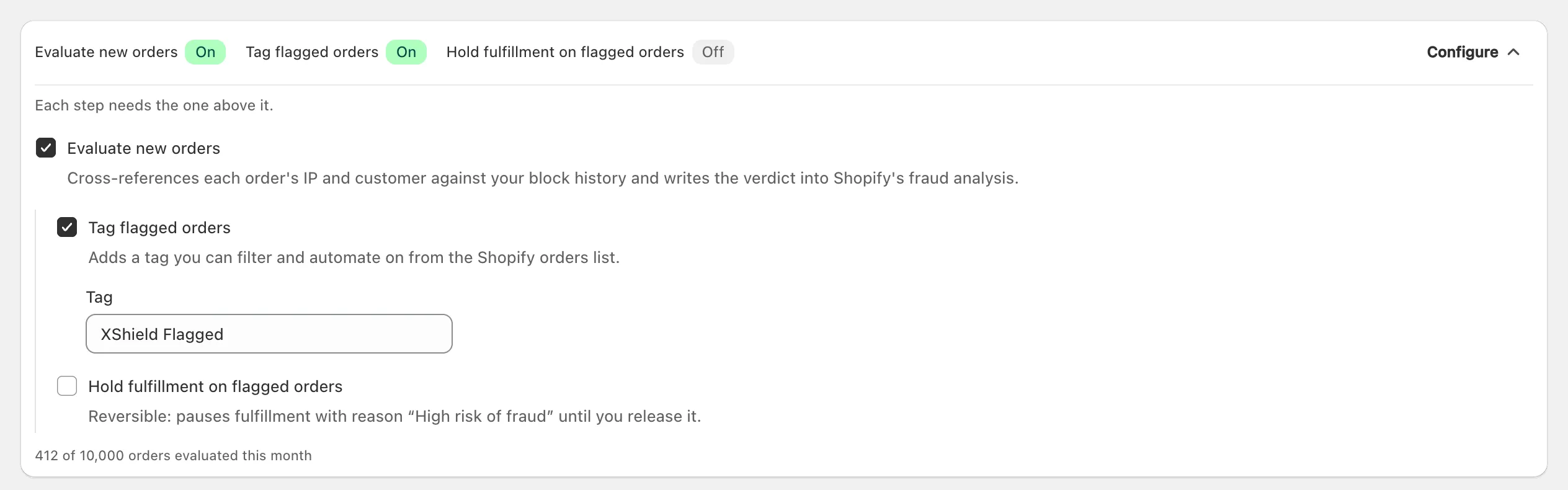
If you decline, the app says Order access was not granted, so order protection stays off. Once it’s on, new orders appear in the list below the settings within a minute of being placed, sorted into the All, Flagged, Clear and Not evaluated tabs. Orders placed before you turned it on aren’t checked.
What evidence does it add to Shopify’s fraud analysis?
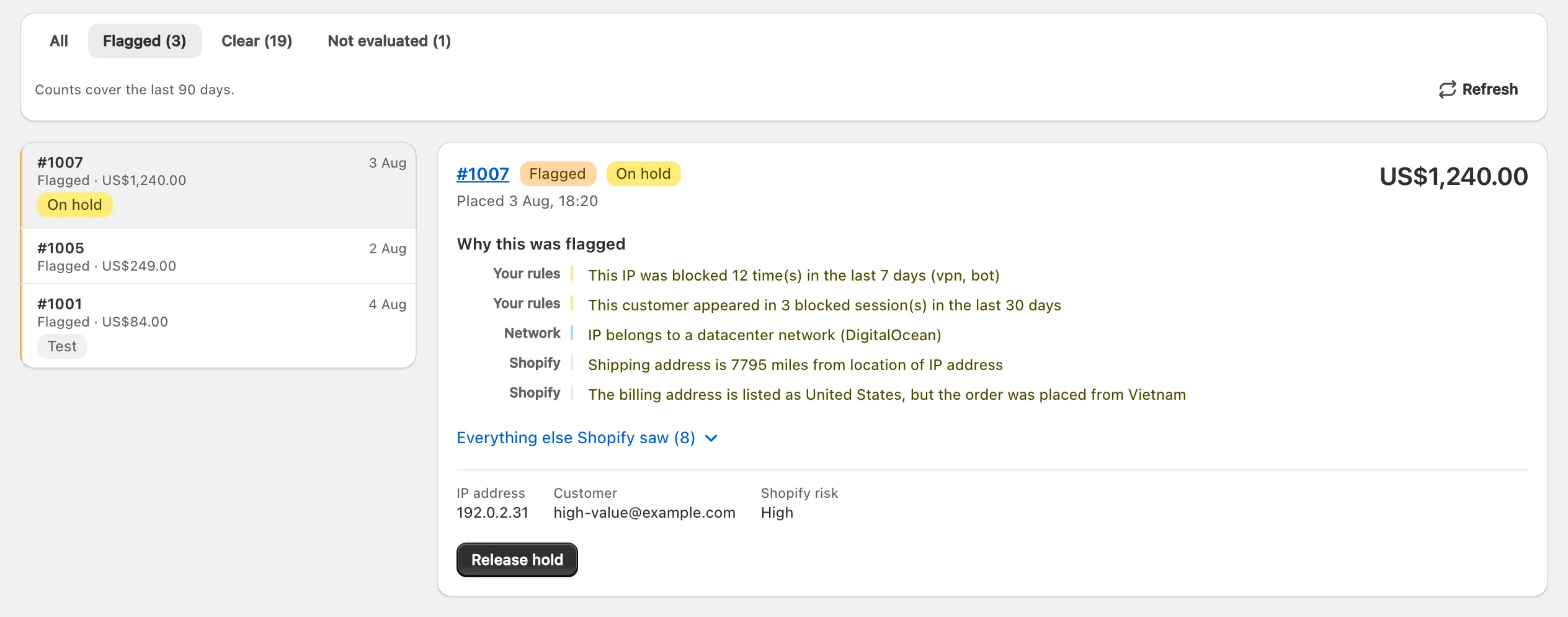
Only flagged orders get anything written. X Shield adds its own assessment, marked high risk, to the order’s fraud analysis, with its evidence as short statements in English. In Shopify admin it appears in the order’s Order risk section, next to Shopify’s own analysis, as Shopify’s guide to fraud analysis describes. Orders marked Clear are left untouched.
| Evidence | Looks back | Flags the order on its own? |
|---|---|---|
| Your rules blocked the order’s IP address | 7 days | Yes |
| The same signed-in customer, matched by account or email, appeared in a visit your rules blocked, or would have in dry run | 30 days | Yes |
| Dry run would have blocked the order’s IP address | 30 days | Only with a VPN or data-centre network, or at least two negative signals from Shopify |
| Shopify rates the order high risk | — | Only with a dry-run match or a VPN or data-centre network |
| The IP address belongs to a VPN, proxy or data-centre network | — | No |
| Your storefront protection never saw the IP address | 90 days | No, it’s context |
A VPN or data-centre network alone never flags an order, because plenty of honest shoppers browse through a VPN.
In X Shield, select an order in that list to see Why this was flagged (or What we checked), its IP address, Customer and Shopify risk. Limited signals means storefront data wasn’t available, so only Shopify’s signals were used. Click the order number to open the order in Shopify.
What do tagging and holding do?
X Shield tags or holds only the orders its order protection has flagged, and both actions need Evaluate new orders on.
- Tagging (Enterprise and Plus) adds your tag without removing any others, so you can filter the Shopify orders list by it.
- Holding (Plus) puts the order’s fulfilment on hold with Shopify’s reason High risk of fraud, so nothing ships until someone releases it. X Shield can hold only fulfilment you manage yourself, not items assigned to a fulfilment service or app.
Will it cancel orders?
No. X Shield never cancels or refunds an order. A hold is the strongest thing it does, and it’s reversible; cancelling stays your decision, in Shopify. Order protection adds evidence to Shopify’s fraud analysis rather than replacing it, and it has no Shopify Flow trigger or action of its own.
How do I release a held order?
Release a held order on X Shield’s Order protection page, or from the order in Shopify admin.
- Open Order protection and choose the Flagged tab above the order list.
- Select an order with the On hold badge.
- Click Release hold. A toast says Hold released. and the badge changes to Hold released.
You can also release it from the order page in Shopify admin, as Shopify’s guide to fulfilment holds shows.
Important: Release X Shield’s holds before you uninstall X Shield or move to the Free plan. After that, the Order protection page isn’t available to you, and each hold stays until someone releases it in Shopify admin. Tags stay on the orders either way.
What does each plan include?
X Shield’s order protection is on paid plans: Premium adds its evidence to Shopify’s fraud analysis, Enterprise also tags flagged orders, and Plus also holds their fulfilment.
| Plan | Orders checked a month | Evidence in fraud analysis | Automatic tag | Fulfilment hold |
|---|---|---|---|---|
| Free | — | — | — | — |
| Premium | 500 | Yes | — | — |
| Enterprise | 2,000 | Yes | Yes | — |
| Plus | 10,000 | Yes | Yes | Yes |
The count resets each month, and the settings panel shows how many orders you’ve used. Past the limit, new orders are still listed, as Not evaluated, until the next month. X Shield keeps each assessment in its list for 90 days. On the Free plan the page describes the feature, with an Upgrade button; the older Pro (Free) plan doesn’t include it.
