Does Blocking Countries Hurt SEO on Shopify?

Does blocking countries hurt SEO?
Usually not, if your Shopify store blocks only countries you don’t sell to and your blocker lets verified crawlers through. It can if you block the country Googlebot mostly crawls from, the United States, or if your blocker mistakes Googlebot for a bot. Google’s guidance: treat Googlebot like any visitor from the country it appears to come from.
Note: Google’s guidance and crawler details on this page were checked against Google’s documentation on 26 September 2026.
When it goes wrong, it goes wrong in public. Shopify App Store reviews of other blocker apps describe a block screen indexed in place of a store’s product and collection pages, and crawlers blocked even with Google ticked in the app’s allowlist, which one merchant saw flagged by Google Merchant Center. Both point to the same weak spot: a blocker that doesn’t reliably recognise Google’s crawlers.
Where does Googlebot crawl from?
Mostly from the United States. Google says Googlebot’s default IP addresses appear to be US-based, and that it also crawls from addresses outside the US (Google: locale-adaptive pages, updated 10 December 2025).
So the US is the country to be careful with. Blocking a country you don’t sell to elsewhere in the world rarely touches Google’s default crawl. Blocking the US, or allowing only a list of countries that leaves the US out, puts Googlebot’s usual addresses on the wrong side of your rule. The ways to block a country, and what each can’t stop, are in how to block countries on Shopify.
Googlebot isn’t the only Google crawler a store relies on. Each of these has its own job, and Google publishes the addresses each one crawls from (common crawlers, special-case crawlers):
| Crawler | What it’s for | Google’s address list |
|---|---|---|
| Googlebot | Google Search, Images and Discover | Common crawlers |
| Storebot-Google | Google Shopping, including the Shopping tab | Common crawlers |
| Google-InspectionTool | Search Console’s URL inspection and the Rich Results Test | Common crawlers |
| AdsBot-Google | Ad-quality checks on the pages your Google Ads link to | Special crawlers |
What does Google say about blocking by country?
Treat Googlebot like any other visitor from the country it appears to come from. On its page about locale-adaptive sites, Google says that when Googlebot appears to come from a country, “treat it like you would treat any other user from that country.” Its example is a site that blocks US users but allows Australian ones: that site should block Googlebot when it appears to come from the US, and allow it when it appears to come from Australia.
Read literally, that rules out the crawler exception many blocker apps offer, which lets verified Googlebot through from any country, including ones you block. Google’s page doesn’t say what happens if you make that exception. Its spam policies define cloaking as showing search engines different content from users in order to manipulate rankings and mislead users (Google: spam policies, updated 28 August 2026).
In our reading, the risk depends on who could be misled. If you block countries you don’t sell to, the searchers who might find a page they can’t open are in places you’ve chosen not to serve. If you block the US while Google keeps showing you in US results, US shoppers are sent from Google to a page that refuses them, which is the mismatch the guidance is there to avoid. The honest rule is simple: don’t block countries you want search traffic from.
How do blocker apps let Googlebot in?
The careful ones check the visitor’s IP address against the ranges Google publishes. The careless ones trust the user agent, which any scraper can fake.
A user agent is a line of text a browser sends to say what it is. Writing “Googlebot” into it takes one line of code, so an app that lets through anything calling itself Googlebot lets scrapers through too. Google documents two ways to verify its crawlers (Google: verifying Googlebot, updated 20 March 2026). One is a pair of DNS lookups: find the host name for the visiting address, check that it ends in googlebot.com, google.com or googleusercontent.com, and confirm that name points back to the same address. The other is to match the address against the IP-range files Google publishes for its common crawlers, special crawlers and user-triggered fetchers.
A blocker that runs in the shopper’s browser can’t make those DNS lookups, so for a storefront app the published ranges are the method that works. X Shield, which we build, uses them. A visitor claiming to be a known crawler gets through only if its address is in that company’s published ranges (Google, Bing, Apple, DuckDuckGo, OpenAI, Anthropic and Perplexity) or, for Meta, Ahrefs and Yandex, on the company’s own network. A “Googlebot” from anywhere else gets no exemption, and Bot protection, when it’s on, blocks it as a fake.
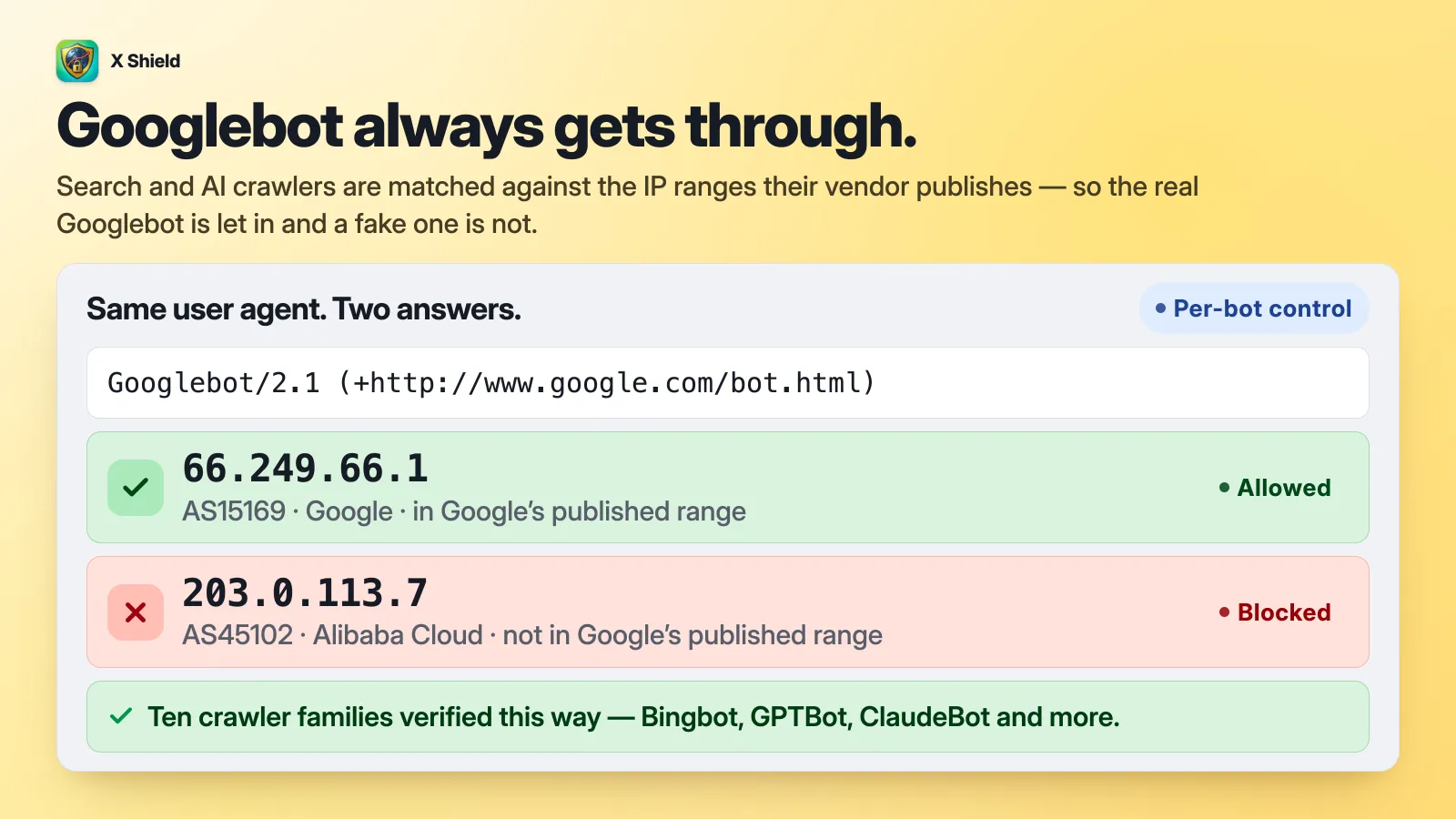
Keeping Googlebot ticked under Global bypass → Known bots covers Google’s other crawlers as well, including Storebot-Google, AdsBot and Search Console’s inspection tool. More detail: how X Shield verifies Googlebot.
Tip: X Shield, a free country and bot blocker for Shopify, keeps verified Googlebot and Bingbot allowed by default and marks its blocked page
noindex.
What happens if Google lands on your blocked page?
That depends on the blocked page. If it’s marked noindex, that URL can drop out of Google’s index; if it isn’t, the block message can end up as what Google shows for your product.
A storefront blocker works in the browser, so a crawler that doesn’t run JavaScript always receives your normal HTML. The blocked page only exists for crawlers that render pages, as Googlebot does. Google confirms that JavaScript can add a robots meta tag to a page (Google: JavaScript SEO basics, updated 4 March 2026). X Shield’s blocked page adds noindex,nofollow for exactly this case, and only to the blocked page: the same tag in your theme would apply to every page, for every visitor. See what X Shield’s blocked page shows.
Shopping listings are stricter than search. Google disables products whose landing page it can’t reach until it can reach them again, and asks that landing pages be accessible from any device, location or browser (Google: product page unavailable). If you list products for a country, don’t block it, and keep Storebot-Google allowed.
Which setups are risky?
Geo-blocking is riskier for SEO the more of Google’s crawling your rules touch, and Google’s default crawler uses US addresses, so blocking the US with no crawler exception is the high-risk case.
| Setup | What can go wrong | Risk |
|---|---|---|
| Block countries you don’t sell to, not the US, with verified crawlers allowed | Very little: Google’s default crawler uses US addresses | Low |
| Allow only your own country, outside the US, with verified crawlers allowed | Google keeps crawling, but US searchers who find you hit the block, and the exception is at odds with Google’s guidance | Medium: check Search Console weekly |
| Block the US, or allow a list without it, with no crawler exception | Google’s default crawler gets the blocked page, and pages can drop out of the index | High |
| Bot blocking that doesn’t recognise Google’s crawlers | Googlebot, Storebot-Google or AdsBot treated as bots; Shopping products disabled | High |
| Crawler exception based on the user agent alone | Anything calling itself Googlebot gets past your rules, scrapers included | Low for SEO, high for protection |
Blocked page without noindex |
A crawler that reaches it can index the block message as your page | High |
The third row is also where following Google’s guidance to the letter leaves a store that blocks US visitors: it gives up Google’s US-based crawling. If you have to block the US for legal or business reasons, decide which matters more, US search traffic or a strict block, and check the result in Search Console.
How do I check Google can still crawl my store?
Run a live test in Search Console on a product page after every rule change, and look at the screenshot.
- In Google Search Console, paste a product page URL into the inspection bar at the top.
- Click Test live URL.
- Click View tested page and open the screenshot. It should show your product, not a blocked page.
- Repeat with a collection page and your home page.
The live test fetches the page as Google-InspectionTool, from one of Google’s published address ranges. A blocker that checks those addresses treats it like Googlebot; one that only looks for the word “Googlebot” in the user agent may block it, which is worth knowing too. Google notes that a passing live test doesn’t guarantee indexing (Search Console: URL Inspection tool). In the weeks after a change, also watch the Page indexing report and, if you list products on Google Shopping, the product issues in Merchant Center.
In X Shield, paid plans show under Global bypass → What bypass is doing how many requests your bypass lists let through, crawlers included, and Analytics labels each verified crawler visit Global bot allowed.
What about AI crawlers like GPTBot and ClaudeBot?
Decide company by company, and say so in robots.txt. A storefront blocker rarely sees these crawlers, because many AI crawlers don’t run JavaScript.
- robots.txt is your main control. Shopify lets you edit it through a
robots.txt.liquidtemplate (Shopify: editing robots.txt). Shopify calls this an unsupported customisation and warns that a mistake can cost you all your traffic, so change as little as you can. - It’s a request, not a lock. Google’s own documentation says the file can’t enforce crawler behaviour and that it’s up to each crawler to obey (Google: robots.txt). OpenAI says GPTBot (model training) and OAI-SearchBot (ChatGPT search) follow it, while ChatGPT-User, which fetches pages when a person asks, may not (OpenAI: crawlers). Anthropic says ClaudeBot, Claude-User and Claude-SearchBot honour it (Anthropic: crawling).
- Training and search are separate choices. OpenAI treats each setting independently, so you can disallow GPTBot while allowing OAI-SearchBot, refusing training but staying visible in ChatGPT search, or the reverse.
- In X Shield, AI crawlers are opt-in. They stay off until you tick Claude (Anthropic), OpenAI (GPTBot, ChatGPT) or Perplexity under Global bypass → Known bots. With Bot protection on, an AI crawler that does run JavaScript is blocked unless you tick it, and one that fails the IP check is blocked either way.
