Bot Protection and Verified Crawlers in X Shield
Will X Shield block Googlebot?
No. X Shield lets Googlebot into your Shopify store while Googlebot is ticked under Global bypass → Known bots, as it is by default. It checks each crawler’s address against the IP ranges Google, Bing, Apple, DuckDuckGo, OpenAI, Anthropic and Perplexity publish, or its network for Meta, Ahrefs and Yandex. With Bot protection on, fake Googlebots are blocked.
A ticked crawler that passes this check skips every protection, so blocking a country doesn’t stop Google indexing your store.
What does Bot protection block?
Automated visitors that run your storefront’s JavaScript and aren’t on your allowed list. To turn it on, go to the Overview and, under Access control, switch on Bot protection; a toast says Feature enabled. The setup guide’s Turn them all on does the same. It’s included on every plan today (compare plans).
| Detail in Analytics | What X Shield saw |
|---|---|
Bot detected (NA): … |
A verified crawler you haven’t ticked in Known bots |
Bot detected (SP): … |
A visitor claiming a crawler’s name from an address that isn’t the crawler’s |
Bot detected (IP): recognised crawler, not allowed |
A crawler recognised by its address that Known bots doesn’t allow |
Bot detected (UA): … |
A client whose user agent isn’t a browser’s |
Bot detected (AT): … |
An automation tool that doesn’t hide itself |
Note: Bot protection works inside the visitor’s browser. Clients that never run your pages’ JavaScript, such as curl, python-requests, Scrapy and most AI crawlers, get your HTML anyway, data endpoints such as
/products.jsonare never checked, and a well-disguised headless browser can pass. Shopify’s theme thumbnails and Lighthouse audits, the engine behind PageSpeed Insights, are let through.
Which crawlers does X Shield recognise, and how?
Ten crawler families, listed under Global bypass → Known bots. Each is verified by its address, using the vendor’s published IP ranges or its network (ASN), never by user agent alone. Google documents matching a crawler’s IP address against its published ranges as one way to verify Googlebot.
| Known bots entry | Covers | Verified by | Default |
|---|---|---|---|
| Googlebot | Googlebot, Google-InspectionTool, Storebot-Google, AdsBot-Google and other Google crawlers | Published IP ranges | Allowed |
| Bingbot (Microsoft) | bingbot, BingPreview, AdIdxBot | Published IP ranges | Allowed |
| Applebot | Applebot | Published IP ranges | Allowed |
| DuckDuckBot | DuckDuckBot, DuckAssistBot | Published IP ranges | Allowed |
| Meta (Facebookbot) | facebookexternalhit, meta-externalagent and other Meta crawlers | Network (ASN) | Allowed |
| OpenAI (GPTBot, ChatGPT) | GPTBot, ChatGPT-User, OAI-SearchBot | Published IP ranges | Blocked |
| Claude (Anthropic) | ClaudeBot, Claude-User, Claude-SearchBot | Published IP ranges | Blocked |
| Perplexity | PerplexityBot | Published IP ranges | Blocked |
| AhrefsBot | AhrefsBot, AhrefsSiteAudit | Network (ASN) | Blocked |
| YandexBot | YandexBot, YaDirectFetcher | Network (ASN) | Blocked |
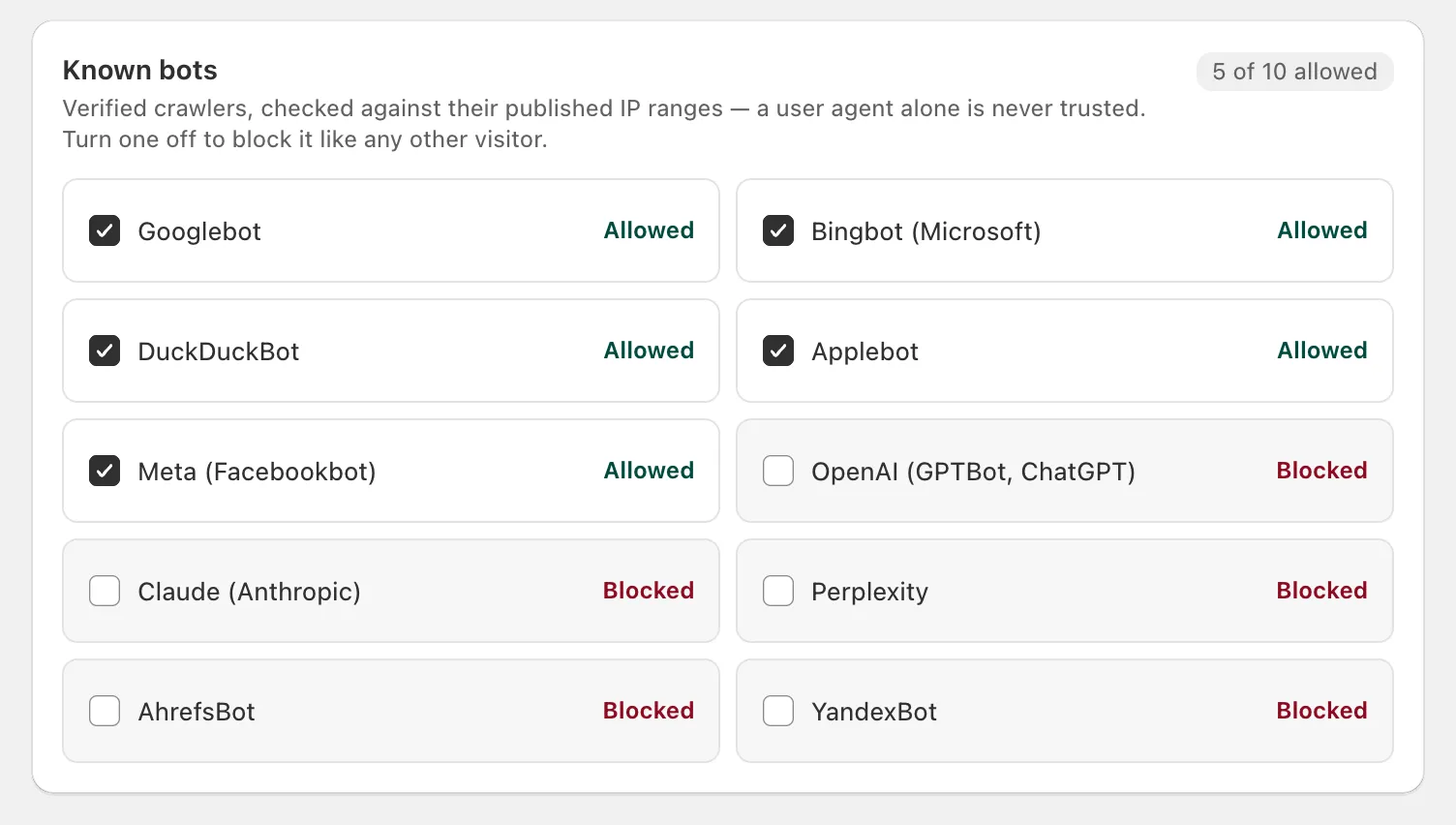
To change the list, tick or untick an entry and click Save. An unticked crawler gets no bypass: with Bot protection on, it’s blocked, and your other rules treat it like any visitor. Crawlers that publish no IP ranges X Shield can check, such as Pinterestbot, Amazonbot and ByteDance’s Bytespider, can’t be verified, so they can’t be added.
What happens to a bot pretending to be Googlebot?
With Bot protection on, it’s blocked. If a visitor’s user agent says Googlebot but its address isn’t in Google’s ranges, X Shield treats it as a fake, shows the blocked page and records Bot detected (SP): … in Analytics.
With Bot protection off, a fake crawler gets no special treatment: your country, IP and network rules apply to it as to anyone else. Bot protection never blocks a crawler just because X Shield’s own IP lookup failed.
Should I allow AI crawlers like GPTBot and ClaudeBot?
Tick them if you want AI search and assistants to read your pages; leave them unticked if you’d rather they didn’t. They’re opt-in: OpenAI (GPTBot, ChatGPT), Claude (Anthropic) and Perplexity start unticked, so with Bot protection on, X Shield blocks them when they run your pages’ JavaScript.
Most AI crawlers never run JavaScript, so they receive your HTML whatever you tick. To ask them to stay away, Shopify lets you edit robots.txt, though Shopify notes those rules are advisory and not every crawler follows them. Shopify also notes that blocking AI crawlers affects only open-web discovery: product data you share with agentic storefronts reaches them through Shopify Catalog either way.
Why does X Shield warn that Facebook and Instagram crawlers are blocked?
Because Meta (Facebookbot) is unticked. Meta’s crawler fetches the preview image, title and price when your store is shared on Facebook, Instagram, WhatsApp or Messenger, and it feeds Instagram Shopping.
- On Global bypass, click Allow Meta on the warning, or tick Meta (Facebookbot).
- Click Save.
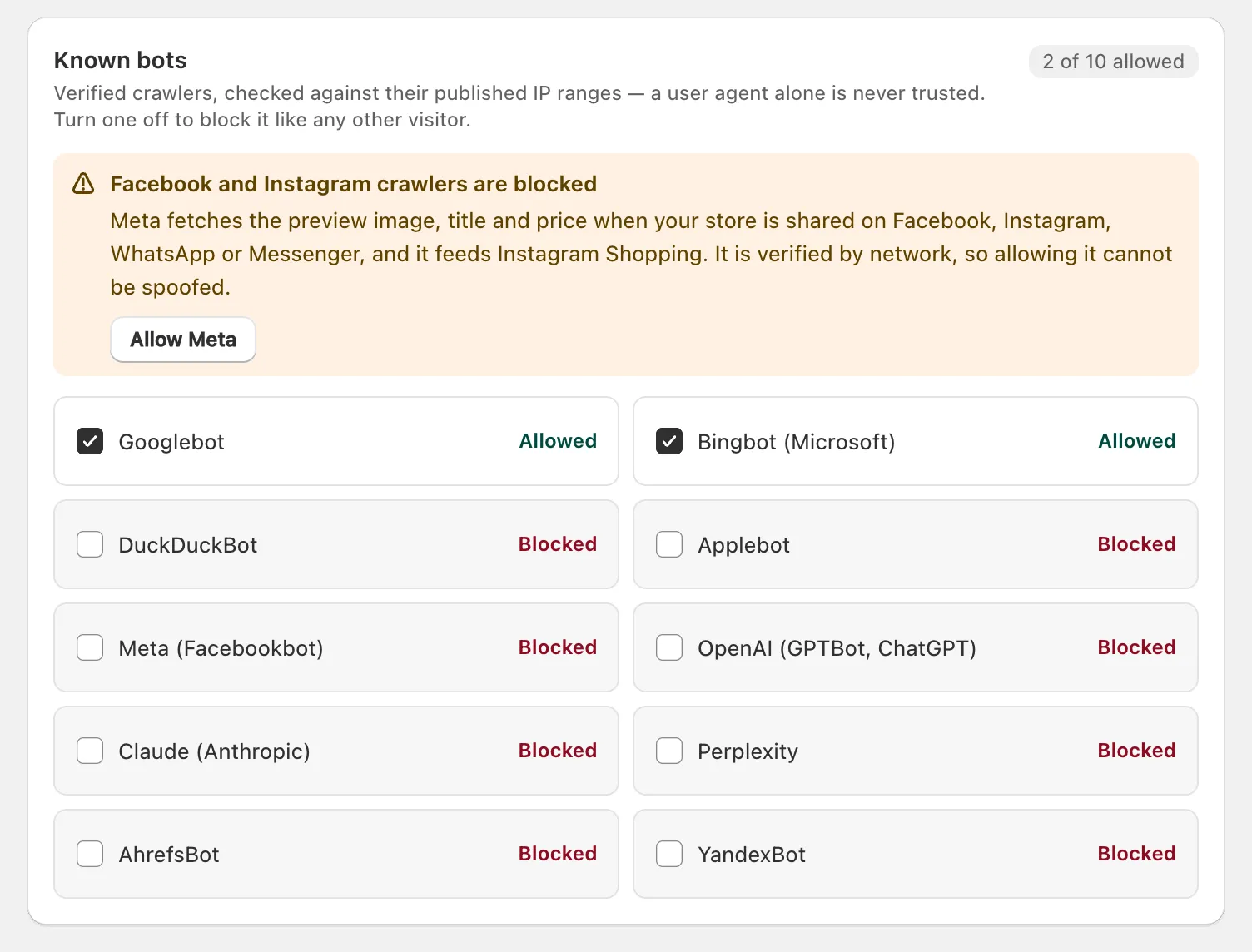
Meta is verified by its network, so allowing it can’t be spoofed. If a note says Meta was added to the list on a certain date, X Shield corrected an outdated default on your store; untick it if you’d rather block Meta.
What if a crawler reaches the blocked page anyway?
The blocked page tells search engines not to index it (noindex,nofollow), so that URL can drop out of Google’s results instead of showing “Access denied”. That happens if you untick Googlebot, or for crawlers X Shield can’t verify.
Keeping Googlebot ticked means Google sees pages your blocked visitors can’t. Google’s guidance for pages that change by location is to treat Googlebot like any visitor from the country it appears to come from, and Googlebot’s default addresses appear to be in the United States. If you block the United States, read does blocking countries hurt SEO? first.
How do I check Google can still crawl my store?
Run a live test in Google Search Console. The screenshot should show your store, not the blocked page.
- In Search Console, inspect one of your product URLs with the URL Inspection tool.
- Click Test live URL.
- Click View tested page and open the Screenshot tab.
The live test uses Google-InspectionTool, which X Shield verifies under Googlebot. On paid plans, Global bypass also lists Recent bypasses, where verified crawler visits appear as Verified crawler.
