Avis Review Stars in Google Search and Shopping
Will my star ratings show in Google?
Avis Product Reviews adds review structured data to your product pages, with the average rating and up to 20 reviews, when the Avis app embed is on and Rich snippets is switched on in Settings. Google decides whether stars appear in its results: structured data makes a page eligible for them, never certain to get them.
Google doesn’t guarantee that structured data leads to stars (Google: review snippets, checked 14 October 2026). Avis prints the data on a product page when:
- the Avis app embed is on in your published theme (why Avis needs its app embed);
- Settings → General → Rich snippets → Add review data for search engines to product pages is ticked, as it is when you install;
- the product has a rating in Shopify’s rating fields, which Avis writes once it has a counted review (values another review app left there count too).

What does Avis add to my product pages?
On each product page with a rating, the Avis app embed prints one block of Product structured data in the page’s HTML, with these parts:
| Part | What Avis puts in it |
|---|---|
Product |
name, url and image |
aggregateRating |
The average and the count from Shopify’s rating fields, reviews.rating and reviews.rating_count |
review |
Up to 20 of the product’s own reviews: author name, date, title, text (up to 600 characters) and rating |
- What counts: published customer reviews, imported ones included. Reviews marked Added by store or Store staff never count and are never in the data; neither are store reviews.
- What it leaves out:
offers(price and availability),brand,skuandgtin, which come from your theme; any store rating; questions and answers. - The block alone adds none of it: the data comes from the app embed.
Note: Imported reviews that another app’s file says came from a marketplace count in the rating Avis marks up once published, though Google’s guidelines say “Don’t aggregate reviews or ratings from other websites”: what to do with marketplace reviews in an import.
Avis prints the data with Liquid on Shopify’s servers, so it is in the page’s first HTML, where Google recommends product data (Google: product snippets, last updated 8 September 2026).
Keep the Avis Reviews block on your product template: Google wants marked-up reviews and ratings visible on the page, and Avis’s data describes what that block shows (in a product group, the block shows the group’s average). Google also rules out undisclosed incentivised reviews, and Avis’s Incentivized review label can’t be removed (review labels).
How do I check what Google sees?
To check what Google sees on an Avis product page, run its address through Google’s Rich Results Test, then watch Search Console.
- On your live store, open a product page with a published review and copy its address.
- Paste it into the Rich Results Test and run it.
- Expand the product items. Avis’s carries
aggregateRatingandreview; your theme’s usually carries the price. - In Search Console, open Product snippets and Merchant listings under Shopping. Critical issues are under Why items are invalid, the rest under Improve item appearance (Search Console Help, checked 14 October 2026).
The test can’t read a store behind its password page, and Avis prints no structured data on the password page anyway.
Why does Google report two products or a missing field?
Google can find two product items on one page because your theme and Avis each print one: the theme’s usually has the price and no rating, and Avis’s has the rating and no price. Search Console may then report a missing rating on the theme’s item, a non-critical issue.
Shopify’s structured_data filter, which Dawn and Horizon use on the product page (Dawn’s product section), outputs a Product or ProductGroup; Shopify’s example has a price and no rating (shopify.dev, checked 14 October 2026). Avis’s item isn’t linked to it, and Google’s documentation doesn’t say how it combines two items for one product.
| What Search Console says | What it means |
|---|---|
| Missing field “aggregateRating” or Missing field “review” | An item, usually the theme’s, has no rating or reviews. Google recommends them for merchant listings but doesn’t require them, so the item stays valid. Products with no rating get nothing from Avis, so expect it there |
| Either “offers”, “review”, or “aggregateRating” should be specified | A product item has none of the three. Avis’s item always has aggregateRating, so look for another item on the page |
Don’t remove your theme’s product data to tidy the report: it carries the price Google’s merchant listings require. We haven’t tested a theme edit that merges the two items, so we don’t recommend one. What matters is a valid item with your rating in the Rich Results Test.
How do I send reviews to Google Shopping?
On the Growth and Pro plans, Avis gives you a product reviews feed: a private web address that Google Merchant Center fetches (compare Avis plans). Google’s Product Ratings programme, which shows your ratings on Shopping ads, needs at least 50 product reviews across your store.
In Avis, open Integrations and switch on Google Shopping reviews feed. Copy the Feed URL.
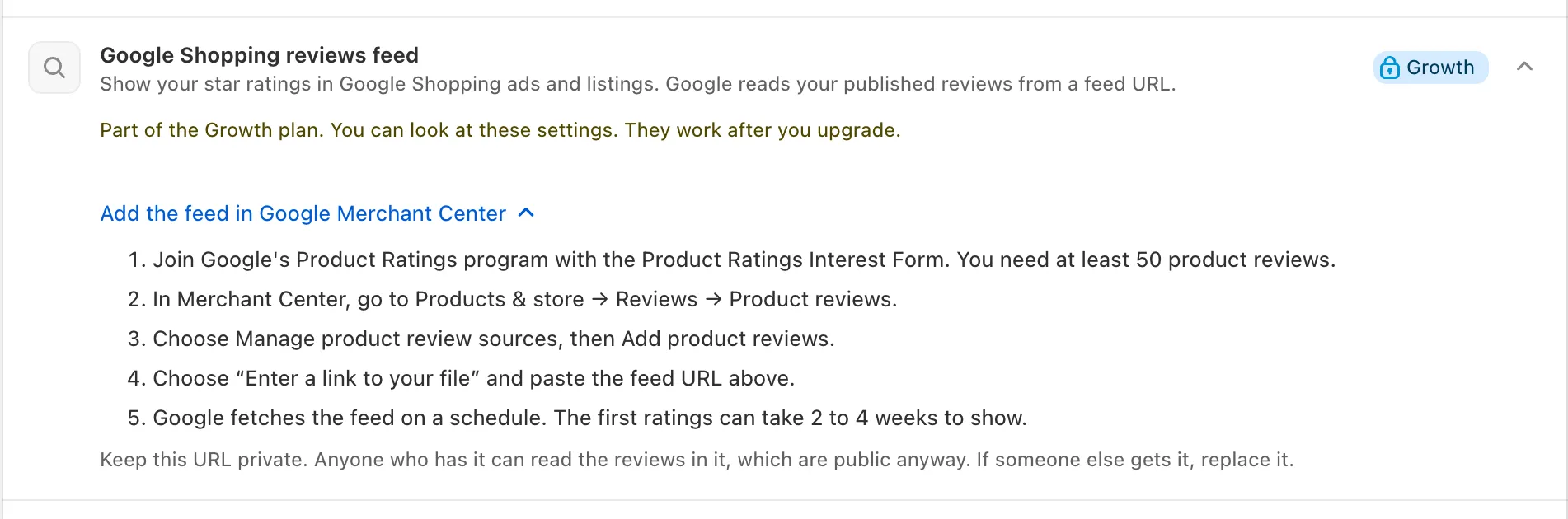
- Join Google’s Product Ratings programme with its Product Ratings Interest Form.
- In Merchant Center, go to Products & store → Reviews → Product reviews.
- Choose Manage product review sources, then Add product reviews.
- Choose Enter a link to your file, paste the feed URL and set the fetch schedule.
Steps 2 to 5 are Google’s own (Merchant Center Help, checked 14 October 2026). Google reviews each data source and decides whether to accept it; ratings typically go live 2 to 4 weeks after it passes (Product Ratings eligibility).
The feed holds your newest published product reviews with text. An imported review goes in only when Avis matched it to one of your orders or you verified it by hand; reviews you added, staff reviews and store reviews stay out.
Does Avis add seller ratings to Google?
No. Avis Product Reviews adds no seller ratings and no store-level structured data, so your store reviews show on your store only. Google’s guidelines also rule out stars for reviews a business controls about itself, marked up as an Organization or LocalBusiness.
