Send Review Request Emails with Avis
How do review requests work in Avis?
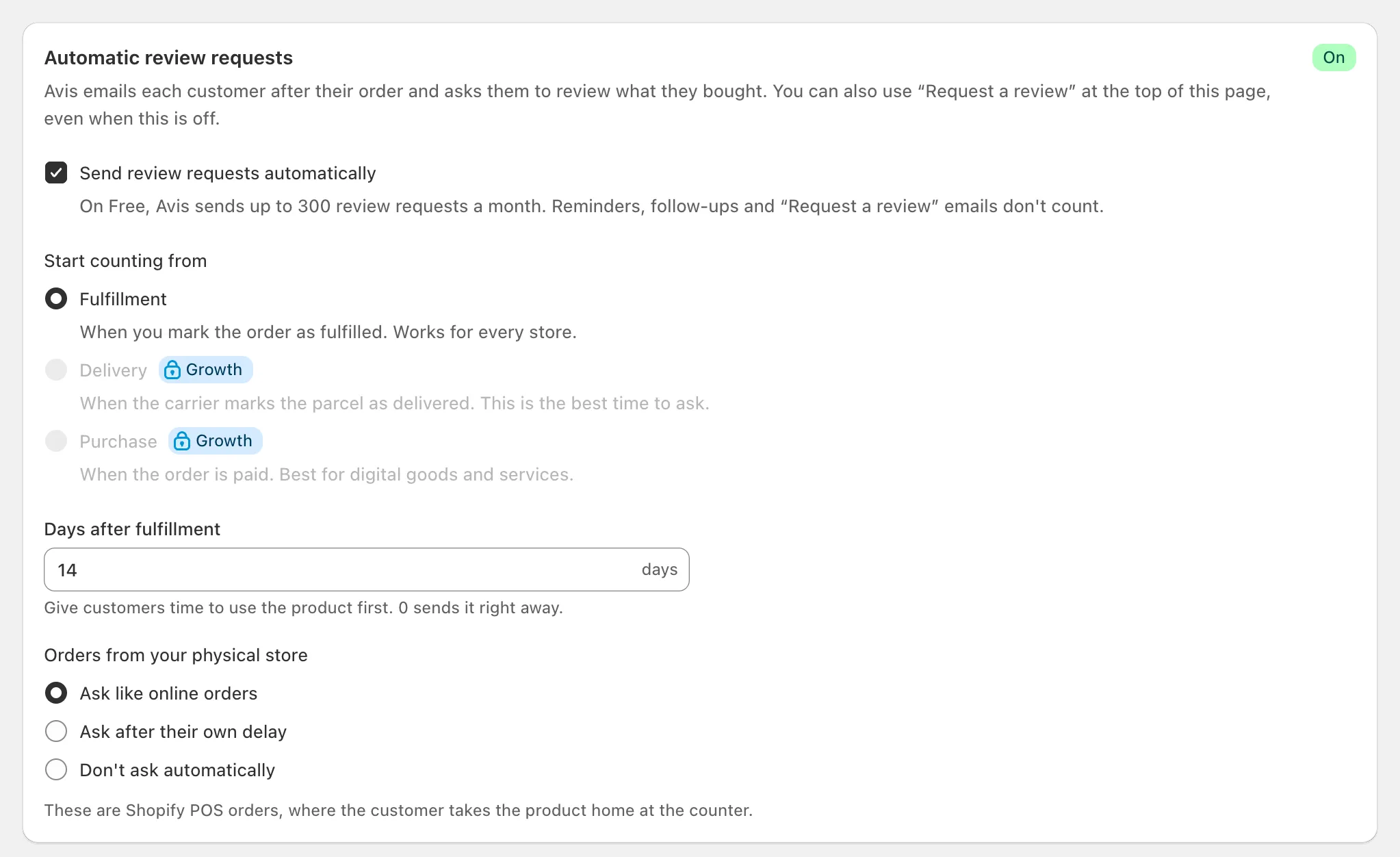
Avis Product Reviews emails each customer a review request a set number of days after their order is fulfilled, 14 by default, then reminders, two by default, for the products they haven’t reviewed yet. Switch it on in Collect, under Timing & rules. Paid plans can start counting from delivery or payment instead of fulfilment.
- In Avis, open Collect → Timing & rules.
- Turn on Send review requests automatically.
- Choose Start counting from and the number of days, then save. The badge beside the Collect title reads Automatic requests on.
Each order gets one request, which waits in the Queue tab until due.
When does Avis send a request?
Avis sends a review request a set number of days after the moment chosen under Start counting from: Fulfillment on every plan, 14 days later by default. Growth and Pro can count from Delivery or Purchase instead.
| Start counting from | Starts when | Plans |
|---|---|---|
| Fulfillment (default) | You mark the order as fulfilled | Every plan |
| Delivery | The carrier marks the parcel as delivered | Growth, Pro |
| Purchase | The order is paid (suits digital goods) | Growth, Pro |
- The delay is 0 to 90 days. With Delivery, If delivery is never confirmed, send after sends anyway 21 days after fulfilment by default.
- On Free, Avis counts from fulfilment and keeps another choice for when you upgrade.
- Orders from your physical store (Shopify POS) follow the online rules by default.
On Growth and Pro, Use a different delay for international orders sets a separate delay, 21 days by default, and Only send during the customer’s daytime holds a due email until 09:00–18:00 (the default hours) in the customer’s time zone, estimated from the shipping country.
How many reminders go out?
Avis sends two reminders by default to customers who haven’t reviewed yet: the first 3 days after the request and the second 7 days after that. Under Reminders, choose Don’t send reminders or up to 3 reminders, and how many days each waits.
Each reminder lists only the products still to review, and reminders stop when the customer reviews or unsubscribes, or you cancel the request. Let customers postpone reminders, on by default, adds a “My order hasn’t arrived yet” link that delays the next one once.
Who gets a request, and who doesn’t?
Avis Product Reviews emails the customer on each order that has an email address, unless they unsubscribed, a tag leaves the order out, or your consent setting holds them back. The rules are under Who is asked.
| Setting | Default | What it does |
|---|---|---|
| Skip products the customer already reviewed | On | Leaves those products out; with none left, the request is Skipped |
| Marketing consent | Everyone, with the transactional version when needed (recommended) | Customers without marketing consent get a version with no offer |
| Skip orders with these tags (also customers, products) | Empty | Leaves matching orders out |
NOREVIEW tag |
Always | On an order, customer or product, leaves it out |
Customers who unsubscribed from Avis are never emailed, and Shopify’s unsubscribes apply to every request made from an order. A cancelled order cancels its request. Tags don’t stop a request you send with Request a review.
What does the email look like?
The default Avis review request has the subject “Order {{order_name}}: how did it go?”, a short message and five clickable stars under each product. One click opens the review form with that rating chosen; nothing is saved until the customer sends the review.
Under Collect → Emails, In the email, ask with switches to A “Write a review” button, and the request and its reminders each have a Promotional and a Transactional version with their own Subject, Message and Button text. Avis adds an Unsubscribe link, which stops review emails from your store only.
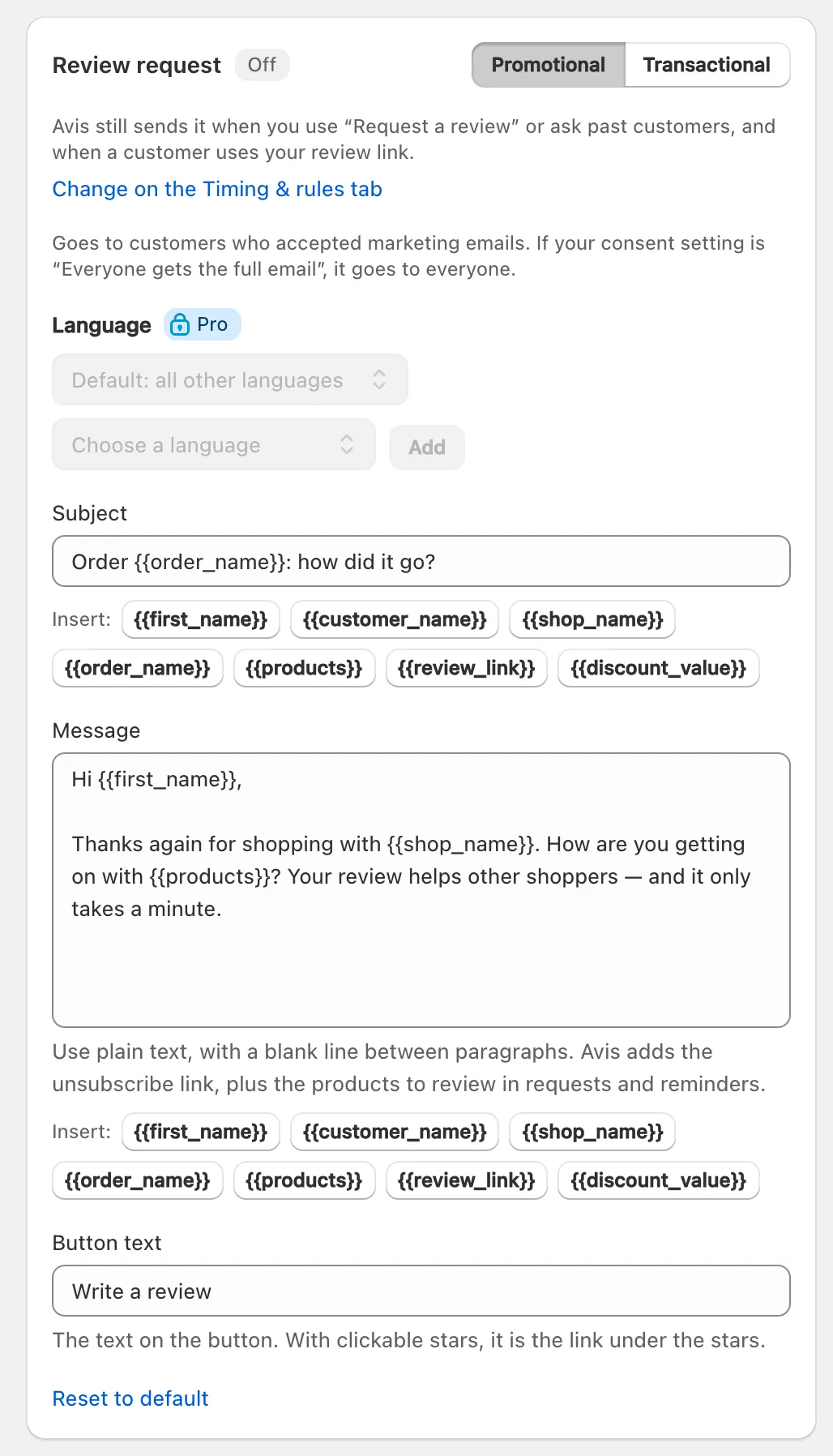
Customers get the email in their order’s language: Avis’s built-in translations (39 languages, all but English machine-translated) apply until you edit that email, and your own text per language needs Pro. On Growth and Pro, A/B test this email tries a second version, and Incentives can offer a discount code, never in the transactional version.
How many requests can I send on the Free plan?
On the Free plan, Avis sends up to 300 review request emails a month, counted per calendar month in UTC. Only the first email of an automatic request or of Ask past customers counts; reminders, follow-up emails and requests sent with Request a review don’t. Growth and Pro have no monthly limit.
Requests over the limit are held, never dropped: they go out from the 1st of the next month, or as soon as you upgrade. Home shows how many you have used under Free review requests this month. Compare Avis plans.
Who is the email from?
Every Avis review request is sent from reviews@avis-mail.b2bgold.app, with your store’s name as the sender name and your store’s contact email as the reply address. Change those two under Collect → Emails: Sender name and Replies go to. The address is the same for every store.
Why didn’t a review request go out?
A review request from Avis usually hasn’t gone out because automatic requests are off, the order isn’t due yet, or a rule skipped it. In Collect → Queue, each request shows its status, and a skipped one says why.
- Automatic requests off beside the Collect title: turn on Send review requests automatically.
- Scheduled or Waiting for delivery: not due yet. Send now sends it at once.
- Skipped, with a reason such as “already reviewed these products” or “has a tag that skips review requests”.
- “over this month’s limit, so it waits until next month”: the Free allowance is used.
- Canceled (the order or request was cancelled) or Failed (click Try again).
- Review requests are paused: customer emails are missing on Home: Shopify sent orders without an email, and they get no request.
- Who sends the email, on Emails, names a platform that isn’t connected or in your plan (“No requests would be sent.”): choose Avis.
To ask one customer now, click Request a review on Collect and choose From an order, from the last 60 days.
