Move Your Reviews to Avis from Another App
How do I move my reviews to Avis?
To move to Avis Product Reviews, export your reviews from your current app as a CSV file, upload it in Avis under Import & export, check the preview and import. Keep your old app installed until the import has finished and the Avis widgets are live: Shopify’s own advice is to transfer reviews before uninstalling a review app.
Avis Product Reviews is a Shopify app that collects photo and video reviews after each order and imports reviews from another review app.
- Export your reviews from your old app (steps for five apps below).
- In Avis, open Import & export, upload the file and check the Preview. Tick Import all reviews as pending to publish each review yourself, then click the import button (import reviews into Avis).
- Add the Avis Reviews block to your product template, on a duplicate of your theme first if you want to compare (set up Avis Product Reviews).
- Turn off your old app’s review request emails. Avis’s Send review requests automatically (Collect → Timing & rules) starts ticked in setup’s Get reviews step, and two apps asking means two emails.
- Remove the old app’s widgets from your theme. After some imports, Keep the look your shoppers know → Try this layout picks the Avis layout closest to your old one.
- Check a product page’s reviews and star rating, then review stars in Google.
- Uninstall the old app last.
Important: Shopify’s page on review apps that sync with the Shop app gives that advice, and says reviews moved between its partner apps with a CSV file, or uploaded from one, can’t display in Shop (Shopify, checked 14 October 2026). Avis doesn’t sync with the Shop app.
What does each app’s export file carry?
Each review app decides what goes into its export, so what reaches Avis depends on your old app’s file. The table shows what each app’s own help page says, checked 14 October 2026 and linked in its section below; “Not stated” means the page doesn’t say.
| App | Photos | Videos | Replies | Verified status | Order IDs |
|---|---|---|---|---|---|
| Judge.me | Yes | No | Yes | No; Judge.me says the review’s source shows it | No |
| Loox | Not stated | Not stated | Not stated | Not stated | Not stated |
| Yotpo | Yes, as links | Yes, as links | Yes, marked public or not | Reviewer type, which can be Verified Buyer | Yotpo’s own order ID |
| Okendo | Yes, as links | Yes, as links | Yes, marked public or not | Yes | Not stated |
| Stamped | Not stated | Not stated | Not stated | Not stated | Not stated |
Avis copies the photos and videos a file links to into your Shopify Files, within size limits, and keeps dates and replies, except replies marked private. It imports reviews, not questions and answers, and ignores order IDs: it matches each reviewer’s email and product to your own orders, and shows an old app’s verified mark only as the opt-in label Verified by previous review app (why imported reviews aren’t verified).
How do I export reviews from Judge.me?
To export reviews from Judge.me, use the Export dropdown on its Reviews page; a file of more than 25 reviews arrives by email.
- In your Judge.me admin, go to Reviews.
- Open the Export dropdown in the top-right corner.
- Choose Export published reviews. Export again with Export hidden reviews if you want those in Avis, where they arrive hidden.
- Download the file from Judge.me’s email within three hours, before the link expires.
One file holds up to 100,000 reviews, with photos and replies but no videos (Judge.me, checked 14 October 2026). There is no verified column: Judge.me says the review’s source, such as an email or SMS request, tells verified buyers apart. Avis reads it that way: its preview counts those reviews under Verified by previous app.
How do I export reviews from Loox?
To export reviews from Loox, click the three dots on Manage Reviews, then Export to .csv on the Product reviews tab.
- In Loox, go to Manage Reviews and click the three dots (…).
- On the Product reviews tab, click Export to .csv.
- Choose all product reviews, or only those matching your filters.
Loox’s article lists no columns (Loox, checked 14 October 2026), so read the preview’s Photos and videos and Replies kept tiles. Avis skips any row in a Loox file that names no product, so Loox’s store reviews, exported separately from its Store reviews tab, don’t come across.
How do I export reviews from Yotpo?
To export reviews from Yotpo, go to Manage > Reviews and click Export. Yotpo emails a link to the CSV file to your account’s address, which can take up to an hour.
- From your Yotpo Reviews main menu, go to Manage > Reviews.
- Click Export in the upper-right corner.
- Download the file from the link in Yotpo’s email.
Yotpo can’t export questions and answers or search-filtered reviews, and reviews from the last 24 hours may be missing (Yotpo, checked 14 October 2026). Avis copies the published images and videos, not the unpublished ones, imports public comments as replies, and its preview counts Verified Buyer reviews under Verified by previous app. Site reviews come in the same file; the preview’s Store reviews tile shows how many Avis will import as store reviews.
How do I export reviews from Okendo?
To export reviews from Okendo, click the export icon on the Reviews row under Settings > Import/Export; Okendo emails a download link.
- In your Okendo admin, go to Settings > Import/Export.
- Click the export icon on the Reviews row.
- Choose a date range and which review sources to include.
- Click Request Export, then open the link in Okendo’s email.
Okendo lists the file’s columns, including verified buyer (Okendo, checked 14 October 2026). Avis copies the images and videos, except images Okendo marks as rejected, imports public replies, and its preview counts verified buyers under Verified by previous app.
How do I export reviews from Stamped?
To export reviews from Stamped, filter or search its Reviews section and click the download button; more than 50 reviews arrive by email.
- In the Stamped dashboard, go to Reviews and open the tab you need.
- Apply a filter, or search for the reviews to export.
- Click the download button that appears.
For every review at once, Stamped’s article sends you to its support team; it lists no columns (Stamped, checked 14 October 2026). If the file gives a photo as a bare file name rather than a web address, Avis can’t fetch it, and the preview doesn’t count it. Avis skips rows that name no product.
What about Shopify’s old Product Reviews app?
Shopify’s own Product Reviews app is no longer available on the App Store (Shopify App Store, checked 14 October 2026). If you kept a CSV exported from it, Avis recognises the file as Shopify Product Reviews.
Its review section can outlive it: in April 2025 a merchant found it still on their product pages, not working, after Shopify had uninstalled the app (Shopify Community). If yours shows one, remove it from your theme, or ask whoever maintains it.
Which other apps’ files can Avis read?
Avis Product Reviews reads export files from 20 review apps, plus its own export and any CSV file. Besides the apps above, it recognises Fera, Junip, Opinew, REVIEWS.io, Klaviyo Reviews, Growave, Air Reviews, Trustoo, Vitals, Rivyo, Ryviu, Ali Reviews, Doran and HelpfulCrowd; See the apps on the import page lists them.
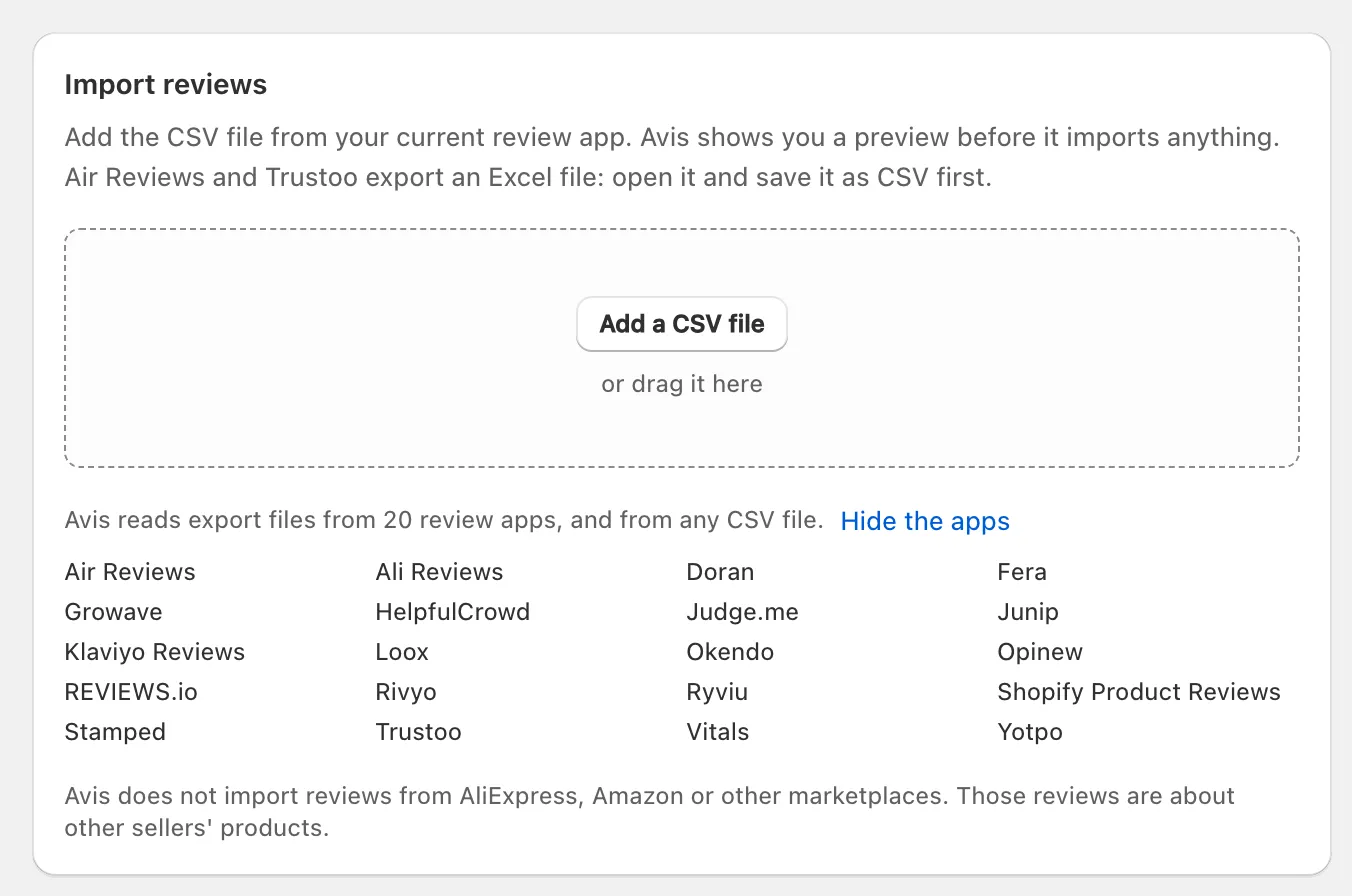
- If your old app gives you an Excel file, open it and save it as CSV first: Avis reads CSV files only.
- Avis recognises each file by its columns, mapped from published documentation, so check the preview: if it names the wrong app, choose the right one under This file is from. A file it doesn’t recognise opens Match your columns (which files Avis can import).
- “Avis does not import reviews from AliExpress, Amazon or other marketplaces.” An old app’s file can still hold reviews it copied from one: what to do with marketplace reviews in an import.
When should I uninstall my old app?
Uninstall your old review app last: after the import has finished, the Avis widgets show on your live theme and the old app has stopped sending review requests.
- Avis fetches photos and videos from the addresses in your file after the reviews arrive: wait until the Media column under Import history has caught up.
- Reviews that reach the old app after your export need a second file. Importing again is safe: “Avis skips duplicates.”
- Export anything else you want from the old app first.
