Moderate and Reply to Reviews in Avis
Does Avis hide negative reviews?
No. Avis Product Reviews never hides a review because of its rating. Its star options only change how fast a review is published: a held review publishes by itself after the waiting time, 14 days by default, unless you hide it first. Taking down a published review needs one of 12 content reasons, such as spam or personal information.
A review still pending is different: you can hide it with No reason needed (how to hide or delete a review).
In the US, the FTC’s consumer reviews rule, in effect since 21 October 2024, bars a business from misrepresenting that the reviews on its site represent all or most of those submitted when reviews have been suppressed because of their ratings or because they are negative (FTC announcement, FTC questions and answers, checked 14 October 2026). Avis logs what you hide; the decision stays yours.
When are new reviews published?
New reviews in Avis are published according to When a new review arrives, under Settings → General → Publishing and moderation. By default Avis publishes every review right away, unless a content check holds it for a look.
| Option | What happens |
|---|---|
| Publish every review right away (default) | Published at once, unless a content check holds it |
| Publish 3★ and up right away, check the rest first | Lower ratings wait as pending, then publish by themselves |
| Publish 4★ and up right away, check the rest first | The same, below 4★ |
| Publish 5★ right away, check the rest first | The same, below 5★ |
| Let me check every review first | Every review waits for you |
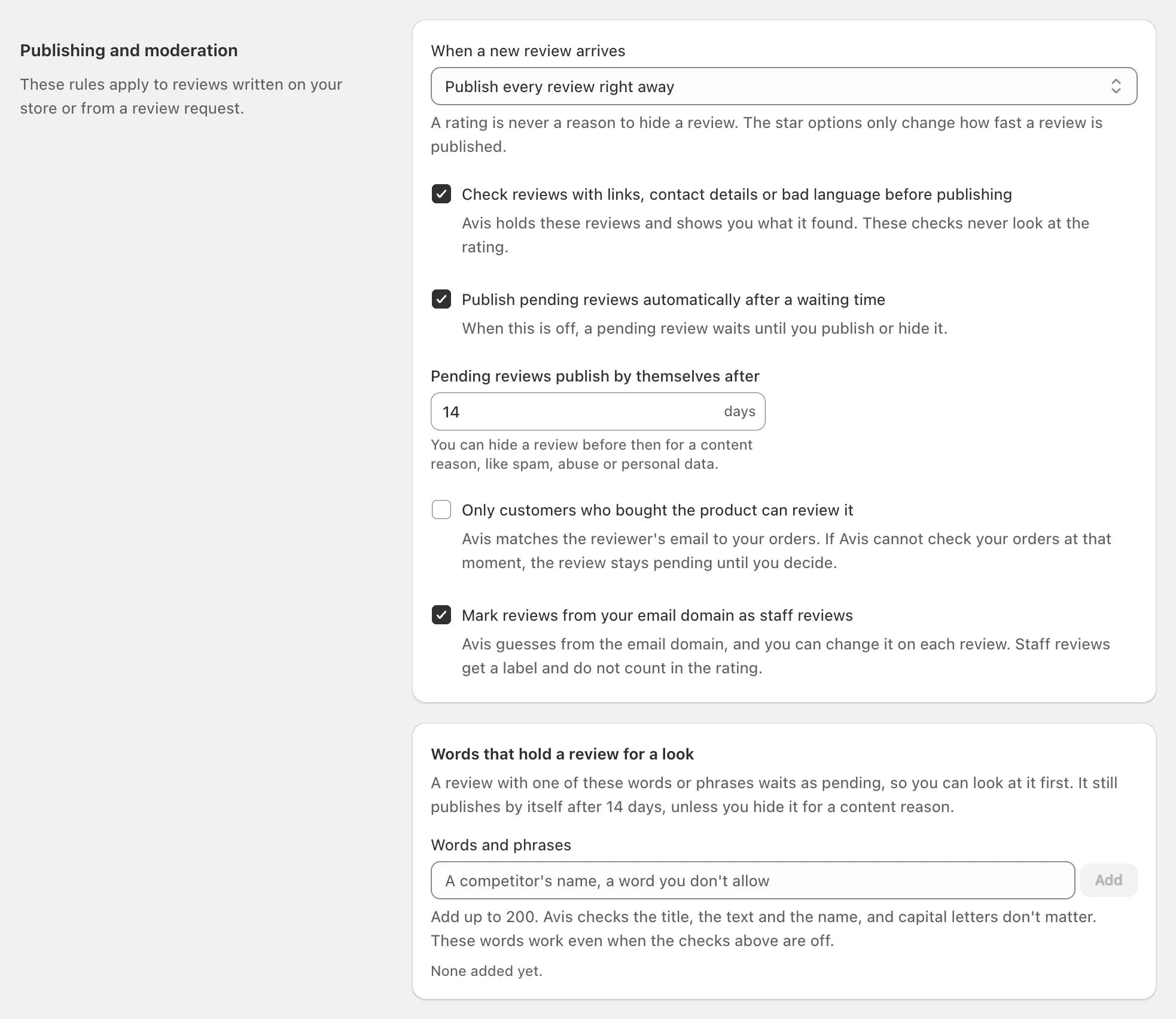
The help line reads: “A rating is never a reason to hide a review. The star options only change how fast a review is published.” Pending reviews publish by themselves after 14 days by default, 1 to 30, and the star options always use it. With Publish every review right away or Let me check every review first, you can switch off Publish pending reviews automatically after a waiting time; pending reviews then wait until you act.
When the time runs out, Avis publishes the review and logs Published automatically. In a star option, How reviews work tells shoppers how long lower-rated reviews can take.
What do the content checks hold back?
Avis’s content checks hold a new review as pending when it contains a link, an email address, a phone number, swear words, mostly capital letters, repeated characters or words, or a word from your own list. They never look at the rating, and they are on by default: Check reviews with links, contact details or bad language before publishing.
A held review says what Avis found, such as Contains a link, and waits with the same timer as any pending review.
- The swear-word list is English only.
- Words that hold a review for a look takes up to 200 words or phrases and works even with the checks off.
- On Growth and Pro, AI adds AI check: may be abusive and AI check: may contain personal information, which “never change a review’s status by themselves.”
These are simple checks, not proof that a review is fake: read it before you act.
How do I hide or delete a review?
To hide a review in Avis, open it from Reviews, click Hide…, choose the rule it breaks and click Hide review. A published review needs one of 12 content reasons; a pending one can be hidden with No reason needed, which also stops its timer.
- In Reviews, open the review.
- Under Status, click Hide….
- Under Reason, choose the rule it breaks. Optional note for the log can say more.
- Click Hide review. The card reads Hidden: with the reason, and shoppers no longer see the review.
The 12 reasons are Off-topic, Offensive content, Adult content, Spam or promotion, Meaningless text, Personal information, Copyright or rights issue, Harmful software, Conflict of interest, Harassment or threats, Legal reasons and Duplicate content. The picker adds: “A low rating or a negative opinion is never a reason to hide or delete a review.”
- Mark as spam records Spam or promotion as the reason.
- Move to pending is offered only for hidden or spam reviews, so a published review comes down only through a reason.
- Delete review removes the review and its votes for good, and a published one needs a reason; its photos and videos stay in your Shopify Files.
- Publish, at the top of a review’s page, puts a pending or hidden review live.
You can’t change a customer’s words; only reviews you added can be edited. Ask reviewer to edit emails the reviewer a link, and Avis logs any edit they make.
How do I reply to a review?
To reply to a review in Avis, open it from Reviews, write under Your reply and click Post reply. Shoppers see it under the review as “Reply from” your store. A reply can be up to 5,000 characters; change it with Update reply or take it down with Remove reply.
Email the reviewer about your reply is ticked when the review has an email address. Private reply emails the reviewer without showing anything on your store. On Pro, Draft with AI suggests a reply that Avis never posts by itself. Avis sends reviewers no email when their review is published.
What does the moderation log keep?
The moderation log in Avis records every status change, reply, edit and deletion, in order, with who made it and any reason given, and no one can change or remove an entry. Open it under Settings → Moderation log, or see one review’s entries under History on its page.
- Who is You, Avis, Reviewer or Import.
- Entries include Status changed, Published automatically, Flagged, Reply posted, Label changed and Deleted.
- Filter by review ID shows one review’s history, even after it was deleted.
- Download compliance export, under Settings → Data and privacy, includes “the full moderation log”, free on every plan.
Shopify’s privacy requests still reach the log: erasing a customer’s data turns the notes on their reviews into [redacted], and 48 hours after you uninstall, Shopify asks Avis to delete your store’s data, log included (Shopify’s privacy webhooks, checked 14 October 2026). Download the export first.
