Verified Purchase and Review Labels in Avis
What does Verified purchase mean in Avis?
In Avis Product Reviews, Verified purchase means Avis matched the review to an order in your store, through the link in its review request email or by the reviewer’s email address and the product. Shopify lets Avis see only the last 60 days of orders, so a review written long after the purchase may not match by email.
Avis sets the label itself: you can’t type it on a review, and an imported file can’t set it (how Avis checks imported reviews). A purchase you confirm yourself shows Verified by the store instead.
How does Avis match a review to an order?
Avis Product Reviews matches a review to an order through the link in a review request email, which belongs to one order, or by searching your orders for the reviewer’s email address and the product.
- From a request link: matched to that order, for the products in it. A request sent to typed addresses or from a CSV file has no order, so it proves nothing.
- By email: Avis asks Shopify for orders with that email and product. Shopify answers only for the last 60 days, so a later review without the link stays unmatched, as does one written while Shopify can’t be reached.
The review form asks for an email for this reason and tells shoppers “Your email is never shown publicly.”
Verify by hand, or accept only buyers
For a purchase Avis couldn’t match, such as a phone order, click Verify by hand under Verification on the review’s page; shoppers see Verified by the store, and the change is logged.
Only customers who bought the product can review it (off by default, under Settings → General) makes Avis refuse reviews it can’t match, and hold any it couldn’t check.
Which labels do shoppers see?
Avis Product Reviews labels where each review came from: Verified purchase when it matched an order, fixed labels for rewarded reviews and reviews you added, and optional labels for imported or unmatched ones.
| Label | When it shows | Default |
|---|---|---|
| ✓ Verified purchase | Avis matched the review to an order in your store | On |
| Verified by the store | You verified it by hand | On, with Verified purchase |
| Verified by previous review app | Imported, marked verified by your old app, and matched to no order | Off |
| Imported from app name | Imported from another review app | Off |
| Written by a site visitor | Written on your store and matched to no order | Off |
| Incentivized review | An offer was shown when it was written, or it earned a reward code | Always |
| Added by store | You added it yourself | Always |
| Store staff | The reviewer’s email address uses your store’s domain | On |
Reviews you added and staff reviews never count in your rating. Store staff is a guess from the email address, “so it can be wrong”.
Which labels can I turn off?
You can turn off Verified purchase, Store staff and the three optional labels, but not Incentivized review or Added by store: “They are required disclosures, so no setting or plan change can remove them.”
- In Avis, open Settings → Labels and statement.
Under Review source labels, tick or untick Show “Verified purchase”, Show “Verified by previous review app”, Show which app a review was imported from, Show the “Store staff” label and Show “Written by a site visitor”.
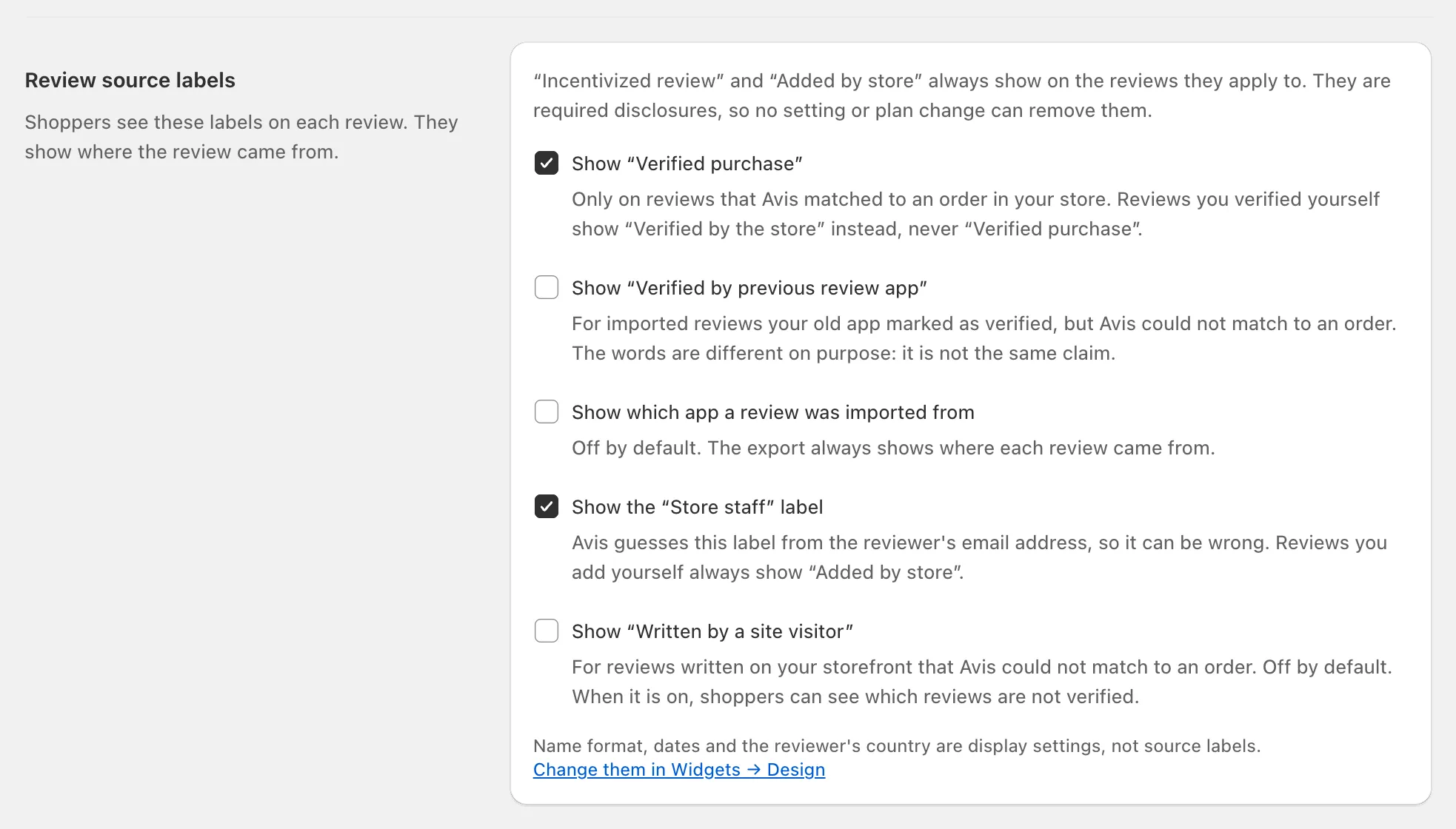
- Click Save; the How reviews work preview follows your choices.
To correct one review, untick Incentivized review or Written by store staff under Labels on its page; Avis asks for a reason and logs it.
In the US, the FTC says “failing to disclose incentives could be a violation of the FTC Act”, and its consumer reviews rule, in effect since 21 October 2024, prohibits certain insider reviews that don’t clearly disclose the connection to the business (FTC questions and answers, FTC announcement, checked 14 October 2026). The labels show the facts; whether you meet a law is for you and your adviser.
What is How reviews work?
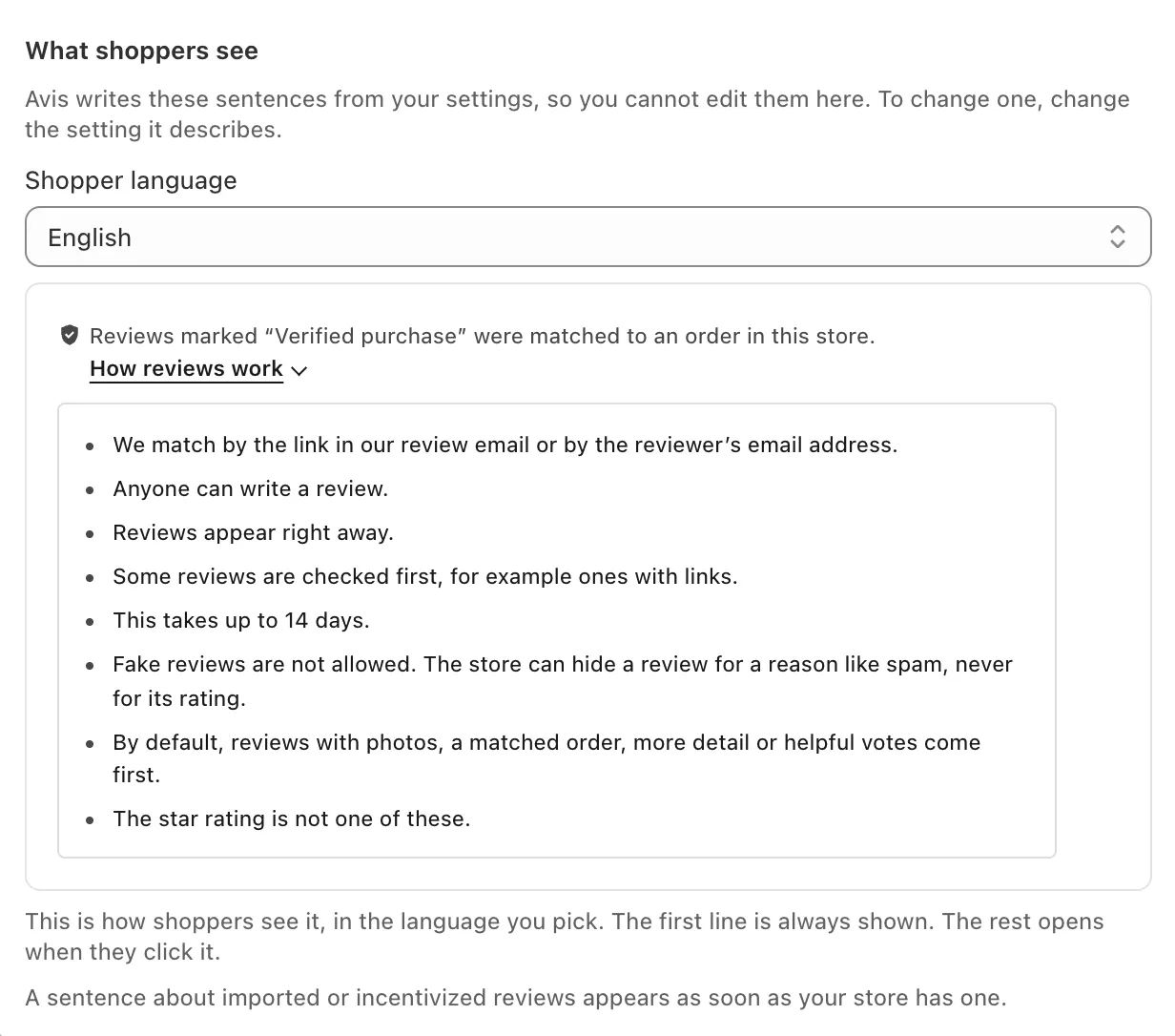
How reviews work is a note that Avis Product Reviews writes from your settings and shows above your reviews, with a How reviews work link that opens the rest. You can’t edit its sentences, only the settings they describe.
Its first line reads “Reviews marked “Verified purchase” were matched to an order in this store.”, and adds how long lower-rated reviews can take while a star option holds them (how Avis publishes reviews). Inside, each sentence appears only when true, for example:
- “Fake reviews are not allowed. The store can hide a review for a reason like spam, never for its rating.” (always)
- “Reviews marked “Incentivized review” were written after a discount was offered. The offer never depended on the rating.”
Preview it in any shopper language under Settings → Labels and statement, where you can also add Your opening sentence; the app warns against writing “that all reviews are verified”. In Widgets, Where “How reviews work” shows can also be Only the link, above the reviews or Don’t show it, except while a star option holds reviews or the French details are on.
In the EU, Directive (EU) 2019/2161, which EU countries have had to apply since 28 May 2022, made it material information whether and how a trader that gives access to consumer reviews ensures they come from consumers who actually used or bought the product, and lists as unfair claiming so without “reasonable and proportionate steps to check” (EUR-Lex, checked 14 October 2026). How reviews work describes your settings, not whether they comply.
What changes for stores in France?
For a store whose country in Shopify is France, Avis Product Reviews turns on Add the details French law asks for by default, and How reviews work adds sentences about rewards, editing and how long reviews stay up. Change it under Settings → Labels and statement.
It adds, for example, “Reviews stay up with no time limit.” How reviews work then always shows above the reviews, and Let me check every review first needs Publish pending reviews automatically after a waiting time. The tab also suggests showing review and purchase dates (Widgets → Design → Review card).
