Avis Reviews Not Showing? What to Check
Why aren’t my Avis reviews showing?
When Avis Product Reviews is installed but no reviews show, the Avis Reviews block is usually missing from the product template of your published theme, or the theme wasn’t saved. Open Home in Avis: Avis on your store checks your published theme and says whether the block and the Avis app embed are on.
| What you see | Checks |
|---|---|
| Nothing from Avis on product pages | Block · Widget switch |
| The widget shows, but not your reviews | Published reviews |
| No pop-up, side tab or floating badge | App embed |
| No stars on collection pages | Collection pages |
| No stars in Google | Review stars in Google, a different problem |
Is the Avis Reviews block in your published theme?
The Avis Reviews block must be on the product template of your published theme, and saved, before reviews show on product pages. On Home, Avis on your store shows Avis Reviews block on product pages as Added or Not added.
- Click Add block beside that row. The theme editor opens with the block already added.
- Drag it where you want it, then click Save. Back in Avis, the row reads Added.
By hand: in the theme editor’s product template, click Add block or Add section, choose Avis Reviews under Apps, then Save.
Do some products use another template?
Home checks whether the block is anywhere in your published theme, not per template. A product set to another template (its Theme template field in Shopify) needs the block on that template too: pick it from the drop-down at the top of the theme editor (Shopify’s guide to templates, checked 14 October 2026).
Is your theme Online Store 2.0?
“Blocks need an Online Store 2.0 theme. Older themes cannot show them.” On a vintage theme, no Avis block can show; Shopify’s theme architecture versions page shows how to check.
Is your previous review app still in the theme?
A previous review app’s block or app embed may still be in your theme: remove it once your reviews are in Avis, in the order given in move from another app.
Is the Avis app embed on?
The Avis app embed is needed only for the pop-up, the reviews side tab, the floating trust badge and the review structured data on product pages; reviews show without it. Avis on your store shows Avis app embed as On or Off.
On Home, click Turn on beside it: the theme editor opens with Avis switched on under App embeds. Click Save, and the row reads On. App embeds belong to one theme, so switch it on again after you publish another. The embed doesn’t run on your store’s password page; blocks do.
Is the widget switched on?
Every Avis widget has a Show on your storefront switch on its page in Widgets, and its block shows nothing while it is off. The Widgets list gives each a status:
| Status | What it means |
|---|---|
| Live | Switched on and in your theme |
| Not in your theme | Switched on; click Add to theme |
| App embed off | Switched on; turn on the embed |
| On | Switched on; Avis couldn’t check your theme |
| Off | Switched off in Avis |
The pop-up and the reviews side tab start switched off; the other widgets start on. Some settings hide a widget on purpose:
- Hide until the product has a review (Product reviews, off by default).
- Hide when a product has no reviews (Star rating, on by default).
- Hide on phones (reviews side tab, on by default).
- Minimum rating or Only reviews with photos or videos can leave a carousel, snippets or the pop-up empty.
- Show Q&A (Product reviews, off by default). Shoppers only see answered questions.
Are the reviews published?
Avis Product Reviews shows only published reviews on your store, so a review under Pending in Reviews doesn’t appear yet. A review is pending when:
- When a new review arrives (Settings → General → Publishing and moderation) holds it for a look. It publishes by itself after the waiting time, 14 days by default, unless you switched off Publish pending reviews automatically after a waiting time;
- a content check held it, for example for a link, contact details or bad language;
- you imported it with Import all reviews as pending (import reviews into Avis).
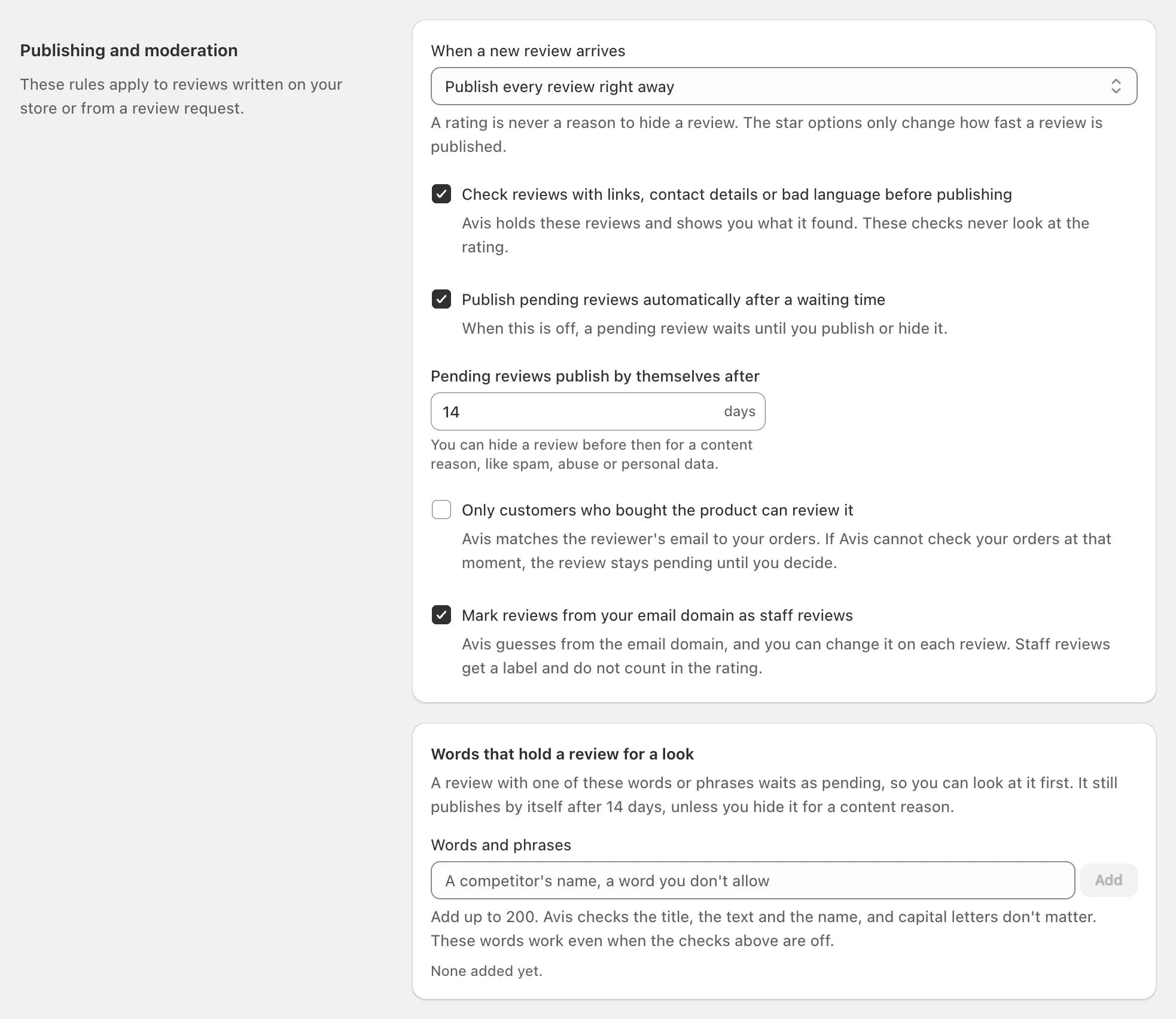
See how Avis publishes and holds reviews. Also:
- Stars count only published customer reviews, never ones you added or staff reviews, so a product with only those shows no stars.
- A new review isn’t instant: Avis updates each product’s review data every minute, and the widget fetches newer reviews when its copy is over five minutes old.
- Avis doesn’t collect reviews written in the Shop app today, so none reach its widgets.
Why don’t stars show on collection pages?
Stars on your collection pages come from your theme, because the Avis Star Rating block works on product pages only. Avis saves each product’s rating in Shopify’s standard rating fields, reviews.rating and reviews.rating_count, which Shopify asks themes that display product ratings to read (standard metafield definitions).
If your theme can show ratings on product cards, turn that setting on in the theme editor. If not, the Avis Collection Reviews block shows reviews of the first 12 products on the collection page instead.
Why does the theme editor look different?
The theme editor doesn’t show everything your shoppers see, because the Avis app embed doesn’t run there: the pop-up, the side tab and the floating trust badge appear only on your live store. A widget switched off in Avis shows an editor-only note, “… is turned off — turn it on in the Avis app.”; shoppers see nothing. The Live preview in Avis uses sample reviews, so check your live store too.
Still not showing?
If your Avis reviews still don’t show, ask Sidekick in your Shopify admin why. Avis lets Sidekick look up which widgets are on, which templates hold the blocks, whether the app embed is on, and how many reviews are published or waiting. Still stuck? Email support@b2bgold.app with your store’s address and a product page that should show reviews.
