Import Reviews into Avis from a CSV File
How do I import reviews into Avis?
To import reviews into Avis Product Reviews, open Import & export, upload your review app’s CSV export or any CSV file, check the preview, which shows what the import will do before anything changes in your store, then import. Avis copies linked photos and videos into your Shopify Files, within size limits, and an import can be undone.
Avis Product Reviews is a Shopify app that collects photo and video reviews after each order and imports reviews from another review app. First, export reviews from your old app.
- In Avis, open Import & export.
Under Import reviews, click Add a CSV file, or drag the file onto the box. Avis names the app the file came from.
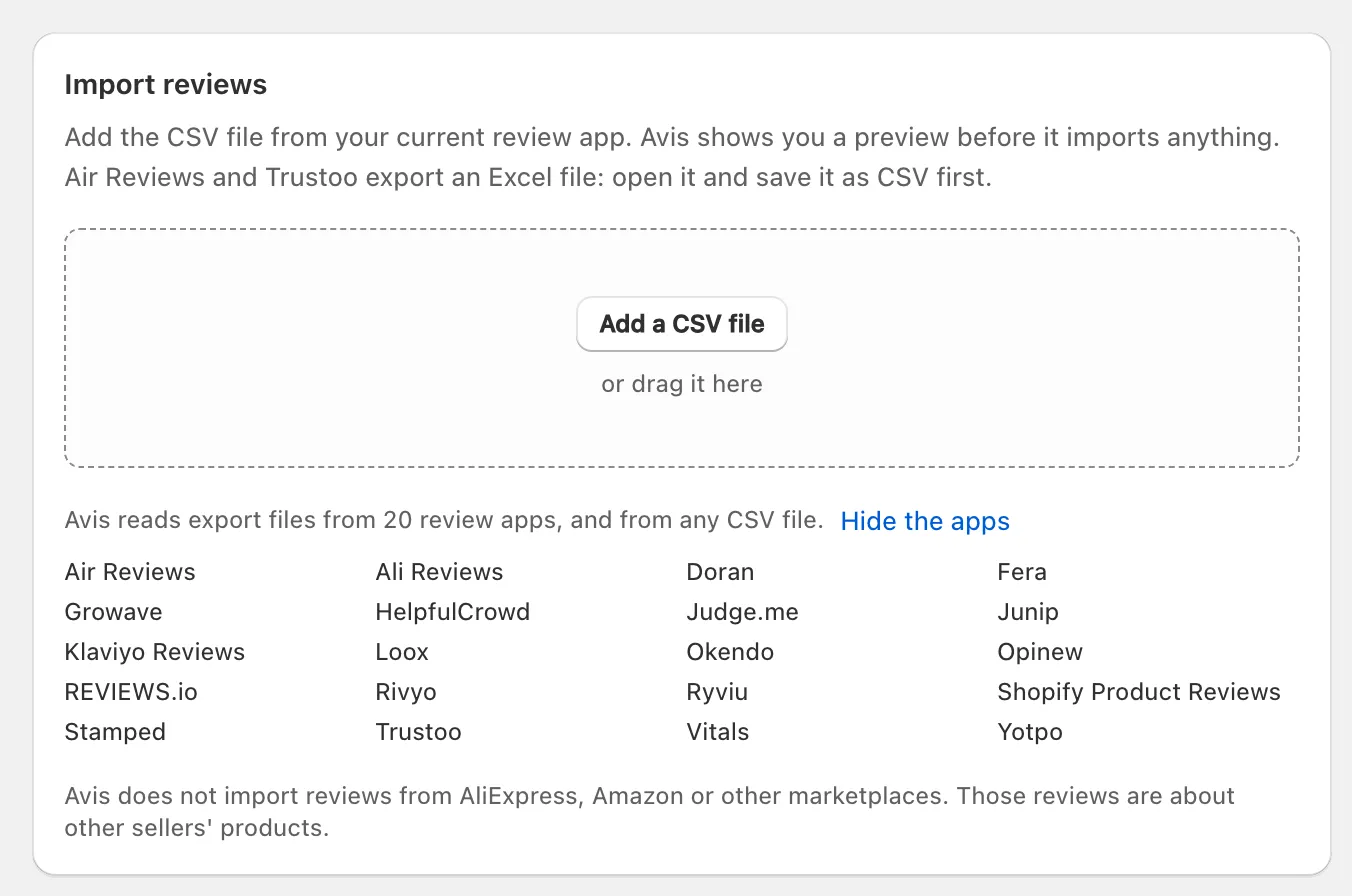
- If that’s wrong, choose the right app under This file is from.
- Read the Preview. To publish each review yourself, tick Import all reviews as pending.
- Click the import button, which shows the number of reviews, for example Import 120 reviews.
- Wait for Import finished, or leave the page: “The import keeps running.” Then click View imported reviews, and check a product page.
Which files can Avis import?
Avis imports CSV files of up to 25 MB and 100,000 rows: exports from 20 review apps, which it recognises by their columns, its own export, and any other CSV file whose columns you match yourself.
- Steps: export reviews from Judge.me, from Loox, from Yotpo, from Okendo and from Stamped; the other apps Avis reads.
- If your old app gives you an Excel file, open it and save it as CSV first: Avis reads CSV files only.
- Split a larger file and import the parts.
- “Avis does not import reviews from AliExpress, Amazon or other marketplaces.”
Match your columns
For a file Avis doesn’t recognise, the preview shows Match your columns: set what each column holds, or Ignore, then click Update preview. Rating and Review text are required, plus a Product ID, Product handle or Product title, unless a Store or product review column marks a store review.
On every plan, Avis’s AI suggests the columns first: “AI chose these columns for you. Check each one before you import.” It sees the column names and the shape of the data, but reads values only from columns that can’t hold personal details. No column can mark a verified purchase: “A file cannot decide it.”
What does the preview show?
The preview shows what the import will do, in counts, before anything is saved: “This is what the import will do. Nothing has changed in your store yet.”
| Tile | What it counts |
|---|---|
| Rows in file | Every review row Avis read |
| Will import | Rows that will become reviews |
| Store reviews | Of those, reviews of your store rather than a product |
| Duplicates skipped | Reviews already in Avis, for example from an earlier import |
| Skipped: no matching product | Rows whose product Avis can’t find in your store |
| Verified by Avis | Reviews Avis matched to an order in your store |
| Verified by previous app | Reviews your old app marked verified that Avis couldn’t match |
| Photos and videos | Photo and video links Avis will fetch |
| Replies kept | Store replies that come with the reviews |
| Skipped: no usable rating or text | Rows with no 1–5 rating or no review text |
| Date range | The oldest and newest review dates |
Below the tiles, Products Avis could not find lists up to ten, and Check these before you import flags the rest: rows too old to match to an order, reviews from a marketplace, converted rating scales, or a file that doesn’t say which reviewers got a reward.
Reviews keep their original dates and their state from your old app: published ones go live, hidden ones stay hidden, and pending ones wait under your publishing rules (how Avis publishes and holds reviews). Import all reviews as pending holds the published and pending ones until you publish them. Remove this file starts again.
What if a file has marketplace reviews?
Avis has no marketplace import, but another app’s export can include reviews that app copied from a marketplace such as AliExpress or Amazon. Avis imports those rows like any other, so once published they count in your star rating, including the rating Avis marks up for Google, whose review-snippet guidelines say “Don’t aggregate reviews or ratings from other websites” (Google: review snippets, checked 14 October 2026).
- When the file has a column saying where each review came from, the preview counts those reviews (“… came from a marketplace, not your store”) but doesn’t list them. Find them in that column, delete the rows, click Remove this file and upload the edited file.
- When the file has no such column but its app can copy marketplace reviews, the preview says so; read the reviews after the import to find them.
- Already imported? Undo the import, which needs no reason, then import the edited file. Hiding or deleting one published review instead asks for one of 12 content reasons, and none of them names reviews copied from another website.
How are reviews matched to products?
Avis matches each row to a product in your store by its Shopify product ID, then its handle, then its title, reading a product web address as its handle. It doesn’t match by SKU.
- A row that names no product becomes a store review only when the file marks it as one, or its app documents a blank product as a store review; otherwise it is skipped.
- Avis refreshes its product list once before skipping a row. If you’ve added or renamed products since, click Sync products now under Settings → General → Product catalog, correct the file’s handles if needed and import it again; rows already imported are skipped as duplicates.
Why aren’t my imported reviews verified?
Avis shows Verified purchase on an imported review only when it matches the reviewer’s email and the product to an order in your store, and Shopify lets Avis check only the last 60 days of orders. Reviews written more than 60 days ago, and rows with no email, import with all their content but without the label.
- The preview counts matches under Verified by Avis, and says how many rows “are too old to match to an order”.
- Your old app’s verified mark becomes a different label, Verified by previous review app, which shows only if you turn on Show “Verified by previous review app” under Settings → Labels and statement → Review source labels. It is off by default, and its help line says why the words differ: “it is not the same claim.”
- For apps that also collect reviews from marketplaces, the preview explains what their verified mark means, and a review the file says came from a marketplace never counts as verified by the previous app.
How every label works: verified purchase and review labels.
What happens to photos and videos?
Avis copies the photos and videos your file links to into your store’s Shopify Files, in the background after the reviews are imported, so they stay with your store.
- Images up to 20 MB and videos up to 64 MB are copied, with up to three tries each.
- A photo given as a bare file name rather than a web address can’t be fetched, and the preview doesn’t count it.
- Import history shows progress in its Media column, but it counts a file Avis couldn’t copy as done, so check a few imported reviews that had photos.
- Keep your old app installed until copying finishes: Avis fetches each file from the address in your export.
Why were some rows skipped?
Avis skips a row it can’t import and records the reason. Click the file’s name under Import history to see each row’s result.
| Reason | What to do |
|---|---|
| Already imported | Nothing: the review is already in Avis |
| No matching product in your store | Sync your products or correct the handle, then import again |
| The rating is not 1 to 5 stars | Correct the rating in the file |
| No review text | Add the text, or leave the row out |
A file that rates on another scale is converted to 1 to 5 stars, and the preview says so.
How do I undo an import?
To undo an import, click Undo import beside the file under Import history. Avis deletes that file’s reviews with their replies and votes and records each deletion in the moderation log, and there is no time limit.
- In Import & export, find the file under Import history.
- Click Undo import. Undo this import? says how many of the file’s reviews are still in your store.
- To keep a copy, click Export these reviews first.
- Click the delete button, for example Delete 120 reviews.
Avis recalculates your star ratings without them. Photos and videos stay in your Shopify Files, where you can delete them yourself.
