Ori Plans and Billing
Which Ori plan do I need?
Ori’s Free plan covers 50 documents a month from your Shopify orders, with every document type, the qualified-invoice (適格請求書) items, the archive and automation rules that issue documents. Standard adds unlimited documents, email, customer self-issue and bulk actions in Ori’s Orders. Pro adds more designs per document type and the accounting CSV for freee, Money Forward and Yayoi.
Prices and current offers are listed under Current plans at the end of this page and in Ori’s pricing.
| Free | Standard | Pro | |
|---|---|---|---|
| Documents a month | 50 | Unlimited | Unlimited |
| All five document types, qualified-invoice items, seal and logo, sequential numbering | Yes | Yes | Yes |
| The 34 built-in designs | Yes | Yes | Yes |
| Designs per document type | 1 | 3 | 5 |
| Archive, tamper check and audit ZIP | Yes | Yes | Yes |
| Issue from Shopify’s order page, and Bulk issue documents in Shopify’s Orders list | Yes | Yes | Yes |
| Automation rules that issue or void documents | Yes | Yes | Yes |
| Template import by Ori’s team | Yes | Yes | Yes |
| Email documents, by hand, in bulk or by a rule | — | Yes | Yes |
| Customer self-issue of receipts | — | Yes | Yes |
| Bulk issue, print, PDF and email in Ori’s Orders; printing several orders at once | — | Yes | Yes |
| Accounting CSV for freee, Money Forward Cloud or Yayoi Kaikei | — | — | Yes |
Choose by what you do with documents once they’re issued:
- Free suits a store that issues up to 50 documents a month and prints or downloads them itself.
- Standard is for sending documents to customers by email, letting customers issue their own receipts, or working through many orders at once.
- Pro is for bringing documents into Japanese accounting software from a CSV, or keeping up to five designs for each document type.
What counts toward the monthly document limit?
Every document number Ori assigns in a calendar month counts toward the Free plan’s limit of 50 documents, whether you issue by hand, from the manual composer, by an automation rule or in bulk. A voided document still counts, because its number was used; a reissue, a draft and the setup sample don’t.
- When it counts: in the month Ori assigned the number, not the month of the order. Issuing last month’s orders today counts toward this month.
- When it resets: on the 1st of each month, Japan time, wherever your store is. Plan shows your count under Documents issued this month, and says “Resets on the 1st.”
- Before the limit: with 10 or fewer left, Ori’s issue dialog and manual composer warn you, for example “10 documents left to issue this month (40/50).”
- At the limit: issuing is refused with “You’ve reached this month’s limit of 50 documents. Changing plan lets you keep issuing.” Automation rules stop issuing too, and only the run log records it (why a rule stops issuing).
- A run that has started finishes: the limit is checked when a run starts, so a bulk run that begins under 50 completes past it. At 48, bulk-issuing 30 orders issues all 30; the next run is refused.
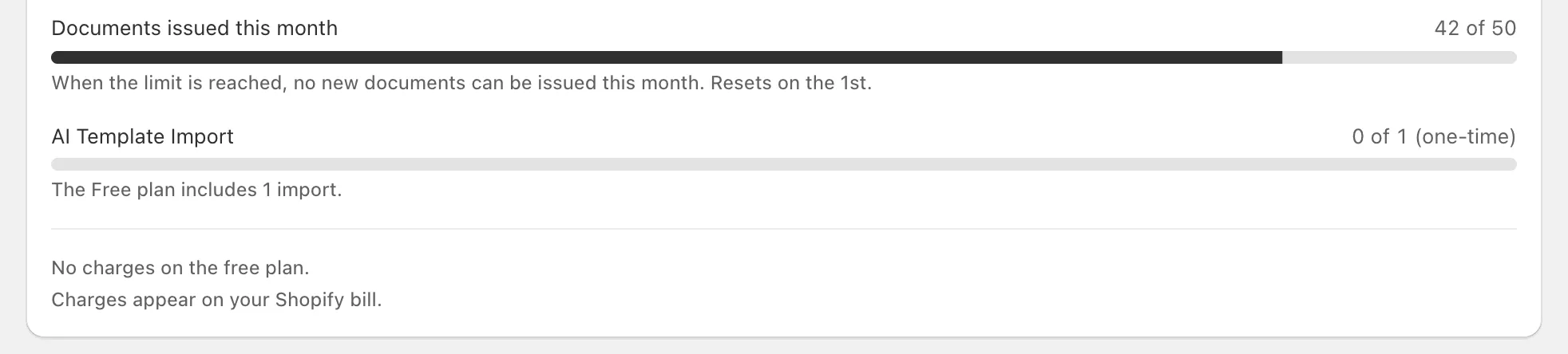
Standard and Pro have no monthly limit on documents.
How do I change plan?
You change your Ori plan on the Plan page, and Shopify asks you to approve the charge before it starts. An upgrade applies as soon as you approve it.
- In Ori, open Plan. The page is titled Plan & billing.
- Choose Monthly or Annual billing.
- Press Upgrade on Standard or Pro.
- Approve the charge on Shopify’s approval screen. You return to Ori on the new plan.
In the words of the page’s FAQ, upgrades “apply immediately and are prorated on your Shopify bill”. On a paid plan, Switch to annual billing or Switch to monthly billing changes how often you’re billed. Moving from an annual plan to a monthly or lower one waits: “The change takes effect when your current annual billing period ends.”
What happens when I downgrade?
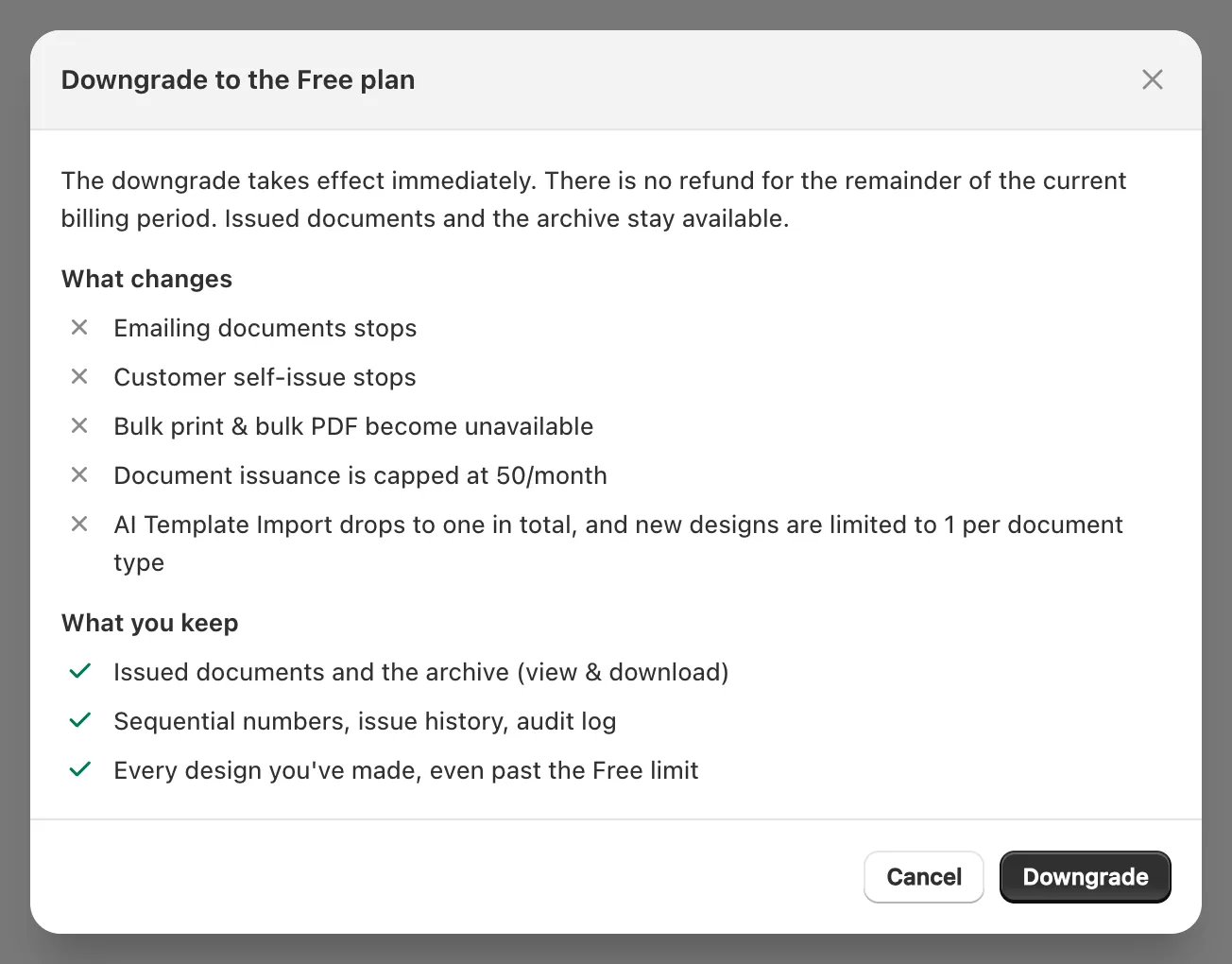
Downgrading Ori to the Free plan takes effect at once, with no refund for the rest of the billing period. Your issued documents, the archive, your numbering and every design you’ve made stay; email, customer self-issue and bulk print stop, and issuing is limited to 50 documents a month again.
- In Plan, press Downgrade on the Free plan.
- Read Downgrade to the Free plan, then press Downgrade. A toast says Switched to the Free plan.
| What changes | What you keep |
|---|---|
| “Emailing documents stops” | “Issued documents and the archive (view & download)” |
| “Customer self-issue stops” | “Sequential numbers, issue history, audit log” |
| “Bulk print & bulk PDF become unavailable” | “Every design you’ve made, even past the Free limit” |
| “Document issuance is capped at 50/month” | Your automation rules, which keep issuing documents without the email |
| “AI Template Import drops to one in total, and new designs are limited to 1 per document type” | — |
To move from Pro to Standard, press Downgrade on Standard; it goes through Shopify’s approval screen, like an upgrade. To stop paying altogether, downgrade to Free.
How am I billed?
Ori’s paid plans are Shopify app subscriptions billed in US dollars, and “Charges appear on your Shopify bill.” Monthly billing charges every 30 days and annual billing once a year; the Free plan has no charges.
Ori doesn’t take a card or send a bill of its own: you approve each paid plan on Shopify’s screen, and Shopify charges it with your store’s bill.
Related
Current plans
| Plan | Price | What it includes |
|---|---|---|
| Free | Free |
|
| Standard | $8.99 / month |
|
| Pro | $19.99 / month |
|
From the Shopify App Store listing, which is authoritative; full details are on the Ori page.
