Reissue, Void and Refunds in Ori
How do I correct a document?
To correct a document in Ori, void it with a reason and issue a new one from the order: the new document takes the next number, and the voided one stays in the archive. Ori’s Reissue prints a document again unchanged, under the same number. Only a customer reissuing their own receipt can change its name, honorific or line description.
| What’s wrong | What to do in Ori |
|---|---|
| The recipient name, honorific or line description | Void the document and issue a new one. If you allow it, a customer can instead reissue their own receipt with the right name (a customer’s reissue) |
| The items or amounts | Correct the order in Shopify, then void and issue again: a new document reads the order as it is then |
| Food at 10% instead of 8% | Ori prints the tax Shopify charged: how Ori prints 8% and 10% |
| The customer lost their copy | Reissue it: the same document under the same number, marked as reissued |
What changes when I reissue?
When you reissue a document in Ori, only its status and its PDF change: Ori makes the PDF again from what the document printed when it was issued, under the same number, and marks it as reissued.
- Open the document: in Ori’s Orders, click its number in the Documents column.
- Click the ⋯ button (More actions) and choose Reissue.
In Reissue this document?, optionally fill in Reason for reissue (optional), such as “Customer asked for another copy”.
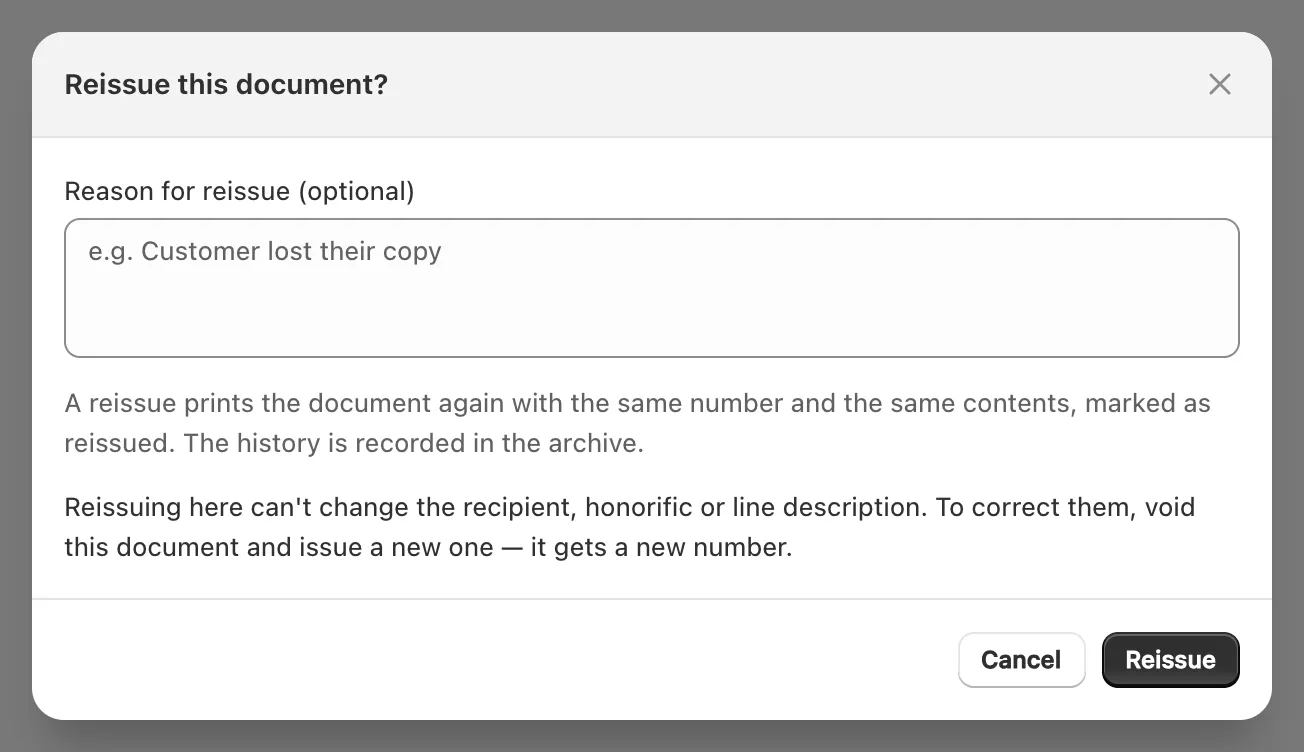
Click Reissue. The status changes to Reissued, and the new PDF is marked 「再発行」 on a Japanese design or “REISSUE” on an English one.
The number, date, recipient, items, amounts and tax per rate stay as issued, and so do the business details, registration number, design, seal and logo it printed, even if you’ve changed them since. As Ori’s Settings puts it: “Documents you have already issued do not change. Reissuing one prints what it printed when it was issued.”
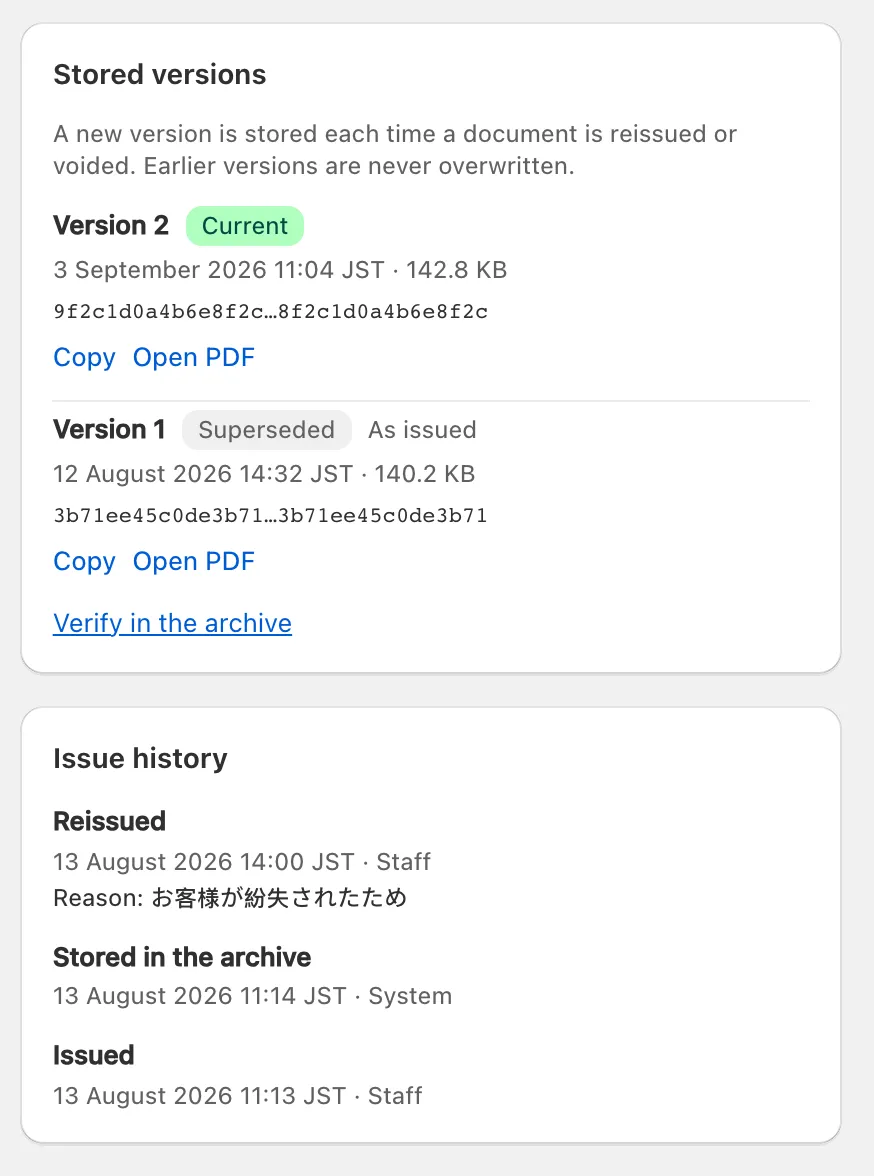
What’s added: a new version under Stored versions, where the earlier PDF stays as Superseded, and an entry in Issue history with your reason. A reissue doesn’t count toward the monthly document limit and sends no email by itself. A voided document can’t be reissued.
When a customer reissues their receipt
A customer can reissue their own receipt with a new name only if you allow it. On Standard and Pro, with Allow reissue switched on under Sending → Customer self-issue (it’s off by default), Ori’s View and reissue documents block on the order status page offers Reissue on the order’s receipt, for a paid order that hasn’t been fully refunded.
- The customer can change the recipient name and honorific if Allow editing the recipient name is on, and the line description if Allow editing the line description is on.
- The receipt keeps its number and is marked as reissued; everything else stays as issued (customer self-issue).
Note: Ori records at issue what kind of document a receipt is. When its design leaves out a qualified-invoice (適格請求書) item, the record says simplified qualified invoice or not a qualified invoice. A reissue keeps that record, even after the customer adds a name. Only a receipt from a design that prints every item is treated as a qualified invoice once reissued with a name. The template editor’s Qualified-invoice check shows which kind a design is.
How do I void a document?
To void a document in Ori, open it, choose Void from the ⋯ menu, give a reason and confirm. The number stays used, Ori adds a version of the PDF marked as void, and a void can’t be undone.
- Open the document from the Documents column in Ori’s Orders.
- Click ⋯ (More actions) and choose Void.
Void this document? warns: “This action cannot be undone. The document will remain in the archive as voided.” Fill in Reason for voiding (required).
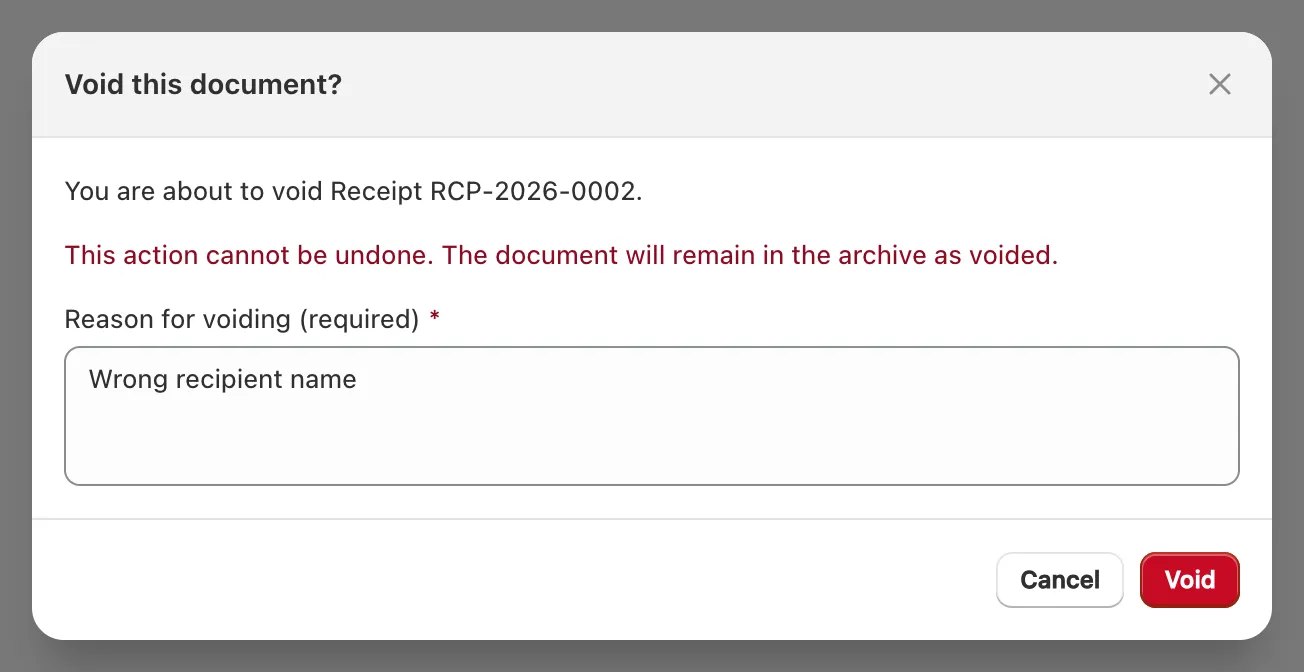
- Click Void. The page shows “This document has been voided” with your reason.
After a void:
- The status is Voided, and the new PDF is marked 「無効」 on a Japanese design or “VOID” on an English one. The earlier version stays under Stored versions.
- The number isn’t reused. A voided document still counts toward the Free plan’s 50 documents a month (what counts toward the monthly document limit).
- It can’t be reissued or emailed again.
- To replace it, issue a new document from the order; Ori doesn’t warn about a duplicate when the earlier one is voided.
What happens when an order is refunded or cancelled?
When an order is refunded or cancelled in Shopify, Ori changes nothing by itself: its documents stay as issued until you or an automation rule voids them.
- A rule whose When is When refunded in full or When canceled voids the order’s documents of the rule’s type: “Voids this order’s documents of this type. Never issues one.” It works on every plan and sends no email.
- A partial refund voids nothing.
- Like every rule, it acts only on orders placed after you save it (automation rules).
- A document issued after a refund shows the amounts after the refund: the issue dialog says “This order has refunds”.
- Customers can’t issue their own receipt for a fully refunded order: “Receipts aren’t available for refunded orders.”
Does Ori have credit notes?
No. Ori does not issue credit notes or qualified return invoices (適格返還請求書); its five document types are Invoice, Receipt, Delivery note, Quotation and Purchase order.
For a refund, void the original document. Or issue from a design with Print amounts as negative switched on (in the template editor, Page → Format): “For returns and rebates. Amounts and tax print as negative numbers.” On Japanese designs, negative amounts are marked △.
- That document is still an invoice, receipt or delivery note with negative amounts, not a qualified return invoice. A shop that must give a qualified return invoice for a refund can’t make one in Ori.
- Every document issued from that design prints negative amounts, so keep it as an extra design for the type. Standard allows 3 designs per document type and Pro 5; Free allows 1 (choose and edit a design).
