Let Customers Issue Their Own Receipts in Ori
How do customers issue their own receipts?
Ori’s customer self-issue lets a customer issue their own numbered receipt (領収書) from Shopify’s thank-you page or order status page, typing the name the receipt is made out to. It needs the Standard or Pro plan, Enable customer self-issue turned on in Sending → Customer self-issue, and Ori’s blocks added in Shopify’s checkout editor.
You add two blocks yourself:
| Block | Page | What the customer can do |
|---|---|---|
| Issue a receipt | Thank-you page, right after checkout | Issue a receipt and download its PDF |
| View and reissue documents | Order status page in customer accounts | Issue a receipt, download it later, and reissue it if you allow that |
Self-issue doesn’t send an email: the customer downloads the PDF. Each receipt takes the next receipt number and is kept in the Archive.
How do I turn on customer self-issue?
Turn on customer self-issue in Ori under Sending → Customer self-issue → Settings, on the Standard or Pro plan (plans and pricing). On the Free plan, the settings are visible but locked, and the blocks show nothing to customers.
- In Ori, open Sending and choose the Customer self-issue tab.
- Select Settings, tick Enable customer self-issue and choose the settings below.
- Save. The Settings row shows On.
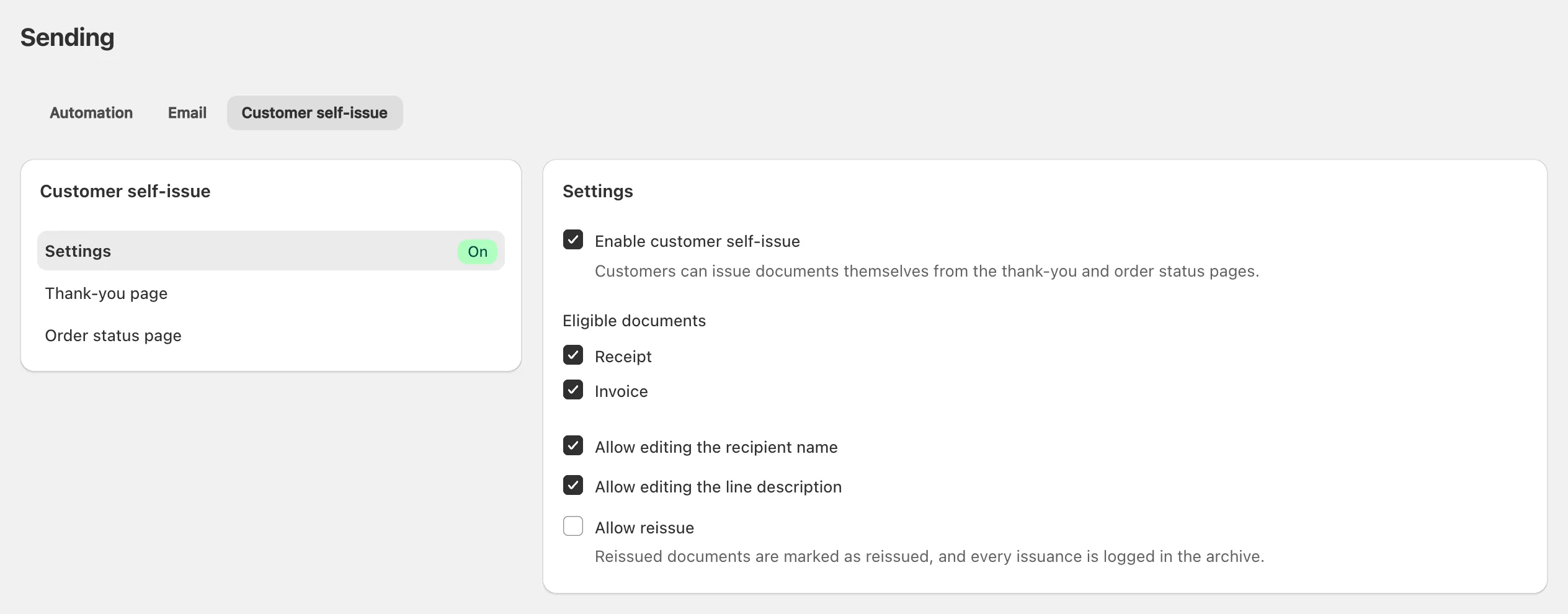
| Setting | Default | What it does |
|---|---|---|
| Eligible documents | Receipt only | Ticking Invoice also lets customers download invoices you issued for their order |
| Allow editing the recipient name | On | Shows the Recipient name and Honorific fields |
| Allow editing the line description | On | Shows the Line description field, the purpose line (但し書き) |
| Allow reissue | Off | Lets customers reissue their receipt on the order status page |
A field turned off is hidden, and the receipt prints your receipt template’s default: the name on the order, or its Default line description.
How do I add the receipt blocks to checkout?
Add Ori’s blocks in Shopify’s checkout and accounts editor, from the Add the block in the checkout editor button in Ori: Issue a receipt on the thank-you page and View and reissue documents on the order status page.
- In Ori, open Sending → Customer self-issue and select Thank-you page.
- Choose Add the block in the checkout editor. Shopify’s editor opens in a new tab on the thank-you page, with its Apps sidebar open.
- Next to Issue a receipt, click ⊕. In the Add to pop-out, choose the thank-you page.
- Move the block where you want it, then click Save.
- Back in Ori, select Order status page, choose Add the block in the checkout editor again, and add View and reissue documents to it the same way.
Shopify’s editor shows both block names in English, whatever your admin language. From Shopify’s admin, the editor is under Settings → Checkout → Edit (Shopify’s help on checkout apps).
Note: Shopify allows app blocks on the thank-you and order status pages on the Basic Shopify plan or higher. The order status block needs Shopify’s current customer accounts: “Legacy customer accounts don’t support customer account UI extensions” (Shopify’s developer docs), and they are deprecated (Shopify’s upgrade guide) (both checked 14 October 2026).
What does the customer see?
The customer sees a block headed Receipt (Documents once it also lists an invoice), with the fields your settings allow and an Issue receipt button:
- Recipient name, pre-filled with the name on the order.
- Honorific: 様 (for individuals), 御中 (for organizations) or None.
- Line description: For goods, For books, For food and drink or Enter your own, which takes up to 30 characters.
After Issue receipt, the receipt replaces the form: its number and date, Preparing PDF… while Ori makes the PDF, then Download PDF. The download link lasts an hour; reloading the page gives a new one.
Later, the customer finds the receipt in the View and reissue documents block. Each order gets one receipt.
Can customers get an invoice?
Customers can’t issue an invoice themselves: Ori’s blocks issue receipts only. Issue the invoice from the order yourself (issue documents from your orders). With Invoice ticked under Eligible documents, the customer can then download it from either block.
Which orders can’t get a receipt?
Ori’s blocks refuse a receipt for an order not yet paid or refunded in full, and say why:
| Order | What the customer sees |
|---|---|
| Not paid yet | “You can issue a receipt once your payment is confirmed.” |
| Refunded in full | “Receipts aren’t available for refunded orders.” |
| A Customer self-issue rule set to Do not issue matches it, or your business name isn’t set | “A receipt can’t be issued right now. Please contact the shop.” |
A guest can use the blocks for 48 hours after ordering; after that, only a signed-in customer can. Receipts already issued stay downloadable after a refund, unless you void them.
Can a customer correct a receipt?
A customer can correct their receipt’s name, honorific or line description by reissuing it on the order status page, when Allow reissue is on and the order is paid and not refunded in full. Reissue reopens the form with the receipt’s values. The reissued receipt keeps its number and is marked Reissued.
Every version stays in your Archive. Your own Reissue in Ori prints a receipt again unchanged. To change the name yourself, void the receipt and issue a new one, which takes a new number (reissue, void and refunds in Ori).
Do receipts work for shops outside Japan?
Customers of any Ori shop can download a numbered receipt, but the form is built for Japanese receipts. The honorifics are 様 and 御中, and the three line-description presets print in Japanese whatever language the customer reads the form in: For goods prints 「お品代として」, For books 「書籍代として」 and For food and drink 「飲食代として」. Only Enter your own prints the customer’s words.
If your receipts aren’t in Japanese, turn off Allow editing the line description, so your template’s own wording prints.
The receipt prints in your receipt template’s language, not the customer’s. An automation rule with the Customer self-issue event and a Customer language condition can pick a template in another language (issue documents automatically with rules).
