Alerts and Reconciliation in cPixel
How does cPixel tell me tracking broke?
cPixel lists problems on its Home page under Needs your attention and emails your Shopify store’s contact address about the critical ones: a rejected access token, the Free plan’s orders used up, or orders still arriving after 24 hours with no storefront events. Its checks run nightly. On paid plans, Reconciliation compares your Shopify orders with what each platform received.
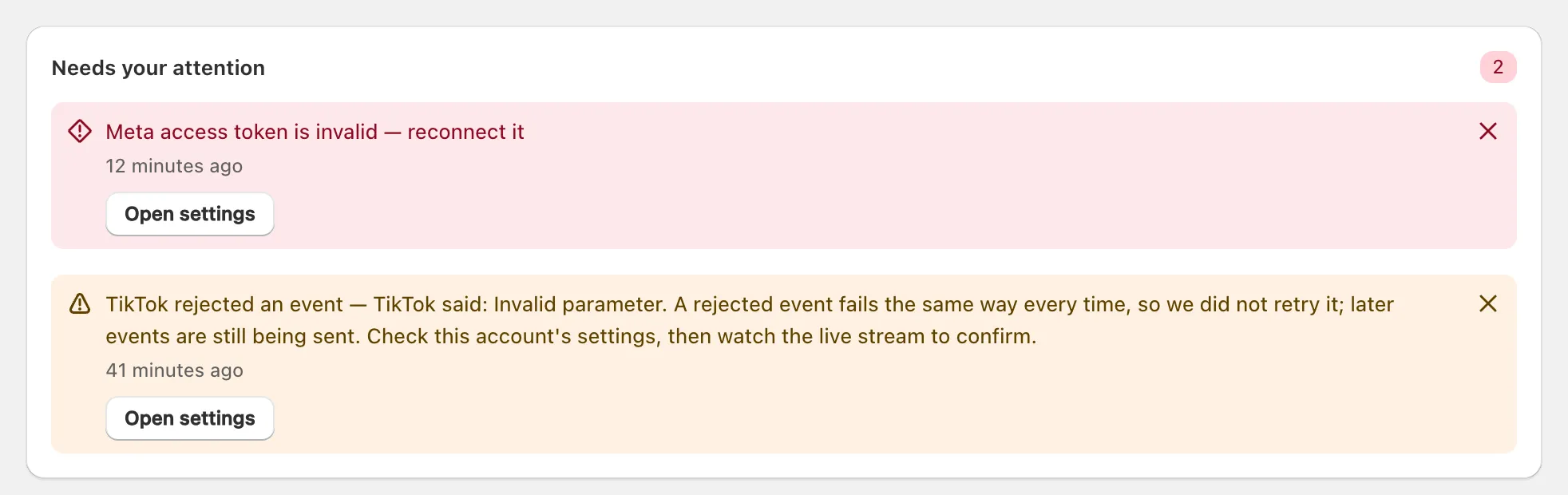
Only the Meta alert here is emailed; a rejected event is a warning.
Which alerts arrive by email, and where?
Only critical alerts are emailed, at most once a day for each kind; the rest stay in the app.
| Alert | What sets it off | Emailed |
|---|---|---|
| Access token invalid | A platform rejects the token on a send, or at the nightly re-check of an account quiet for 7 days; its server sends stop until you reconnect | Yes |
| No storefront events | Orders keep arriving, but no storefront events for 24 hours | Yes |
| Free plan’s orders used up | Free’s monthly allowance is used, so server sends pause | Yes |
| 80% and 95% of monthly orders | Orders reach that share of your plan’s allowance | No |
| Send dropped | A platform refuses an event outright, or five retries fail | No |
| App embed off | You publish a theme with cPixel’s app embed off | No |
| Orders from outside your online checkout | POS, draft or API orders arrive while cPixel skips them | No |
| Another sender found | The daily storefront scan finds other tracking for a platform cPixel sends to | No |
Emails come from cPixel, in English, to your store’s contact email in Shopify. Each says what broke and links into the app, without event data or customer details. cPixel learns the address when you first open the app and when your store details change, so a store that has never opened cPixel may get none. There’s no separate address to set.
Tip: No email? Check your spam folder; every alert is also on Home.
How often does cPixel check?
Once a night, at 03:00 UTC, cPixel looks for silent storefronts, re-checks tokens on quiet accounts, scans for other tracking and settles Reconciliation. It is not continuous monitoring.
Send failures are recorded when cPixel sends, not at night; temporary ones, such as a rate limit, are first retried five times, at gaps from one minute to six hours.
Warnings close themselves after 7 days without recurring. Critical alerts stay until you dismiss them, and a token alert also closes when Test connection passes. A dismissed alert returns if the problem does.
What should I do when an alert arrives?
Each alert’s button, such as Open settings, opens the page that fixes it; the three critical alerts need action from you.
A rejected access token
The platform refused the token as invalid, for example because it was revoked or expired. Server sends to that account stop until you replace it, and browser tracking keeps running. For Meta, only an invalid-token reply raises this alert; other refusals, such as a permission error, show as a warning and later sends continue.
- On Home, click Fix Meta (or your platform’s name), or Open settings on the alert.
- Create a new token in the platform’s own tools. For Meta, see replacing a rejected Meta token; each connect doc covers its platform.
- Paste it into the token field, which reads Saved — paste a new one to replace it.
- Click Continue, then Save and continue. Server sends to that account resume.
To confirm, run Test connection before saving (Meta and TikTok need a test event code), or watch each send in Live.
Orders but no storefront events
cPixel’s pixel has stopped reporting from your storefront. Start a session in Live and browse your store in another tab. If nothing arrives, check that Shopify still lists the cPixel pixel under Settings → Customer events, then contact support from Get help on Home.
The Free plan’s orders are used up
Server sends pause until the month resets; browser tracking continues. To resume now, move to a paid plan from View plan.
What does Reconciliation show?
Reconciliation compares your Shopify orders with what cPixel’s server sends delivered to each platform, over the last 30 whole days. It’s on every paid plan. Days are in UTC and settle overnight, so today’s orders appear tomorrow.
| Section | What it tells you |
|---|---|
| Recovered by server-side tracking | Paid orders your pixel didn’t report that a platform accepted from cPixel’s server: count, share of measurable orders, and order value |
| Where your orders went | Every order, as Your pixel reported it, Recovered by us, Reached no platform or Not measurable |
| Delivery by account | Accepted, Failed, Skipped and Accepted rate per account. Skipped means cPixel chose not to send (consent declined, or the allowance spent) |
| By day | The same figures per UTC day |
| Revenue by ad click | Orders arriving with a Meta, OpenAI Ads, TikTok or other ad click. An order with two platforms’ clicks counts under both, so rows don’t add up; it isn’t attribution |
A dash means cPixel couldn’t measure, not zero: paused days, and POS, draft and API orders, have no browser side to compare. Export CSV and Export JSON download the figures.
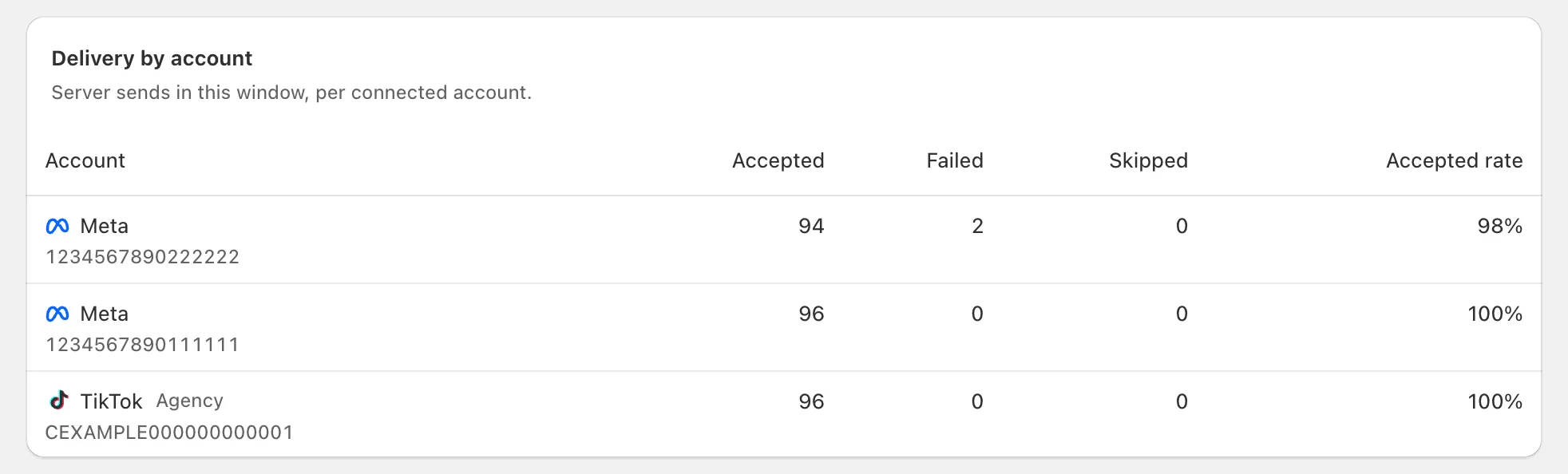
No alert fires when the numbers disagree: it’s a page you check. On Free it reads Reconciliation is part of the paid plan. On Starter and Growth it locks 72 hours after you pass the monthly allowance, until you move up a plan or a new 30-day cycle starts; sending carries on.
Why can’t every missing order be recovered?
cPixel can only send what Shopify and the shopper’s browser gave it, while the platform still accepts it.
- Consent: a refusal recorded at checkout is respected.
- Order rules: test, cancelled, POS, draft and API orders are skipped by default (order rules).
- GA4: without the checkout’s browser session, Live shows “Not enough data to build the payload for this destination”.
- Google Ads: it’s browser-only, so a blocked tag leaves nothing to resend.
- Time limits: retries, and orders held while Free was paused, go only to platforms whose window is still open.
- Missed notifications: each night cPixel re-sends yesterday’s paid orders Shopify never reported to it; older gaps stay.
- Earlier orders: orders from before you installed cPixel or connected a platform are never sent.
