Block Spy Extensions and DevTools in X Shield
Can X Shield block PPSPY and Koala Inspector?
Yes, on paid plans. X Shield checks each shopper’s desktop Chrome-based browser for more than 130 known store-spy and dropshipping extensions, PPSPY and Koala Inspector among them, and shows your blocked page instead of your store when one is installed. It can’t stop spy services that collect your public store data from their own servers.
Spy extensions protection and Developer tools protection are included with Premium, Enterprise and Plus, and with the older Pro (Free) plan. On Free, both cards carry a Premium badge, and their switches open Upgrade Required instead.
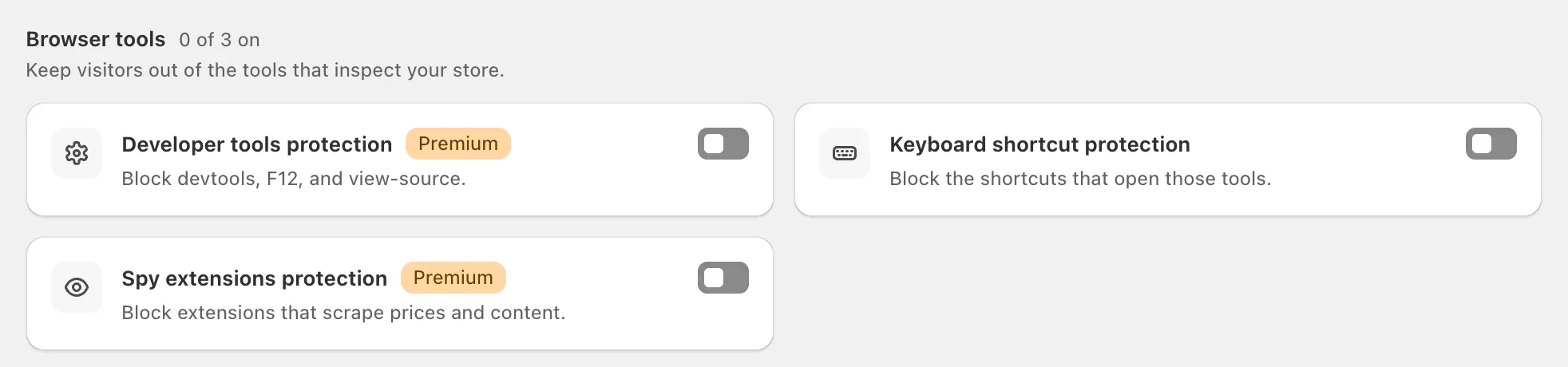
Turn them on
- In X Shield, open Overview and find the Browser tools group.
- Click the switch on Spy extensions protection, Developer tools protection or both. A toast says Feature enabled.
- Open Analytics over the next few days. Blocks appear under Spy Extension and Developer Tools.
Both need the X Shield app embed on in your theme, and both apply to every page of your store. Dry run covers these two as well: on paid plans, Analytics shows who they would have blocked, without blocking anyone. Before you move to the Free plan, switch both off; see what happens when you downgrade.
How does X Shield detect a spy extension?
X Shield’s script looks in the visitor’s own browser for files that belong to known extensions, when the page loads and while it stays open. A match replaces your store with the blocked page, or sends the visitor to your redirect, and Analytics records the block with the extension’s name.
That method has three limits:
- It covers Chrome, Edge, Brave and other Chromium-based desktop browsers. Extensions in Firefox or Safari, and phone browsers, aren’t detected.
- It only knows the extensions on its list. A new or renamed tool is missed until an X Shield update adds it.
- It only sees extensions that are installed and switched on in that browser.
The list isn’t only spy tools. It also includes general Shopify, SEO and tag-debugging extensions, such as DataLayer Checker Plus and Shopify Developer Tools, which your own team or agency may use.
What does Developer tools protection do?
It replaces the page with your blocked page when a visitor opens the browser’s developer tools, the panel that shows a page’s code and network requests. It also recognises Eruda, an in-page console some people load on phones. Verified search-engine crawlers are exempt, so it doesn’t trip on Google rendering your pages.
Treat it as a deterrent, not a lock. Closing the tools and reloading brings the page back, determined users can get around it, and your theme’s HTML, CSS and JavaScript are public anyway.
The free Keyboard shortcut protection blocks the shortcuts that open developer tools, but it also takes find on page and the copy and paste shortcuts away from shoppers. See content protection before you switch it on.
Why was someone on my team blocked?
Usually because they opened developer tools on the storefront, or because an extension from the list is installed in their browser, often a general Shopify or tag-debugging tool rather than a spy tool. On paid plans, find their visit in Analytics: Module / Reason shows Developer Tools or Spy Extension, and the detail names the extension.
To let them in without switching protection off:
- give them your private access link from Safety & testing → Your private access link. It skips every rule for that browser tab, on any network; or
- add your office’s IP address under Global bypass → Whitelisted IPs. Everyone on that connection then skips every protection.
Important: Treat the private access link like a password and never give it to customers. If it leaks, click Generate a new link and save; the old link stops working.
What can spy tools still see?
Everything your storefront shows the public. Product pages, prices, new products, your theme and the apps it loads can all be collected by a service that fetches your store from its own servers, and Shopify’s public product feeds, such as /products.json, answer anyone who asks. Those requests never run X Shield’s script, so no setting in X Shield can hide them.
Blocking extensions removes the one-click view in a competitor’s browser. It doesn’t make your catalogue private.
