Block VPNs, Proxies and Scrapers with X Shield
Should I turn on VPN blocking or scraper-network blocking?
In X Shield for Shopify, start with Scraper network blocking: it refuses data centres known for scraping — Alibaba, Tencent, Huawei and Baidu clouds, DigitalOcean, Vultr, Hetzner and Linode — without targeting consumer VPNs. Add VPN/Proxy protection only if anonymous traffic is costing you orders, because it also turns away honest shoppers who browse through a VPN.
| Scraper network blocking | VPN/Proxy protection | |
|---|---|---|
| What it blocks | A short, curated list of cloud and hosting networks that send scraper traffic | Tor, networks run by VPN and proxy operators, and hundreds of data-centre and hosting networks |
| Real shoppers it can turn away | Very few: measured across X Shield stores, these networks carry almost none | Some: shoppers on many consumer VPNs, and on work VPNs that exit from a cloud provider |
| Label in Analytics | Scraper network | VPN/Proxy/TOR |
Both are switches on the Overview, under Access control. Both start off, and the setup guide never turns them on for you.
- Switch on Scraper network blocking. A toast says Feature enabled.
- Only if you need it, switch on VPN/Proxy protection as well.
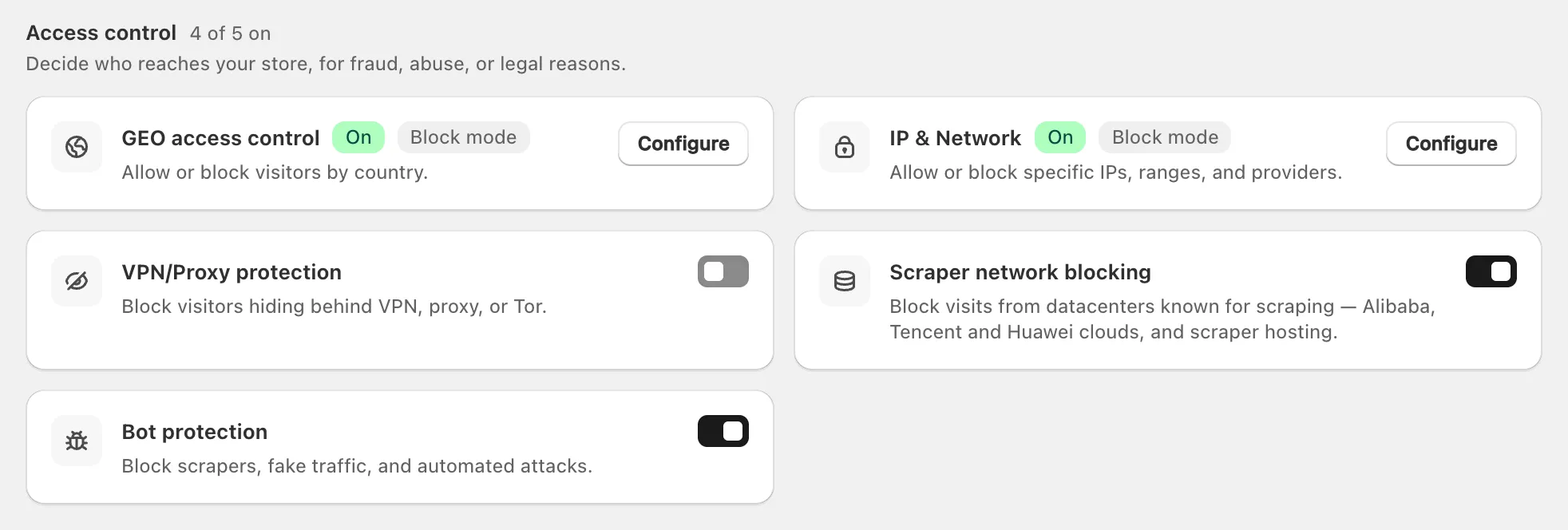
With both on, Scraper network blocking runs first, so its blocks keep their own label. Crawlers you allow under Global bypass → Known bots always get through. Both protections are on every plan today (compare plans). Like the rest of X Shield, they run in the visitor’s browser: tools that never run your pages’ JavaScript aren’t blocked, and Shopify’s checkout isn’t covered.
Which networks does Scraper network blocking cover?
Twenty networks as of September 2026, chosen because they send scraper traffic to X Shield stores and almost no real shoppers: Alibaba Cloud, Tencent Cloud, Huawei Cloud, Baidu Cloud, DigitalOcean, Vultr, Hetzner and Linode (Akamai Connected Cloud), plus HostRoyale, FiberPower, Zenlayer, Oculus Networks, trafficforce, a CHINANET data-centre network and code200, a commercial proxy seller.
- Verified crawlers, and uptime monitors such as Pingdom and UptimeRobot, are let through.
- PetalBot, Huawei’s search crawler, is blocked on purpose: it crawls from the same rentable Huawei Cloud network as the scrapers and publishes no address list that sets it apart.
- A shopper whose own VPN or proxy runs on one of these networks is blocked too.
- The list is built into X Shield and grows with app updates. To block a network that isn’t on it, add a network rule on Enterprise or Plus.
On paid plans, Analytics may suggest Known scraper networks under Suggested to block when they reach your store; Enable blocking switches the protection on.
Will iPhone users with iCloud Private Relay be blocked?
No. iCloud Private Relay’s exit networks, run by Cloudflare, Akamai and Fastly, are on X Shield’s exceptions list, which both protections check first, so neither blocks them. Cloudflare WARP is exempt the same way.
What about corporate networks and Starlink?
Starlink and the big corporate security gateways are exempt. A company VPN that exits from a cloud provider such as Amazon Web Services, Microsoft or Google Cloud is on the hosting list, though, so VPN/Proxy protection blocks anyone browsing through it.
| Exempt from both protections | Why |
|---|---|
| iCloud Private Relay (Cloudflare, Akamai, Fastly) and Cloudflare WARP | Privacy relays used by ordinary phone and laptop owners |
| Zscaler, Cato Networks, Forcepoint, iboss | Security gateways that companies route their staff through |
| Starlink | Satellite internet for homes |
| Opera Mini’s proxy | Carries real phone users |
| Consumer ISPs and mobile carriers once flagged by mistake | They carry real shoppers |
The lists are built to exclude consumer and mobile internet providers, national telecoms, universities, governments and ordinary office networks.
Can X Shield catch residential proxies?
Some, not all. X Shield blocks networks run by VPN and proxy operators, but a residential proxy borrows a real home connection on an ordinary internet provider, and X Shield’s lists never target those providers. Traffic through them gets through unless another rule catches it, and so do VPNs whose servers sit on networks X Shield doesn’t list. Bot protection still stops automation that doesn’t hide itself.
How do I try it without losing sales?
Watch what a protection blocks before you rely on it, and keep a way in ready for real customers.
- On paid plans, open Safety & testing, click Observe only under Dry run, then Save. Analytics lists would-be blocks as Would block · VPN/Proxy/TOR or Would block · Scraper network. When the list looks right, click Block for real and Save.
- On the Free plan, dry-run results aren’t shown visitor by visitor, and Test your rules doesn’t cover these protections. Switch the protection on and check Analytics → Recent blocked visitors over the first few days: each row names the protection and, for a network block, the network number.
- If a customer says they were blocked, add their IP address under Global bypass → Whitelisted IPs, or find the rule that blocked them.
- If VPN/Proxy protection keeps catching real shoppers, switch it off and keep Scraper network blocking.
