X Shield Plans: Upgrade, Downgrade or Cancel
Which X Shield plan do I need?
X Shield’s Free plan already gives a Shopify store country and IP rules up to a limit, bot, VPN and scraper-network blocking, content protection and dry run. Upgrade when you need more: Premium adds unlimited rules, spy-extension and developer-tools protection, visitor history and order checks; Enterprise adds city and network rules; Plus adds fulfilment holds and event export.
Prices, the trial and yearly billing are listed under Current plans at the end of this page. The Plus plan is open to any Shopify store, not only stores on Shopify Plus.
| Free | Premium | Enterprise | Plus | |
|---|---|---|---|---|
| Made for | Getting started, with limits | Single stores, steady traffic | Busy stores selling in many markets | High-volume and multi-store groups |
| Country rules and IP rules | 5 of each | Unlimited | Unlimited | Unlimited |
| Bot, VPN/proxy and scraper-network blocking, content protection, dry run, your own blocked page | Yes | Yes | Yes | Yes |
| Spy-extension and developer-tools protection | — | Yes | Yes | Yes |
| City and network (ASN) rules | — | — | Yes | Yes |
| Analytics | Latest 200 blocked visitors | 30 days | 90 days | 90 days |
| Suggested to block | — | Yes | Yes | Yes |
| Event export (CSV) | — | — | — | Yes |
| Hide the “Protected by X Shield” badge | — | Yes | Yes | Yes |
| Order protection | — | Up to 500 orders a month | Up to 2,000, plus automatic tags | Up to 10,000, plus fulfilment holds |
| Email report options | Monthly, totals | Weekly or monthly, with countries and IPs | Daily, weekly or monthly | Daily, weekly or monthly |
How do I start a free trial or switch to yearly billing?
Upgrading happens on the Plans page in X Shield, and Shopify handles the charge.
- In X Shield, open Plans.
- Choose Monthly or Annual · save 30% above the plans.
- Under the plan you want, click Start free trial. If your store has already had its trial, the button reads Choose Premium, or the name of that plan.
- Approve the charge on Shopify’s screen.
- You return to Plans, which now shows your new plan after Current plan:.
Each store gets one free trial, whichever paid plan it starts on. Nothing is billed until the trial ends, and you can cancel any time. X Shield bills through Shopify: the charge appears on your regular Shopify bill, and Settings → Billing → View current charges in Shopify admin lists it, as Shopify’s page on app charges explains.
To use a promo code, click Have a promo code? before step 3, enter it under Promo code and click Apply. If a launch offer is running, the page says Launch offer applied without one.
To change billing period on the plan you already have, choose the other period; your plan’s button reads Switch to annual or Switch to monthly. Moving to another paid plan works the same way, through that plan’s button. Either way you approve a new charge in Shopify, which replaces your subscription. Unused days are credited, your rules are untouched, and a discount on your current subscription doesn’t carry over.
What happens when I downgrade?
Your saved rules stay in place, and whatever the lower plan doesn’t include stops or shrinks. Moving to Free is also how you cancel a paid plan.
| After you move to a lower plan | |
|---|---|
| Country and IP rules over the new limit | Kept and still enforced. You can remove them, but you can’t add more until you’re under the limit. |
| City and network rules (leaving Enterprise or Plus) | Kept and still enforced. You can remove them but not add new ones. |
| Analytics | Shows what the new plan includes. Events are stored for 90 days on every plan, so upgrading again brings them back. |
| Order protection | Tagging stops below Enterprise, holds stop below Plus, and on Free new orders aren’t checked. Holds already placed stay until released. |
| Email reports | The setting stays on, limited to the new plan’s options. |
| Spy-extension and developer-tools protection | Not part of Free. Switch both off on the Overview before you move to Free. If either is still on afterwards, contact support. |
Important: Release any order holds before you move to Free. The Order protection page isn’t available on Free, so after that you’d have to release each hold from the order in Shopify admin.
What if I’m on the Pro (Free) plan?
Stores that installed X Shield before the July 2026 price change are on Pro (Free), a founding-merchant plan. It keeps unlimited country and IP rules and every protection, including spy-extension and developer-tools protection, at no cost for as long as X Shield stays installed. It doesn’t include city or network rules, the Analytics dashboard, order protection or hiding the badge. The Plans page shows it as Current plan: PRO, free for as long as the app stays installed, and the Overview lists it as Pro (Free).
Nothing changes unless you act, but two actions are one-way:
- Taking any paid plan replaces Pro (Free) for good. Cancelling that plan later moves you to Free, not back to Pro (Free).
- Uninstalling X Shield ends it, and it can’t be restored.
How do I cancel?
To cancel a paid X Shield plan, switch to the Free plan on the Plans page.
- Open Plans.
- In the Free column, click Switch to Free.
- The dialog asks, for example, Switch to Free and cancel Premium? Click Switch to Free. Keep Premium closes it instead.
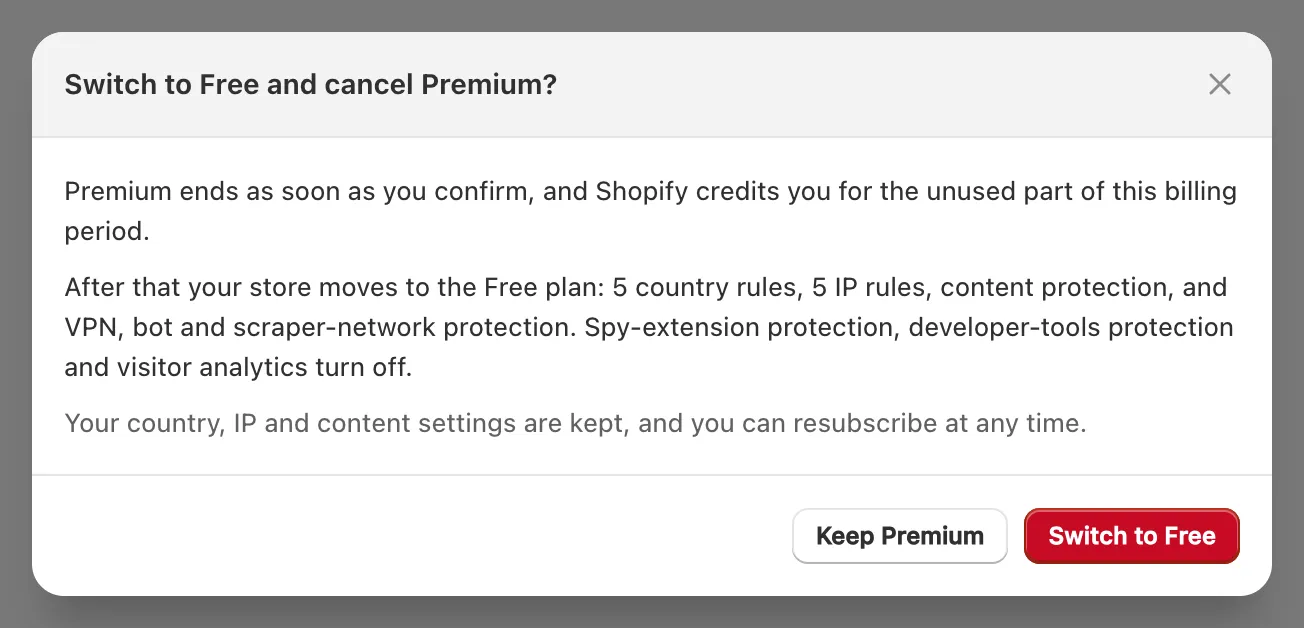
The paid plan ends straight away, and Shopify credits the unused part of the billing period. A toast says Changes saved, and your settings are kept, so you can subscribe again at any time.
Uninstalling X Shield also cancels its future charges, though Shopify’s guide to uninstalling apps notes you might still be billed for the current billing cycle. Uninstalling deletes your X Shield settings within 48 hours, so if you might come back, switch to Free instead.
Related
Current plans
| Plan | Price | What it includes |
|---|---|---|
| Free | Free |
|
| Premium | $9.99 / month | Everything in Free, plus:
|
| Enterprise | $19.99 / month | Everything in Premium, plus:
|
| Plus | $39.99 / month | Everything in Enterprise, plus:
|
From the Shopify App Store listing, which is authoritative; full details are on the X Shield page.
