Event Quality, Consent and Privacy in cPixel
What customer details does cPixel send?
cPixel sends the identifiers ad platforms match conversions on: click IDs and cookies such as _fbp, _fbc and ttclid, the visitor’s IP address and browser, and, once a Shopify shopper gives them at checkout, their email and phone number, hashed with SHA-256. It never sends names or postal addresses, and it applies the consent choices Shopify records.
Per platform, from cPixel’s server:
| Identifier | Meta | TikTok | GA4 | OpenAI Ads | Snapchat | |
|---|---|---|---|---|---|---|
| Email and phone, hashed | Yes | Yes | Yes | Yes | Yes | Yes |
| Shopify customer ID | Hashed | Hashed | Unhashed, as user_id |
Hashed | Hashed | Hashed |
| Shopify device ID, hashed | Yes | Yes | — | Yes | — | — |
| IP address and user agent | Yes | Yes | — | Yes | Yes | Yes |
| Click IDs and cookies | _fbp, _fbc |
_ttp, ttclid |
Client and session IDs | oppref, obref |
— | — |
| Location guessed from the IP, hashed | On by default | — | — | — | — | — |
Google Ads gets no hashed details: its browser tag carries Google’s click ID (gclid, gbraid or wbraid).
Location from the IP address
By default Meta, and only Meta, also gets the country, region, city and postcode guessed from the shopper’s IP address, hashed. cPixel’s help text warns that a guessed city or postcode is often wrong on mobile networks and VPNs, which can lower Meta’s match quality. To send less:
- Open Settings in cPixel.
- Under Location from the shopper’s IP address, choose Send country only or Send nothing derived from the IP instead of Send country, region, city and postcode.
- Click Save.
How are they protected?
Email and phone are hashed with SHA-256 before they leave cPixel, which never stores them in any form. The customer ID and the IP-based location are hashed too, except GA4’s user_id; IP address and user agent are sent unhashed. Shopify approved cPixel’s access to protected customer data on 1 September 2026, and cPixel’s code withholds email, phone and customer ID without that approval. Live shows payloads redacted, with IP addresses masked, and cPixel keeps no copy.
What changes when a shopper declines tracking?
cPixel reads each shopper’s consent from Shopify and applies it in its own code, on browser and server sends alike: GA4 needs analytics consent, and every ad platform needs marketing consent. A refused event is skipped, and Live says why.
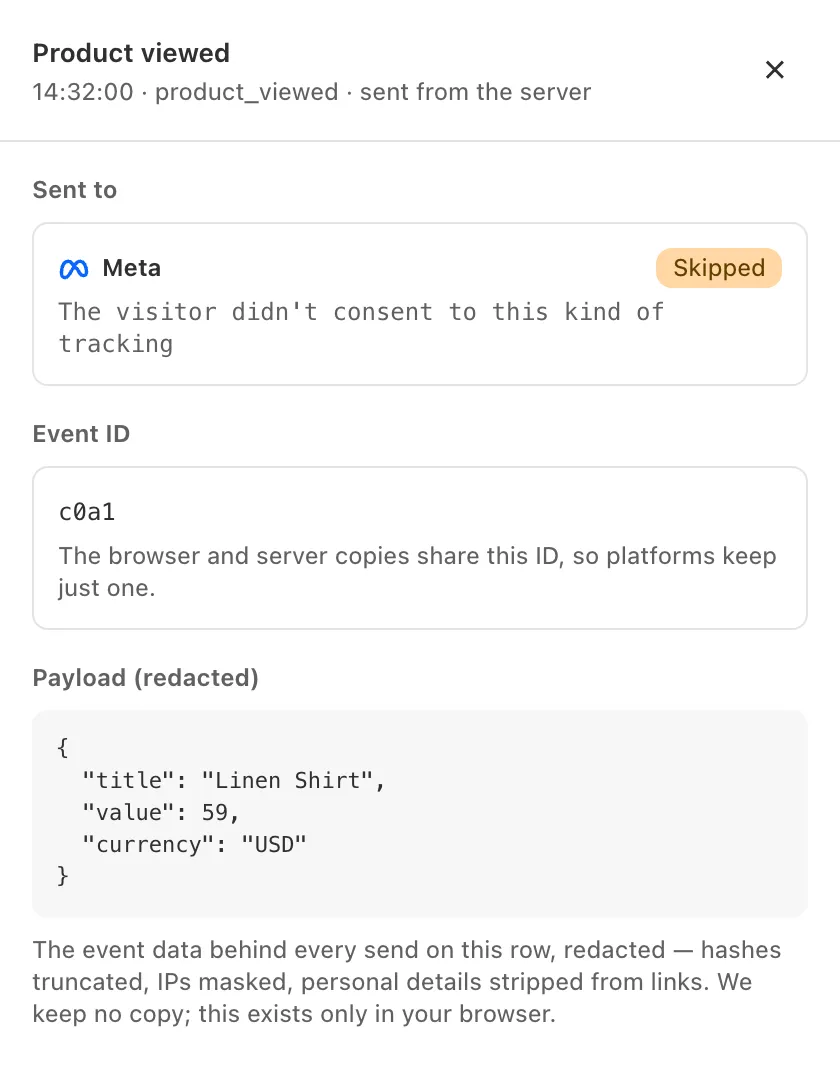
- Before the shopper chooses: where your store asks for consent first, events wait on the shopper’s device and are sent, with their original times, only if they agree. The TikTok, OpenAI Ads, Pinterest and Snapchat storefront tags don’t load until consent allows.
- Sale of data: a shopper’s opt-out turns on Meta’s Limited Data Use for their events. cPixel sends no equivalent flag to other platforms.
- Purchases: cPixel uses the consent recorded for that checkout. When it has no record, for example because an ad blocker stopped its pixel or the shopper never answered your banner, the purchase is sent as if the shopper had consented. No setting changes this.
What does the Event quality page show?
cPixel’s Event quality page covers the last 7 days of sends. For each connected platform it shows Their score, the platform’s own match-quality score, which cPixel reads only from Meta, beside Identifiers we sent: how many match keys cPixel attached. For TikTok, it also computes TikTok’s published formula from what it sent.
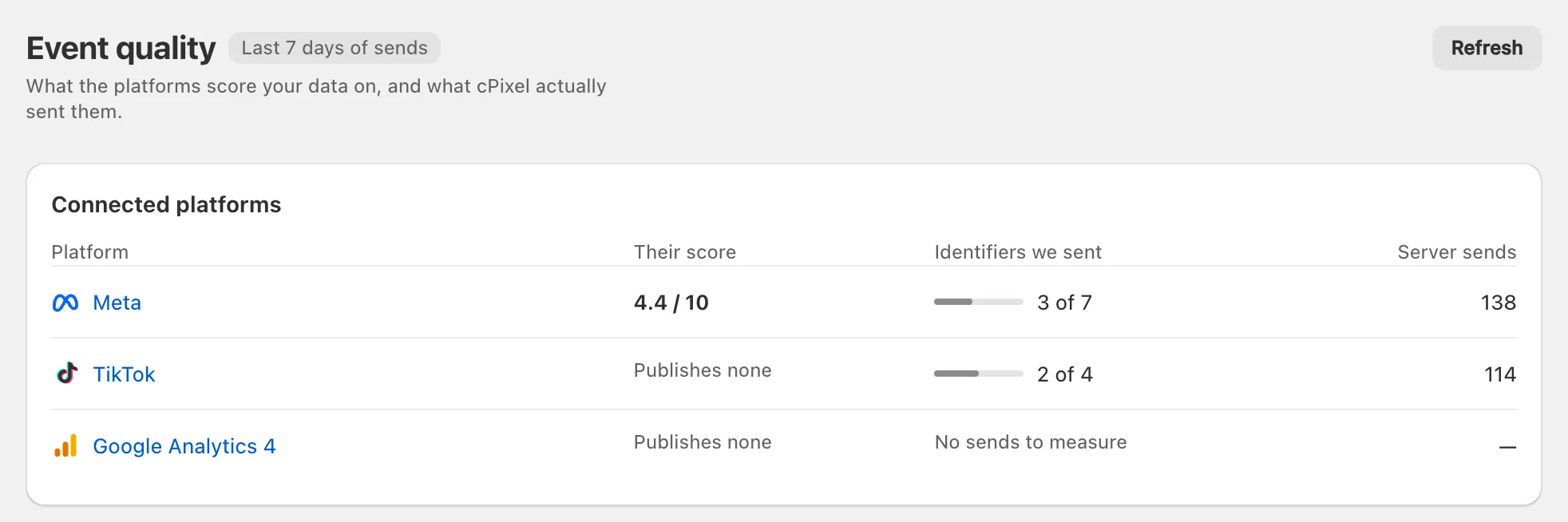
The figures shown are examples.
- Meta: cPixel reads Meta’s Event Match Quality once a day and shows it unchanged, on Meta’s 0–10 scale, with Meta’s own diagnostics. Many tokens made in Events Manager can’t read it, so This token type can’t read Meta’s score is expected and doesn’t affect sending.
- TikTok: its score reads Publishes none. Instead, cPixel computes TikTok’s published formula, average match-key coverage, from what it sent, as a percentage. That isn’t the score TikTok shows in its own Events Manager, a weighted average whose weights cPixel can’t see.
- GA4, OpenAI Ads, Snapchat and Pinterest: their score also reads Publishes none, and the page says they publish no score. That’s out of date except for GA4: OpenAI Ads scores each data source daily, Snapchat shows an Event Quality Score in its Events Manager, and Pinterest returns one through its API. cPixel reads none of them.
As the page says, “These count identifiers we sent, not identifiers that matched a customer.” No tool can promise a score: each platform sets it from what it manages to match.
What does cPixel never send or keep?
cPixel never sends names or postal addresses, and doesn’t request them from Shopify. It never keeps event payloads, what Live shows, or your customers’ email addresses and phone numbers in any form. What it does keep:
| Record | What’s in it | Kept |
|---|---|---|
| Checkout match data | Click IDs, cookies, IP address, user agent and consent; only the consent if a shopper refuses all tracking | 7 days |
| Order record | Order reference, total, whether the browser reported it, which platforms’ ad clicks it came with, and GA4 client and session IDs, for Reconciliation and GA4 refunds | 45 days |
| Held orders | Order IDs, while Free’s server sends are paused | 7 days |
| Settings and access tokens | Your configuration | Until uninstall: tokens at once, the rest about 48 hours later |
| Support requests | What you write to support | Up to 180 days after closing |
Does cPixel make my store GDPR-compliant?
No single tool does that. Compliance depends on your whole store, from your privacy policy and banner to every app that handles customer data, and Shopify’s customer privacy settings page makes complying with the laws that apply to you your responsibility.
What cPixel does: it applies the consent choices Shopify records, hashes email and phone, never sends names or addresses, keeps records for fixed times and lets you limit IP-based location. Where that differs from what your store needs, such as purchases with no consent record, take advice on your setup. See also our privacy policy.
